Solved

Lucid MCP does not work on Microsoft Copilot Studio

  • February 12, 2026
  • 0 replies
  • 23 views

Forum|alt.badge.img

Hi,

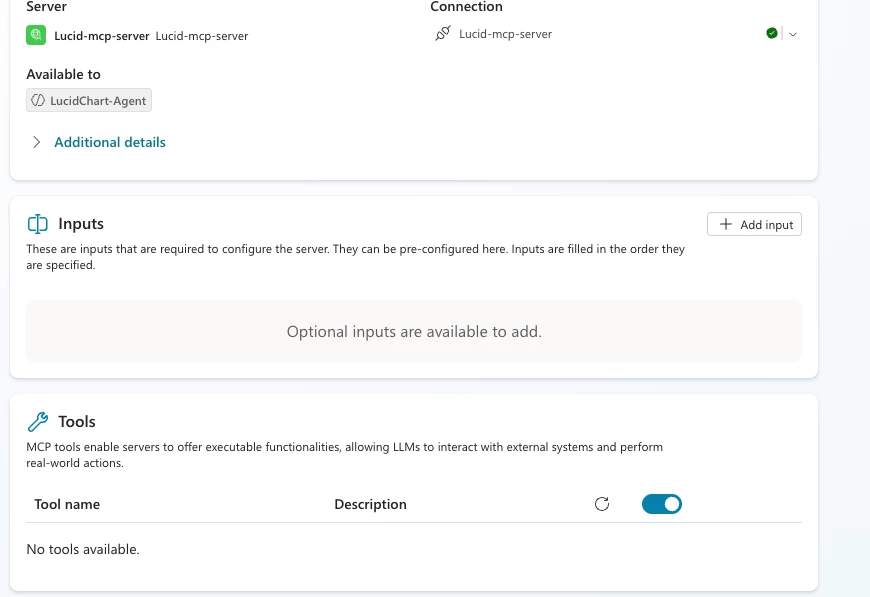
I’m seeing an issue when setting up the MCP server in Copilot Studio — the available tools are not being listed.

This appears to happen when the endpoint is exposed as SSE. Copilot Studio has deprecated support for SSE endpoints. I believe Lucid will need to publish the endpoint as streamable-http instead. That should resolve the issue.

I’ve noticed similar behavior with other MCP servers and was able to fix it by switching to streamable-http.



Best answer by Jake B

Hi there!  The Lucid MCP server exclusively uses streamable HTTP, and does not support SSE streaming.  The error you posted appears to be from making a GET request to the MCP server endpoint, which would attempt to establish an SSE connection, which Lucid’s MCP server does not support.  Depending on how you’ve set up the connection in Microsoft Copilot Studio, the error there might be the same error, or a different error.  


It looks like Microsoft’s official documentation for connecting to an MCP server is here and here.  For authentication type, you should select OAuth 2.0, and under OAuth 2.0, you should select Dynamic Discovery.  


If there are additional errors you are seeing in Microsoft Copilot Studio, please let me know!

Jake B
Forum|alt.badge.img+1
  • Lucid product team
  • Answer
  • February 12, 2026

Hi there!  The Lucid MCP server exclusively uses streamable HTTP, and does not support SSE streaming.  The error you posted appears to be from making a GET request to the MCP server endpoint, which would attempt to establish an SSE connection, which Lucid’s MCP server does not support.  Depending on how you’ve set up the connection in Microsoft Copilot Studio, the error there might be the same error, or a different error.  


It looks like Microsoft’s official documentation for connecting to an MCP server is here and here.  For authentication type, you should select OAuth 2.0, and under OAuth 2.0, you should select Dynamic Discovery.  


If there are additional errors you are seeing in Microsoft Copilot Studio, please let me know!