

Solved

Lucid Card details missing in current version display

  • April 17, 2026
  • 9 replies
  • 50 views

StacyK
Forum|alt.badge.img+1

My colleague opened a Lucid Spark board and found the status missing from our Lucid Cards. Opening the edit view for the card, no field data appears.
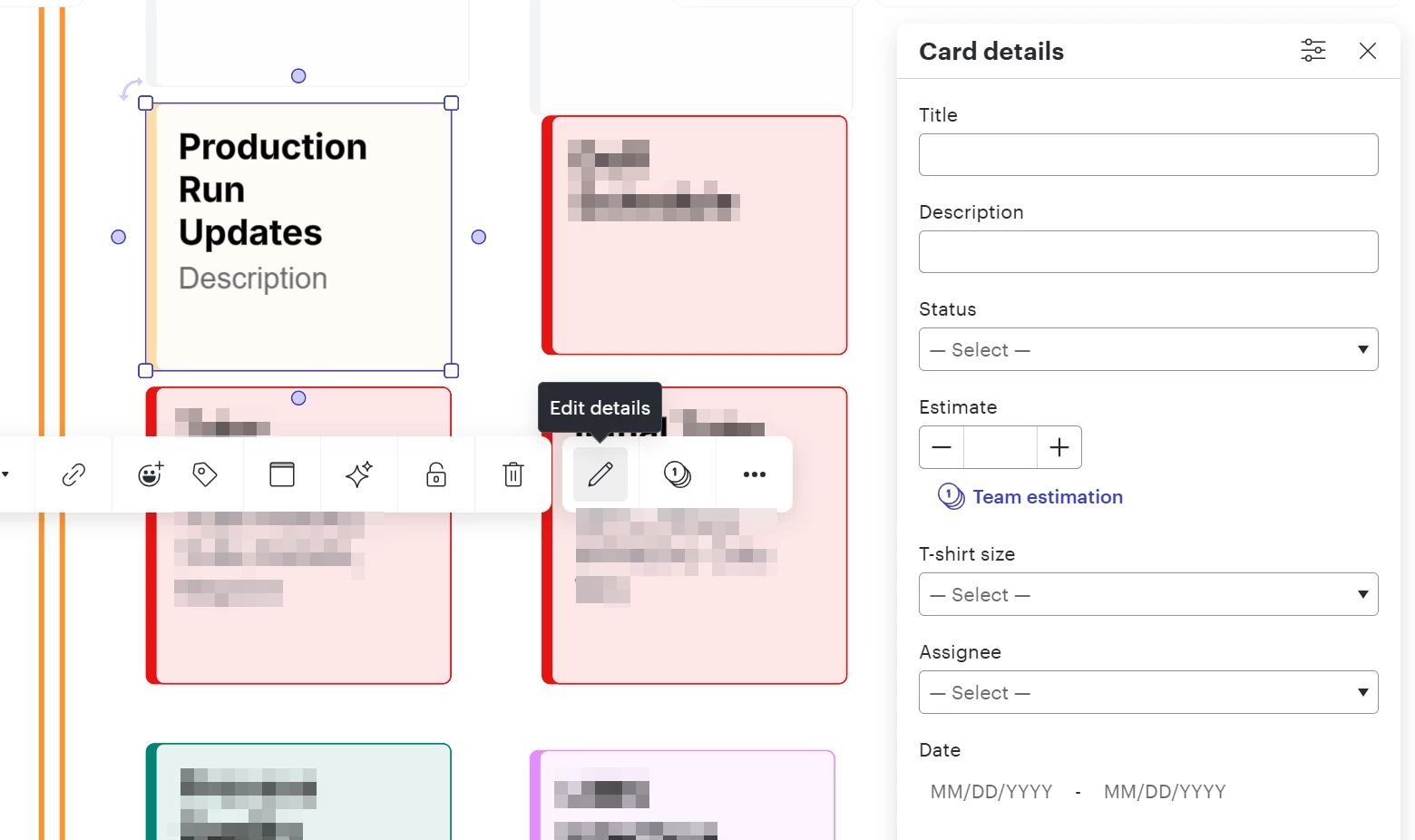
No field data included, even Title, which appears

Poking around the revision history, selecting an earlier version enables the display. Incrementing back to the current version corrects the view, but after closing and reopening the document the data is still missing.

  • I tried correcting the display and making an edit (added a card), same result when reopening.
  • I corrected the view, then copied the document. The new document includes the desired data, but then I’ve lost the revision history.
  • This content is on a second page added by switching to Chart editing.

On the Lucid Chart side, I found history reflecting data changes on 80 objects (the whole board).
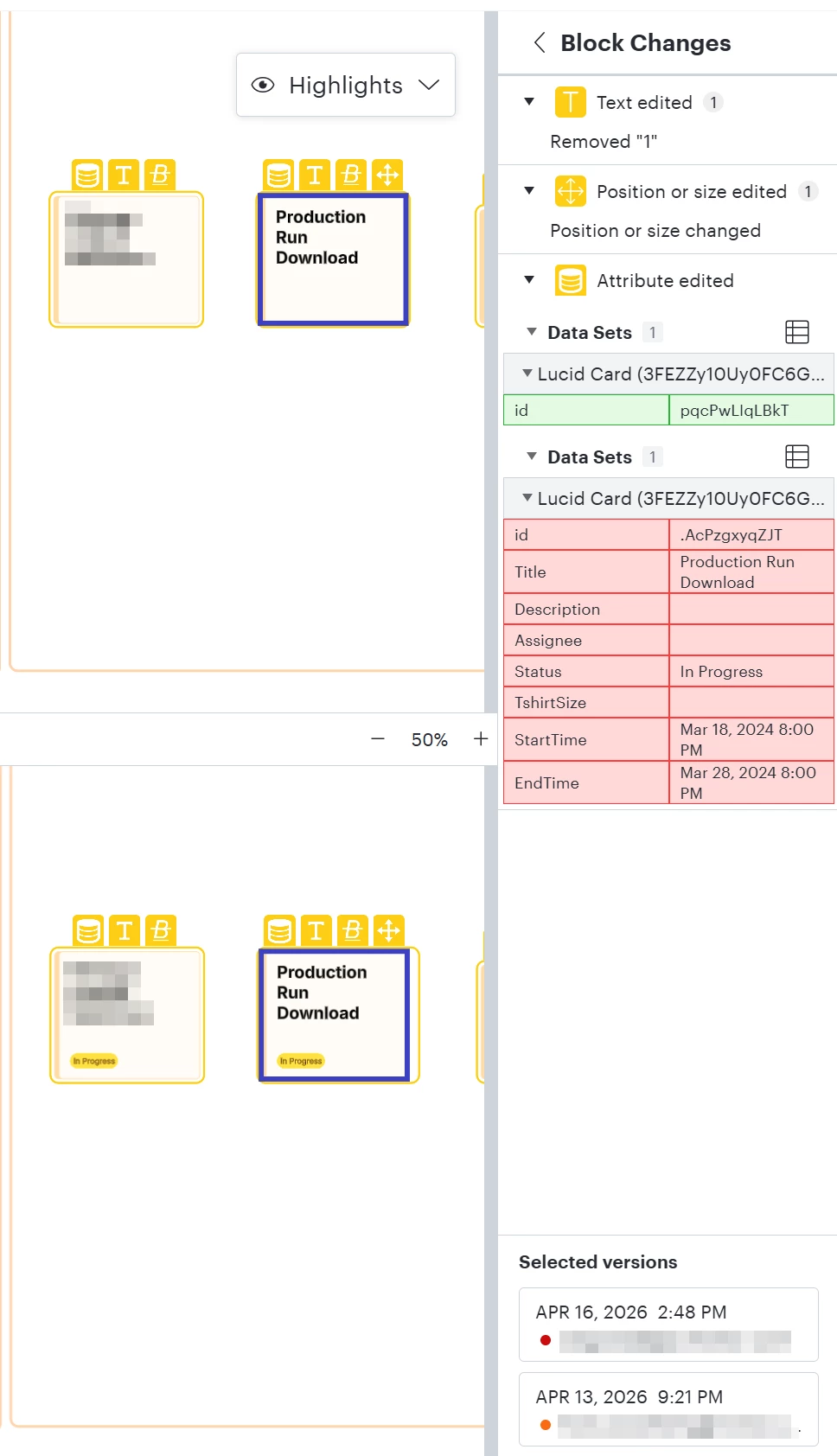
Where’d the data go?


Best answer by andrea_z

Hello ​@StacyK, thank you for providing that document support PIN. After taking a closer look at your document and testing things on my end, I believe you have identified a bug, and I have reported this to our development team. I apologize for any disruption this may cause, and I will update this thread with any new information about a fix. Please follow along on this thread for updates, and post any additional questions or concerns below. 

Could you also share a Technical Support PIN for your account? This will help our engineers take a closer look at what’s going on. This PIN is safe to post in this thread because it is only accessible by members of the Lucid support staff. You can find steps for generating a Support PIN in this Lucid Help Center article: Generate a Lucid Support PIN.

Thank you for your cooperation while we try to solve this issue!

Comments

aparrish
Lucid Legend Level 7
Forum|alt.badge.img+15
  • Lucid Legend Level 7
  • April 18, 2026

@StacyK the issue could be tied to a legacy version of the Smartsheet integration. The original legacy version will be deprecated in July and the related Lucid Agility Accelerator is no longer available for purchase. I recommend transitioning over to the newest Smartsheet integrator. If you have a paid subscription, you can submit a ticket to our Product Support team.


StacyK
Forum|alt.badge.img+1
  • Author
  • April 20, 2026

This board was drawn by hand.

@aparrish Are you with Lucid? As an infrequent visitor I’m not sure reading your profile. I’ll assume yes since you mention the Smartsheet integration - that was added Friday out of curiousity.


Forum|alt.badge.img+2
  • Lucid support team
  • April 20, 2026

Hello ​@StacyK, thank you for posting in the Lucid Community! ​@aparrish, thank you for your comment here. 

Just to clarify, ​@aparrish is one of the top contributors in the Lucid Community, and she is part of our Lucid Legends program.

My name is Andrea and I work in Product Support with Lucid. Just want to jump in this thread and continue supporting you. 

Could you share a temporary Document Support PIN for this document? This will help me take a closer look at what’s going on. This PIN is safe to post in this thread because it is only accessible by members of the Lucid support staff. You can find steps for generating a Support PIN in this Lucid Help Center article: Generate a Lucid Support PIN.

Thanks for your help and patience here as I dig into your document. 


StacyK
Forum|alt.badge.img+1
  • Author
  • April 20, 2026

Thanks, Andrea. duDTLptsd52H07KEHEiGcmwBl5bCngNqxA191806571


Forum|alt.badge.img+2
  • Lucid support team
  • Answer
  • April 21, 2026

Hello ​@StacyK, thank you for providing that document support PIN. After taking a closer look at your document and testing things on my end, I believe you have identified a bug, and I have reported this to our development team. I apologize for any disruption this may cause, and I will update this thread with any new information about a fix. Please follow along on this thread for updates, and post any additional questions or concerns below. 

Could you also share a Technical Support PIN for your account? This will help our engineers take a closer look at what’s going on. This PIN is safe to post in this thread because it is only accessible by members of the Lucid support staff. You can find steps for generating a Support PIN in this Lucid Help Center article: Generate a Lucid Support PIN.

Thank you for your cooperation while we try to solve this issue!


StacyK
Forum|alt.badge.img+1
  • Author
  • April 22, 2026

Is document access limited by the Document PIN? From the Technical PIN description, I guess that access to other documents is enabled. Is that accurate?


Forum|alt.badge.img+2
  • Lucid support team
  • April 22, 2026

Hello ​@StacyK, thank you for your question here. I apologize for any confusion here. That's correct!

The document support PIN you've provided allows our Lucid support team to view that one specific document. The technical support PIN grants us more access at the account level- such as viewing all documents or creating test documents.

To clarify- are you seeing this behavior in just the one document, or across multiple documents in your account?

The PINs expire automatically after seven days, at which point we will not be able to access your documents or account. You're in full control! If you want to revoke access to these items sooner, you can do so by following the steps here: View PINs and revoke access. You can read the full documentation about these PINs here.

The PIN is safe to share in this thread, but if you prefer, I'd be happy to move this conversation to a private support ticket. We take the security of your account seriously and certainly want you to feel comfortable.


StacyK
Forum|alt.badge.img+1
  • Author
  • April 23, 2026

No, I have not witnessed this issue elsewhere.

Yes, let’s move to an internal ticket. I’d rather not share a Technical PIN due to customer privacy. Thank you!


Forum|alt.badge.img+2
  • Lucid support team
  • April 23, 2026

Hello ​@StacyK, I have gone ahead and moved this to a private support ticket. You can expect to receive an email to the address associated with your Lucid account.




