Solved

Lucid and Google Slides integration error code: access blocked

  • August 21, 2025
  • 9 replies
  • 90 views

Forum|alt.badge.img+1

On an enterprise plan with the Lucid extensions installed following Lucid instructions. For both Spark & Chart when trying to send a slide from Spark/Chart to Google Slides all members of our team get the following message:

“Access blocked:  This app’s request is invalid”

“You can’t sign in because this app sent an invalid request. You can try again later, or contact the developer about this issue…

Error 400: redirect_uri_mismatch”

When clicking on error details it says the redirect URI doesn’t conform to Google’s OAuth 2.0 policy. 

Best answer by Leianne C

Hi ​@Bevy, thank you for giving that a try and sorry to hear that didn’t help resolve the issue. Could you please confirm what chrome version you are using? If you are not using the latest version, could you please try updating your browser and trying this again? 

Could you please also share a screenshot of the error you are seeing? You mentioned it says “Access blocked:  This app’s request is invalid”. 

Thank you for all your help and patience. Please let us know if you have any questions! 

Comments

Leianne C
Forum|alt.badge.img+15
  • Lucid support team
  • August 22, 2025

Hi ​@Bevy, thank you for posting in the community! To confirm, is this the first time your team tried sending slides to Google Slides or did it work previously and you’re seeing a new error?

If possible, could you please try this again in a private or incognito window and let me know if the error persists there? If so, could you please share the following to help us take a closer look at the issue?

  • A screenshot of the associated Javascript Console output when the export fails. You can open your Javascript Console by pressing Ctrl + Shift + J (if your computer is a Windows / Linux) OR Cmd + Opt + J (if your computer is a Mac).

In the meantime, as a workaround, if you need to get your diagram into Google Slides as quickly as possible, you could use our Google Slides add-on. If you take a look at this Help Center article, it goes through how you can do this. 

Hope this helps. Please feel free to let me know if you have any questions! 


Forum|alt.badge.img+1
  • Author
  • August 22, 2025

This is our first time trying. 

From a chrome browser on a mac in private browser it failed again. 

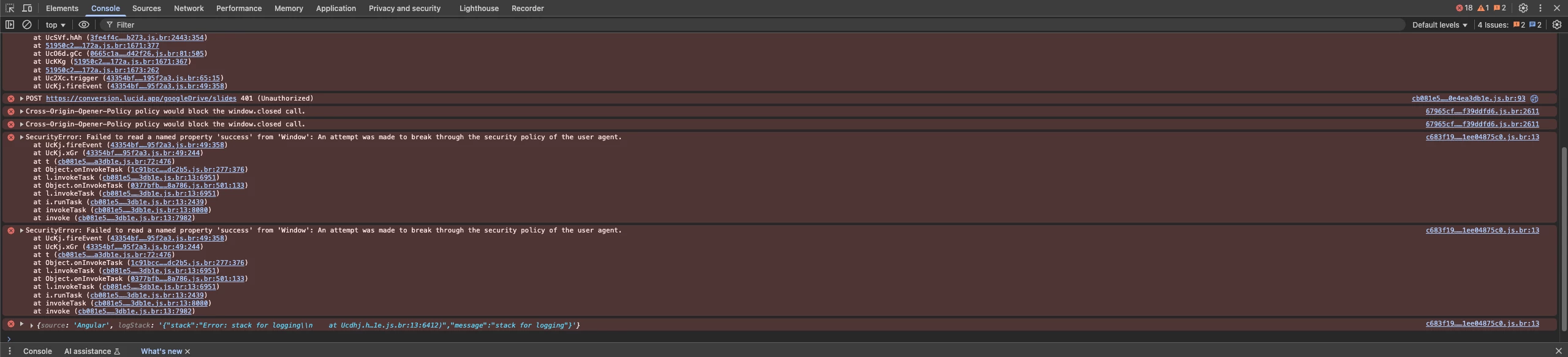
Below is the console screenshot:


Leianne C
Forum|alt.badge.img+15
  • Lucid support team
  • August 26, 2025

Hi ​@Bevy, thank you for sharing the JS Console screenshot. If this is your first time sending a presentation to Google Slides, you may be prompted to link Lucid to Google Drive. Can you please confirm if this is the step where you are seeing the error? 

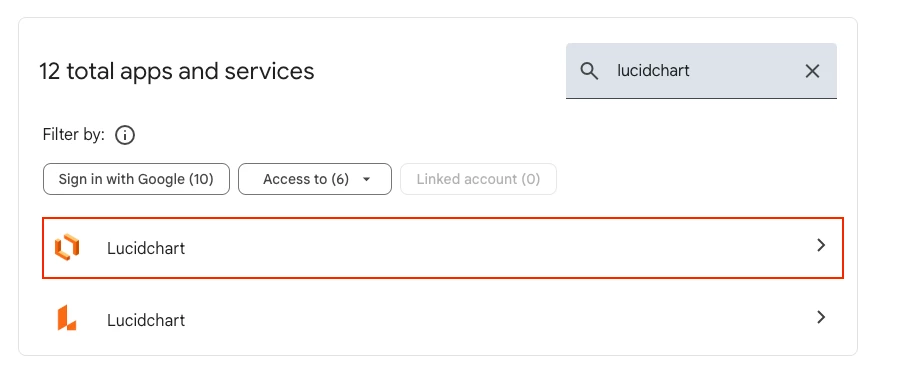
Would you mind trying to revoke Lucid’s permissions by navigating to the Security section of your Google account? From there you should be able to find the setting for “Third-party apps with account access” and revoke Lucidchart's access to your Google account. You’ll want to look for the one with the following logo. You can find more information about this in this article from Google. 

After revoking access, you should be prompted to give permission again when you try to send your Lucid presentation slides to Google Slides.

I hope this helps. Please let me know if you see any changes after trying this step or if you have any questions! 


Forum|alt.badge.img+1
  • Author
  • August 27, 2025

Hi ​@Leianne C,

Prior to my first attempt I had linked my drive and received the error. I then also installed the slides extension for Lucidchart and received the same error. 

As you requested I unliked my drive and revoked permissions and tried again but still got the error. I re-linked everything go to a Lucidchart OR Lucidspark of my choosing the steps to reproduce are the same:


  1. Click Send to Slides (a banner rolls in from lower lefthand corner that slides are generating)
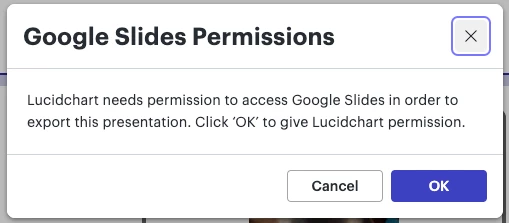
  2. Google Slides Permission pop-up comes up and I click ‘OK”
  3. Error opens in new window


Leianne C
Forum|alt.badge.img+15
  • Lucid support team
  • Answer
  • August 29, 2025

Hi ​@Bevy, thank you for giving that a try and sorry to hear that didn’t help resolve the issue. Could you please confirm what chrome version you are using? If you are not using the latest version, could you please try updating your browser and trying this again? 

Could you please also share a screenshot of the error you are seeing? You mentioned it says “Access blocked:  This app’s request is invalid”. 

Thank you for all your help and patience. Please let us know if you have any questions! 


Forum|alt.badge.img
  • December 2, 2025

Hello,

We are experiencing problems both as editors of Lucidchart and with our clients' ability to view the flows created in Lucidchart. We use Zendesk for display flowcharts, but problems also occurs form google docx 

Access Denied

You don't have permission to access "/documents/embedded/2b3eb4d3-aa18-4079-ae11-f98807139c22/YL0~KJfGPe.S?invitationId=inv_40f6f158-d9d1-4509-98a0-28c39282e256" on this server.

or an image of 404 error


Leianne C
Forum|alt.badge.img+15
  • Lucid support team
  • December 9, 2025

Hi ​@maritcella, thank you for continuing this post and apologies for the delayed response! Is this issue still happening for you? If so, would you mind sharing some additional details on how the documents are inserted into Zendesk and Google? Are you using our Google Docs add-on? Is it inserted into Zendesk via embed code? This information will help us take a closer look at the issue described. 

Thank you for your help and patience. Please let us know if you have any questions! 


Forum|alt.badge.img
  • December 9, 2025

Hello there,

Than you for the answer. Regarding to your questions.

how the documents are inserted into Zendesk and Google? We get the link from the option: Share > Embed > View preview , and we get this link: https://lucid.app/documents/embedded/2b3eb4d3-aa18-4079-ae11-f98807139c22/YL0~KJfGPe.S?invitationId=inv_40f6f158-d9d1-4509-98a0-28c39282e256

That link is uploaded to Zendesks articles or Google docx. In case we need to use  the same flowchart for another zendesk article, we get the link from zendesk.

Lately to avoid the error messages, we get link from the HTM preview, just the one in red color:

<div style="width: 640px; height: 480px; margin: 10px; position: relative;"><iframe allowfullscreen frameborder="0" style="width:640px; height:480px" src="https://lucid.app/documents/embedded/2b3eb4d3-aa18-4079-ae11-f98807139c22" id="SkvcFA4vy3S7"></iframe></div>


Are you using our Google Docs add-on? yes.

Is it inserted into Zendesk via embed code? yes, it is.

Regards in advance,

maritcella.


Leianne C
Forum|alt.badge.img+15
  • Lucid support team
  • December 19, 2025

Hi ​@maritcella, thank you for sharing that information. It sounds like you are pasting the hyperlink found in the embed code to your Zendesk and Google Doc. Could you please try using the Publish link instead and let me know if you see any differences with this link? 

For Google Doc, have you tried inserting your document through the add-on by following the steps outlined in this Help Center article

If the issue persists, could you please share an example screenshot demonstrating how these documents are inserted in your Zendesk and Google docs? Please feel free to censor any private information. This will help us take a closer look at the issue you are experiencing. 

Please let me know if you have any questions!