September 14, 2026
Question

Lines not duplicated with Container

  • September 14, 2026
  • 1 reply
  • 30 views

I have a LucidChart document, that uses Grid LayOut Rectangle Container with a standard Block in it. This Block in the container has a line towards another Block, outside the container. So the lines goes across the container-boundary:
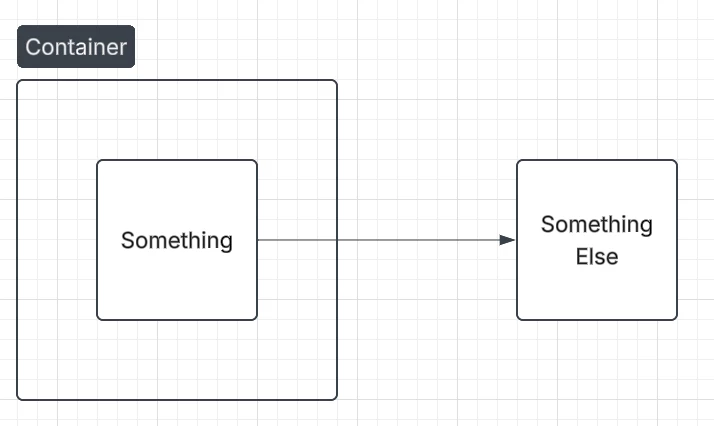
 

When I duplicate this Page, the duplicate page contains the Container and the boxes, but the line is missing:
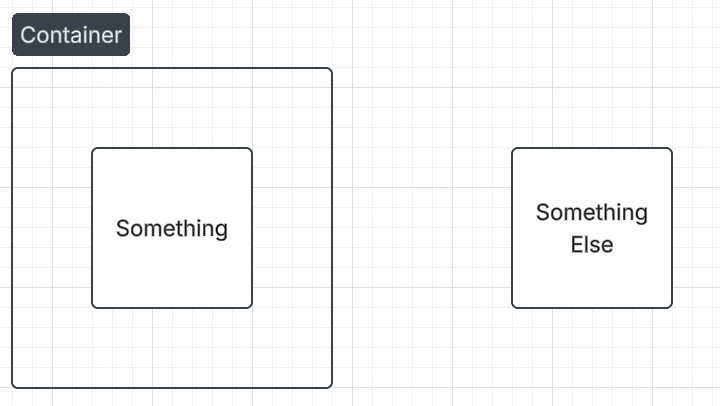
 

Is this expected behaviour?

For me as a user, this is counter-intuitive, and I would expect a full duplicate, including all lines.

Temporary support pin to a simplified LucidChart doc that shows the behaviour: duXlfr5iqMcxPUwrgdnlaORmWDMBhmBHtr165429201

Comments

alison cheney
Lucid community team
September 17, 2026

Hi ​@Renze Feitsma,

Thank you for posting in the Lucid Community, and I appreciate your patience here! 

I was able to reproduce the error and got the same result you did, the arrow connecting the shapes wasn’t appearing when I duplicated the page. However, I found a workaround for this that should fix this for you.

  1. Turn off Grid Layout in your container.
  2. Select all objects
  3. Select the three horizontal line menu at the top of your document.
  4. Select “Arrange”
  5. Select “Group”
  6. Then, click in to the container and turn Grid Layout on.
  7. Finally, Duplicate your page.


These steps above should move all objects, including your arrow, onto the duplicated page. Please let me know if you have any additional questions here!