JP P102
January 2, 2019
Solved

Issues moving lines in Lucidchart

  • January 2, 2019
  • 11 replies
  • 1921 views

Ok - I know this is incredibly basic but I'm finding it impossible to move or nudge lines!

Once a line segment is inserted via the default shape template I need to shift the entire line - not just one end.

However if I click on the line it selects either one of the endpoints or the midpoint. If I then click and drag any of these the line is re-aligned not moved. 

The only way I've found to trick the system is to create a line copy then paste. Somehow the line then gets selected for moving (although it drops with a random offset making it hard to place precisely).

I'd also like to nudge objects finely depending on the zoom level - but there's neither any functionality nor any nudge term found in the help system. Moving and nudging are extremely basic - and especially for complex floor plan work essential.


Am I missing something completely obvious? Help!


Best answer by Mark W101

I had the same issue.  But after following the instructions here I still couldn't move the line.

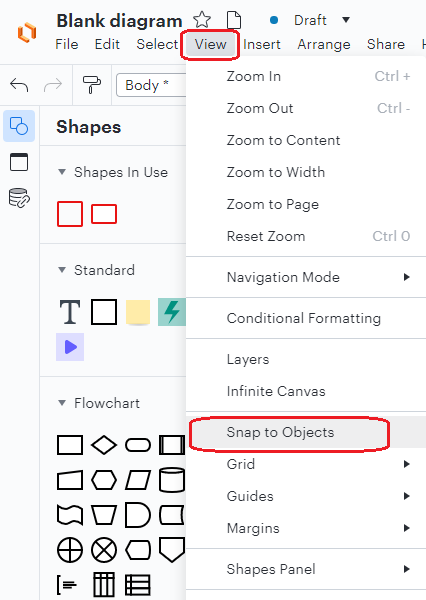
Ultimately I had some inspiration from where I had similar frustrations with Visio and found that if I turned OFF the 'View | Snap to Objects' feature then I was able to nudge the lines as I wanted.

Hope this saves someone the frustrations that I encountered!

Comments

July 15, 2026

Ok - I know this is incredibly basic but I'm finding it impossible to move or nudge lines!

Once a line segment is inserted via the default shape template I need to shift the entire line - not just one end.

However if I click on the line it selects either one of the endpoints or the midpoint. If I then click and drag any of these the line is re-aligned not moved. 

The only way I've found to trick the system is to create a line copy then paste. Somehow the line then gets selected for moving (although it drops with a random offset making it hard to place precisely).

I'd also like to nudge objects finely depending on the zoom level - but there's neither any functionality nor any nudge term found in the help system. Moving and nudging are extremely basic - and especially for complex floor plan work essential.


Am I missing something completely obvious? Help!
 

set line options to straight line instead of elbow line before drawing the line