Solved

Insert item in mind map

  • February 27, 2026
  • 1 reply
  • 15 views

Forum|alt.badge.img+1

Dear friends,

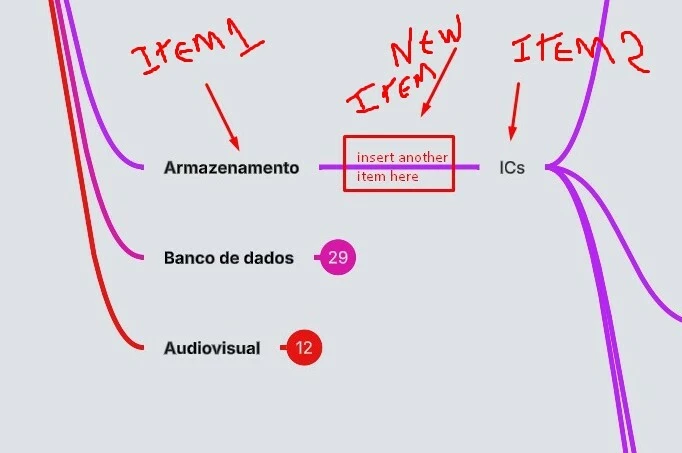
I forgot to insert a item in a mind map and now I need to do it between other two itens but I can’t.

Someone can help me? Thanks a lot.


Best answer by alison cheney

Hi ​@Editor_AL,

Thank you for posting in the Lucid Community! It looks like you want to insert a new node into the middle of an existing branch. In the Lucid mind map tool, nodes follow a specific hierarchy (Parent > Child), so the easiest way to "insert" a middle item is to create the new node first and then move the existing end node to it.

  • Select your first node ("Armazenamento") and click the plus icon that appears to the right of it (or press Tab on your keyboard). This creates a new child node.

  • Click and drag your "ICs" node (Item 2) and hover it over your "New Item."

  • When the "New Item" highlights, release your mouse. This moves the "ICs" node and its entire branch to become a child of your "New Item," effectively placing the new node in the middle.

*Note: You can Tab or Enter to add new nodes, then the mind map will auto-rearrange to make space for each of the new nodes.

Please review this Lucid Help Center article: Create a Mind Map in Lucid if you have any additional questions!


If the issue persists, could you please send the following information:

  • A screenshot of the issue.
  • A description of steps you took leading up to the issue.
  • A screenshot of the associated Javascript Console output after reproducing the issue. You can open your Javascript Console by pressing Ctrl+Shift+J (if your computer is a Windows/Linux) OR Cmd+Opt+J (if your computer is a Mac).

Let me know if you have any additional questions about the functionality of mind maps!

Comments

alison cheney
Forum|alt.badge.img+4
  • Lucid community team
  • Answer
  • March 3, 2026

Hi ​@Editor_AL,

Thank you for posting in the Lucid Community! It looks like you want to insert a new node into the middle of an existing branch. In the Lucid mind map tool, nodes follow a specific hierarchy (Parent > Child), so the easiest way to "insert" a middle item is to create the new node first and then move the existing end node to it.

  • Select your first node ("Armazenamento") and click the plus icon that appears to the right of it (or press Tab on your keyboard). This creates a new child node.

  • Click and drag your "ICs" node (Item 2) and hover it over your "New Item."

  • When the "New Item" highlights, release your mouse. This moves the "ICs" node and its entire branch to become a child of your "New Item," effectively placing the new node in the middle.

*Note: You can Tab or Enter to add new nodes, then the mind map will auto-rearrange to make space for each of the new nodes.

Please review this Lucid Help Center article: Create a Mind Map in Lucid if you have any additional questions!


If the issue persists, could you please send the following information:

  • A screenshot of the issue.
  • A description of steps you took leading up to the issue.
  • A screenshot of the associated Javascript Console output after reproducing the issue. You can open your Javascript Console by pressing Ctrl+Shift+J (if your computer is a Windows/Linux) OR Cmd+Opt+J (if your computer is a Mac).

Let me know if you have any additional questions about the functionality of mind maps!
