I have an org chart where everyone’s photo is uploaded into Lucidchart; however, not all images will load. This was working up until today, when I added 2 new employees to the chart. Whether I’m exporting to PDF or JPG, certain images will no longer appear. I have checked their file size, and they are within the limit. Here is an image to show that the files are uploaded into Lucid.
@bzaharatos Thank you for providing the above information! I was not able to reproduce the issue you are experiencing, and the images present in the document do appear when exporting to PDF and PNG on my end.
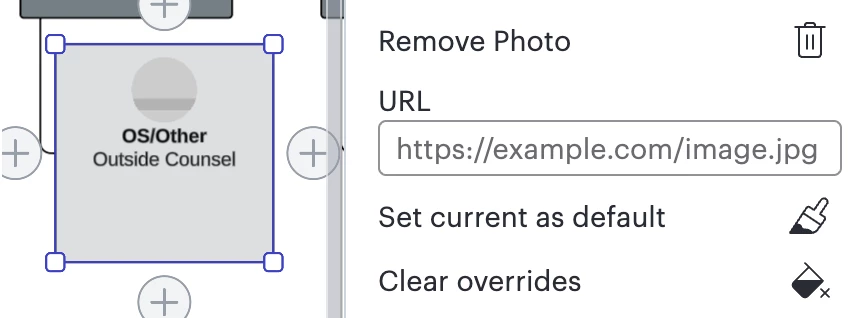
Please note that in the current Lucid document, some employees do not have images, such as this one:
If you are uploading images via URL, they must be from a public location or they won't display properly. If you are using Google Drive links they must be public links. Alternatively, you can upload the images directly to Lucidchart.
Just to make sure that we are on the same page, please review our Export Your Lucid Documents article from the Lucid Help Center. Additionally, please see ourTroubleshooting: Exportarticle from the Lucid Help Center for steps to resolve any issues you may be having.
There are a few specific things worth noting when working with exporting your document:
Try the export in a Chrome Incognito browsing session. This often improves performance by clearing your cache and cookies and disabling your extensions.
Sometimes issues like this can be related to internet connection speed or network security. Please try the export again on another network, ensuring that you are on a strong, stable connection.
Hi @bzaharatos, thank you for posting in the Community! And I am sorry that you are experiencing this issue.
Could you share a temporary Document Support PIN for this document? This will help me take a closer look at what’s going on. This PIN is safe to post in this thread because it is only accessible by members of the Lucid support staff. You can find steps for generating a Support PIN in this Help Center article.
@bzaharatos Thank you for providing the above information! I was not able to reproduce the issue you are experiencing, and the images present in the document do appear when exporting to PDF and PNG on my end.
Please note that in the current Lucid document, some employees do not have images, such as this one:
If you are uploading images via URL, they must be from a public location or they won't display properly. If you are using Google Drive links they must be public links. Alternatively, you can upload the images directly to Lucidchart.
Just to make sure that we are on the same page, please review our Export Your Lucid Documents article from the Lucid Help Center. Additionally, please see ourTroubleshooting: Exportarticle from the Lucid Help Center for steps to resolve any issues you may be having.
There are a few specific things worth noting when working with exporting your document:
Try the export in a Chrome Incognito browsing session. This often improves performance by clearing your cache and cookies and disabling your extensions.
Sometimes issues like this can be related to internet connection speed or network security. Please try the export again on another network, ensuring that you are on a strong, stable connection.
A Lucid or airfocus account is required to interact with the Community, and your participation is subject to the
Supplemental Lucid Community Terms.
You may not participate in the Community if you are under 18. You will be redirected to the Lucid or airfocus app to log in.
A Lucid or airfocus account is required to interact with the Community, and your participation is subject to the
Supplemental Lucid Community Terms.
You may not participate in the Community if you are under 18. You will be redirected to the Lucid or airfocus app to log in.



 Your privacy choices


