Answer

Images in my Lucidspark board won't load, disappeared

  • March 27, 2024
  • 4 replies
  • 171 views

Forum|alt.badge.img

HI,

I have a board with a couple hundred photos on it. I just went back to the board and now about half the images are white boxes. They are in the same position and size of the original images. Any idea on getting the pictures back would be much appreciated.

Best answer by Humas1985

Hi @groi 

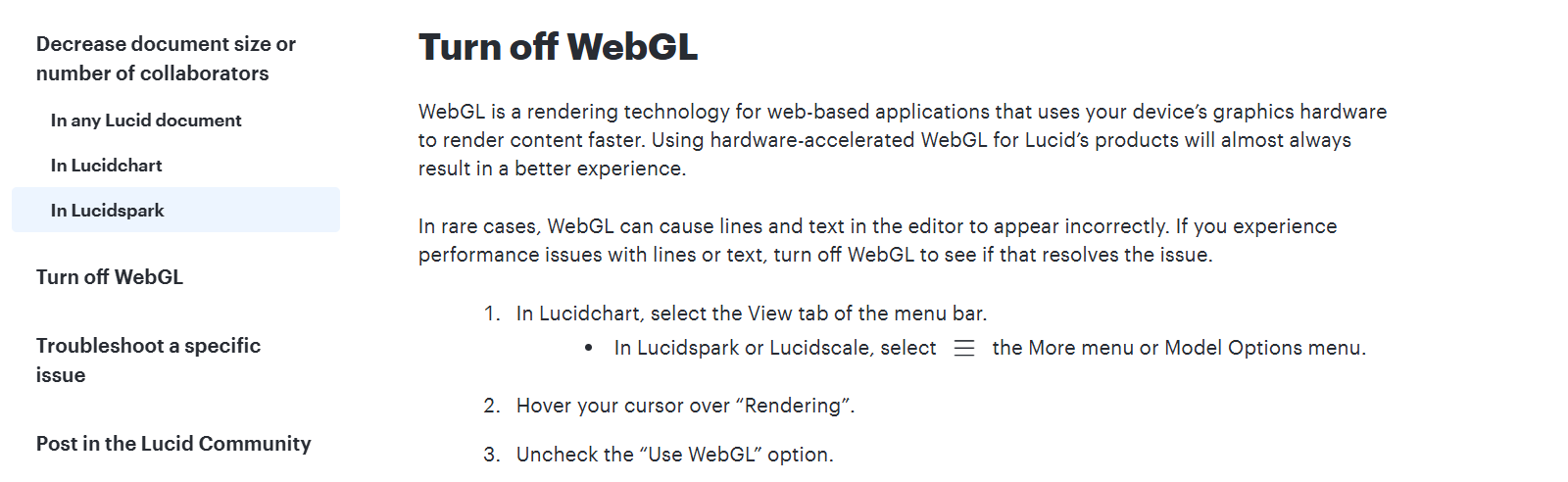
Have you tried WebGL / Without VPN ?


Best Regards

Comments

Humas1985
Lucid Legend Level 10
Forum|alt.badge.img+24
  • Lucid Legend Level 10
  • March 28, 2024

Hi @DavidL 

Kindly give a try with a different browser and it should be cache or image permission.

Also please take a look at the below troubleshoot guide - Basic troubleshooting – Lucid


If this doesn't work - keep us posted.


Hope this helps - Happy to help further!!
Thank you very much and have a great one!

Warm regards


Forum|alt.badge.img+1
  • September 5, 2024

Hello,

I’m experiencing an issue where my pictures aren’t loading and sometimes disappear entirely. I’ve tried accessing the site on both Safari and Chrome, but the problem persists on both browsers. Could you please look into this?

Thank you!


Humas1985
Lucid Legend Level 10
Forum|alt.badge.img+24
  • Lucid Legend Level 10
  • Answer
  • September 5, 2024

Hi @groi 

Have you tried WebGL / Without VPN ?


Best Regards


Amelia W
Forum|alt.badge.img+9
  • Lucid support team
  • September 5, 2024

Hi @groi, thanks for adding to this thread! And thanks for that suggestion, @Humas1985, WebGL is always a great place to start. I would also recommend opening your document in a Chrome incognito window. Doing so disables extensions and clears cache and cookies, which often improves performance. This may also help you identify an extension causing an issue with Lucid performance.

Here is the article from the Lucid Help Center that Humas’ screenshot came from, in case that is helpful!