Solved

Page Size Changes on PDF Export in Lucidchart

  • July 7, 2026
  • 11 replies
  • 336 views

Forum|alt.badge.img+4

I have a LucidChart document that has about 32 pages. Each page contains a state chart for a process. Some state charts are small and fit easily on an 8,5x11 inch letter sheet, but some are huge and must be in a customized page that is large enough to contain the whole chart.

But after I assign page sizes for all the pages through the “Document Properties” menu and export a PDF file of the pages, I noticed that the page size is not remembered, so every time I want to export a PDF file I have to go through the entire process of assigning page sizes to all 32 pages.

Is there some setting that tells LucidChart to recall the page sizes and orientations that were used the last time I exported the diagram?


 

Best answer by Leianne C

Hi ​@Fklein23, thank you for the update and confirming you’re using Lucid in a Brave browser. Lucid is optimized for Google Chrome, so if you haven't already I would recommend trying Chrome and see if the issue still happens there. 

I appreciate all the details and updates of your findings. Please let me know if you notice any changes in behaviour or if you have any questions1 

Comments

Leianne C
Forum|alt.badge.img+15
  • Lucid support team
  • July 8, 2026

Hi ​@Fklein23, thank you for posting in the Community! Just to confirm my understanding —are your canvas pages in Lucidchart reverting back to a standard size after you finish exporting, or is it that the exported PDF file forces all 32 pages into the exact same size regardless of what your canvas looks like?

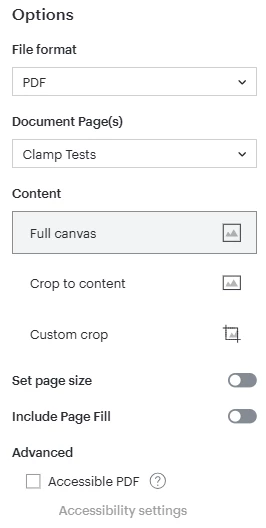
If possible, could you please also share a screenshot of settings (file type, document pages, cropping, quality, etc.) that you selected for the export? This will help me take a closer look at the issue on my end. 

Thank you in advance for your help and patience! Please let me know if you have any questions. 


Forum|alt.badge.img+4
  • Author
  • July 8, 2026

Regarding your 2-part question, the answer is “neither”. It seems completely random. Sometimes one or two pages are contaminated and sometimes EVERY page is damaged.

I just screen-shot several examples and didn’t post the response because I wanted to show an exhaustive set of examples, But as I kept adding examples to my response, I accidentally closed the browser and lost the entire document.

So I will just summarize:

I noticed that the mistakes in page format and size were completely random. 

I discovered that sometimes the document properties get trashed by just closing the LucidChart document and reopening it. Sometimes the pages in the PDF file were wrong and when that happened, the document properties remained erroneously changed in the LucidChart document.

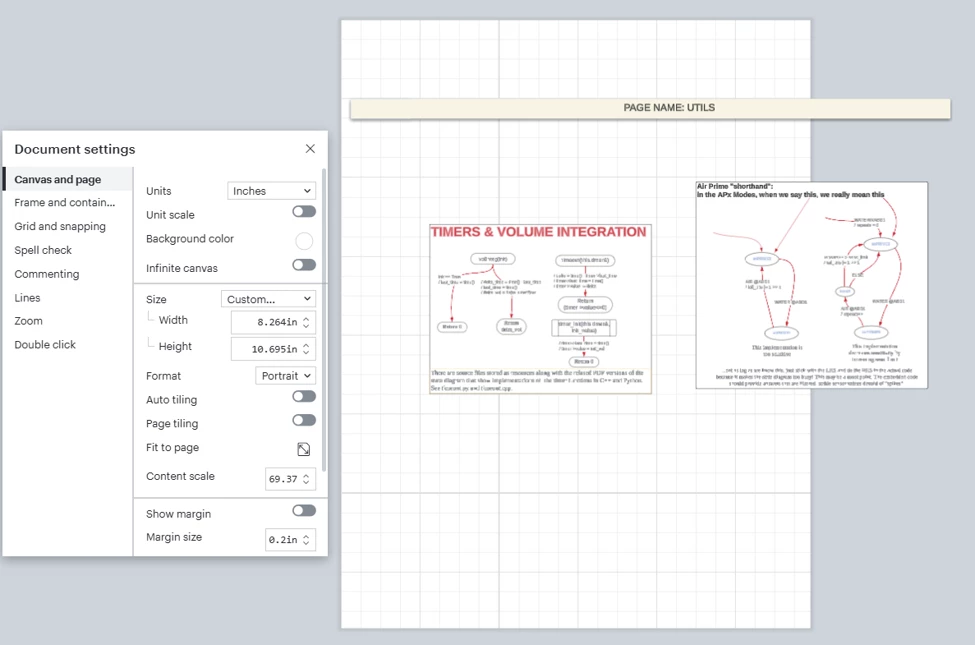
In every example I tried in today’s experiment, 1 or two pages were damaged. In each instance, the pages changed to a custom size that seemed entirely random. One example that I didn’t lose from an earlier experiment was this one:

This one happened by just closing and reopening the document. The correct size was letter/landscape. How that got changed to a custom 8.3”x10.7” just seems random.

Here are the settings for exporting:

Is there a stand-alone LucidChart app for Windows? I just wonder if the involvement of the browser could be a culprit.


Leianne C
Forum|alt.badge.img+15
  • Lucid support team
  • July 9, 2026

Hi ​@Fklein23, thank you for following up with that information. To confirm, have you noticed this happening in other documents before or only this one document? If the behaviour happens again, could you please try checking Revision History and see if you are able to quickly restore the document this way? 

I would also love to take a closer look at the issue on my end. Could you share a temporary Document Support PIN for this document or a copy/example? This PIN is safe to post in this thread because it is only accessible by members of the Lucid support staff. You can find steps for generating a Support PIN in this Lucid Help Center article: Generate a Lucid Support PIN.

Thank you for your help and patience. Please don’t hesitate to let me know if you have any questions or concerns. 


Forum|alt.badge.img+4
  • Author
  • July 10, 2026

I have worked on this document for more than 3 years. But it has only been during the past year that I broke the design up into pages, so this is the only document I have ever seen that has this problem.

When I first started using pages, I just assumed that it was not able to remember page sizes, and I just expected to have to reassign page sizes before every export. 

The document is a high level design document for a new medical device and there is no way I can hand off a copy of this document to anyone, because of intellectual property concerns.

I created a saved copy of the document and deleted all the content except the page title on each page. It has the same number of pages, by the same names, and if anything, the pages are more complex than the original, because I made sure the pages were very busy with random snippets of diagrams on all the pages and I placed a light green shaded rectangle over the whole page to make it easy to spot any pages where the contents spill outside the page boundary.

I have tried

  • closing and reopening the document.
  • exporting a PDF 
  • powering down and cold-starting my PC

and so far, I have not encountered the problem.

I tried looking at the original document’s history. In different versions, there are simply occasional occurrence of pages with incorrect sizing. I could detect no pattern.

Furthermore, with the new test file I saved, I have not been able to re-create the problem. 

That last sentence gave me reason to ask this question: The test document I created “Test page-sizes” was saved to my hard disk. The production document was exported to OneDrive. Do you know if there are issues related to saving exports to OneDrive?

If I can cause one of these page size faults by changing something about the test (like exporting it to OneDrive) I will create a Document support PIN and send it to you.


Leianne C
Forum|alt.badge.img+15
  • Lucid support team
  • July 14, 2026

Hi ​@Fklein23, thank you for sharing that detail. I understand the privacy concern and appreciate your help with trying to recreate this in a copy of the document. Would you mind clarifying what you mean by the test document was saved to your hard disk and the production document was exported to OneDrive? Is this the saving location of the exported file? 

Based on the provided details, it sounds like the issue may be document specific. If you haven’t already, it may be worth trying a duplicate your document (with all the content) and try exporting that to PDF. Do the page sizes revert when you try it this way? 

Please let me know if you try the above and if you notice any changes, or if you have any any questions! 


Forum|alt.badge.img+4
  • Author
  • July 21, 2026

Well, that was unfortunate. I just spent 45 minutes writing a reply and explaining the test case that I came up with explined in painstaking detail and when I hit “Submit” I got the dreaded “Something went wrong” message which lost the whole thing.

OK, I will try again but with a much shorter explanation.

To answer your questions: I duplicate the file EVERY time I promote to a new version. So I have effectively tried that experiment maybe 20 times because they always lose their page sizes.

All my exported PDF files are exported directly to OneDrive. I only use my hard drive for temporary files I do not need to save for FDA compliance. As you will see from the info below, it turns out exporting has nothing to do with it. So forget about OneDrive -- it is not involved.

Here are some terms, for simplicity of explanations:

    Real file = the one we have been discussing

    Straw-Man = a file I created by duplicating Real File and scrambling the contents so I can give it to you without any IP/security issues.

Real File lost its marbles over this past weekend even though I didn’t edit it or export anything.

Straw-Man had all the correct page sizes.

The only difference was that Real File was left open on the browser. Straw-Man was closed the whole time.

So it seems to not be related to exporting.

Tonight I will reverse the process. I will close Real File and leave Straw-Man open on the browser.

If Straw-Man loses its marbles, I will create a support PIN and send it to you.


Leianne C
Forum|alt.badge.img+15
  • Lucid support team
  • July 21, 2026

Hi ​@Fklein23, thank you for the update and sorry for the trouble! I appreciate the detailed outline of your findings and confirming that creating duplicates of the document doesn’t change the behaviour. Please let me know if you notice the same issue happening to the ‘Straw-man’ document and I’ll be happy to take a closer look on my end. 

In the meantime, would you mind clarifying what you mean by ‘Real File lost its marbles over this past weekend’? Did the page sizes revert or did you notice other behaviour as well? 

If you have any questions, please feel free to let me know! 


Forum|alt.badge.img+4
  • Author
  • July 22, 2026

By “lost its marbles” I meant that it lost ALL the page sizes. No other anomalous behavior.

Over the weekend, I did not access the document to edit it or read through it. It was just open on a tab in the Brave browser.

When I accessed it on Monday, all the page sizes were bad. So the document was simply active but unused from Friday evening to mid-day Monday.

Tuesday and Wednesday, I looked at the Straw Man and it hasn’t lost any marbles yet.

I accidentally left the Real File open overnight Tuesday-Wednesday and it had no lost page sizes.

I will try a few power-down, hard reset, events to see if they are part of the problem.


Forum|alt.badge.img+4
  • Author
  • July 22, 2026

Today, I was doing routine edits to three pages and couldn’t tell exactly when it happened, but suddenly, without warning, the page size changed for ALL the pages.

I tried comparing version in the version history view and couldn’t find a change in page sizes because every page that you compare appears on an infinite canvas, so the page size is not evident during the compare.

But I compared all pairs of corresponding pages and, only one page, named “Therapy Modes” was different.

That changed page was the last page I edited so something I did triggered the change in page sizes. But it was a bunch of routine editing commands in which I put objects on the page and connected them with connectors, etc. Nothing unusual. 

So I created a new blank document called “Saved changes”. I created 1 page in it with a Tabloid page size and pasted the contents of the page that was different between the two versions.

Then I returned to the damaged document and restored the version with the correct page sizes.

Then I copied the contents of the one page in “Saved changes” to the restored document and all the pages looked fine.

So, although I know the problem happened during routine edits of “Therapy Modes”, I have no idea which action caused it.

Just bulk copying of that one page to “Therapy Modes” did not trigger the change in page sizes. Some individual edit command must have done it. 

I will pay a lot more attention to when the page sizes change in the future. Maybe I can narrow it down that way.


Forum|alt.badge.img+4
  • Author
  • July 23, 2026

I think I may have found the problem. I have been having a different problem:

Notes added to “Go to shape” links simply stopped displaying. I switched to the Chrome browser and that problem went away.

I noticed that there are 4 browsers that LucidChart recommends. Chrome is #1 and Brave doesn’t appear on the list at all.

So if abandoning Brave and switching to Chrome fixed that problem, I wonder if the page sizes issue will also go away with chrome?

I will let you know if the problem recurs.


Leianne C
Forum|alt.badge.img+15
  • Lucid support team
  • Answer
  • July 23, 2026

Hi ​@Fklein23, thank you for the update and confirming you’re using Lucid in a Brave browser. Lucid is optimized for Google Chrome, so if you haven't already I would recommend trying Chrome and see if the issue still happens there. 

I appreciate all the details and updates of your findings. Please let me know if you notice any changes in behaviour or if you have any questions1