Dilshad C
November 28, 2022
Solved

How to Unlink or Delete Data from an Org Chart

  • November 28, 2022
  • 19 replies
  • 1246 views

Hello


I have created an internal org chart in Lucidchart using an internal google sheet for various fields.  Some of these fields are sensitive and I want to remove them from the org chart/underlying data set before sharing with the wider organization (some fields contain info on Compensation etc.)  How can I remove either specific fields or the underlying data set in general and be left with just the org chart?


Best answer by Addie

Hi there

Thank you for posting your question in the Lucid Community! In order to delete or remove a data field from view within Lucidchart:

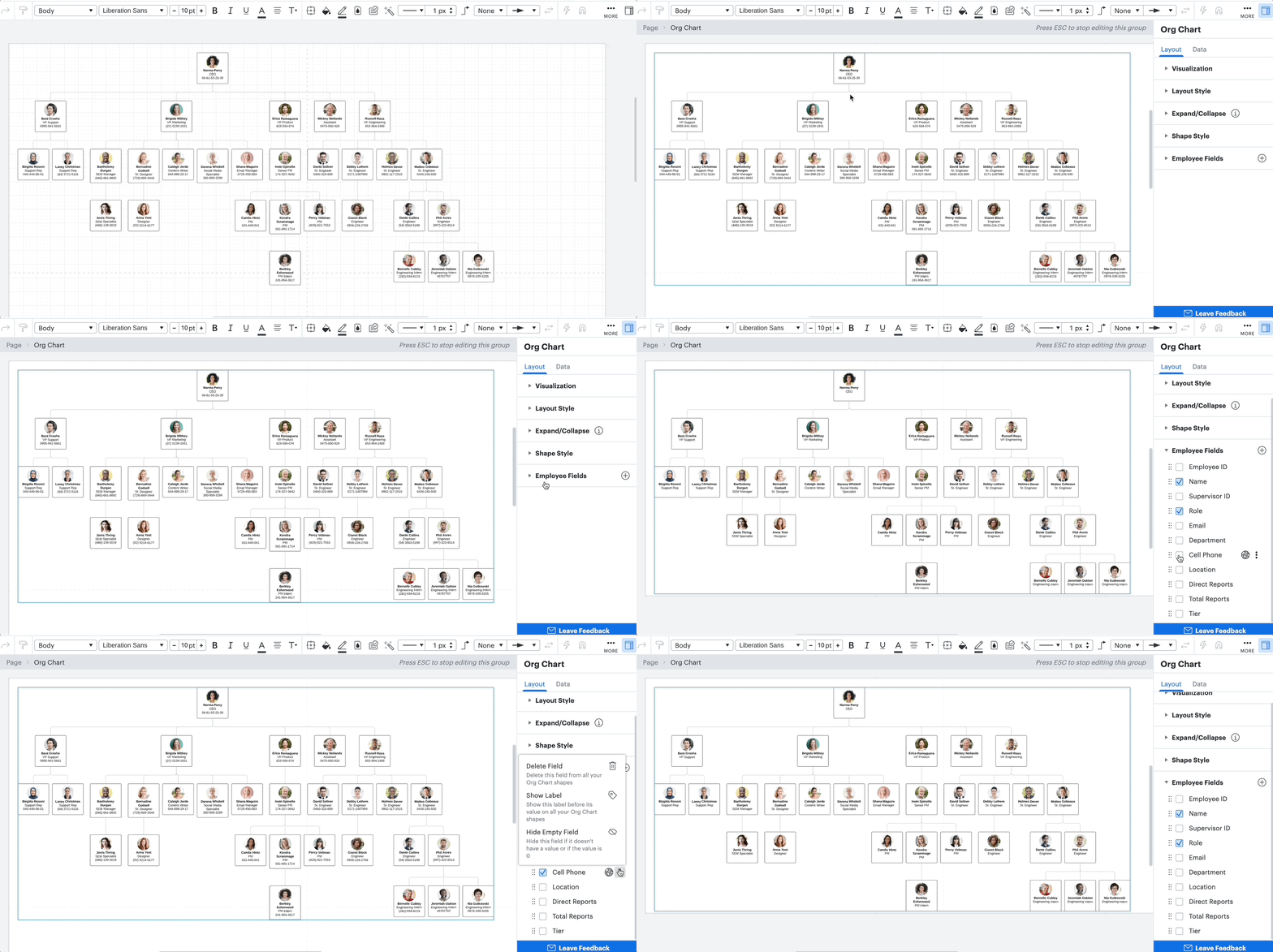
  1. Select the Org Chart
  2. Open the Contextual Panel on the righthand side
  3. Click into the Layout tab and expand Employee Fields
  4. Here you can remove a field from view or you can delete it entirely 
Rp1ueLQvfjG6WN4A5-ORWg.gif

Please note: If you share a data-linked document with another Lucidchart user then your collaborator will be able to see the full data set linked to your document even if the data field is not visible in the Org Chart. If you share a document as “view-only” your collaborator can still see any data you’ve linked to your document and can access this data by making a copy of your data-linked document. With this in mind if the data is sensitive I recommend actually deleting the field so that it will not be viewable or accessible when sharing the Org Chart document. 

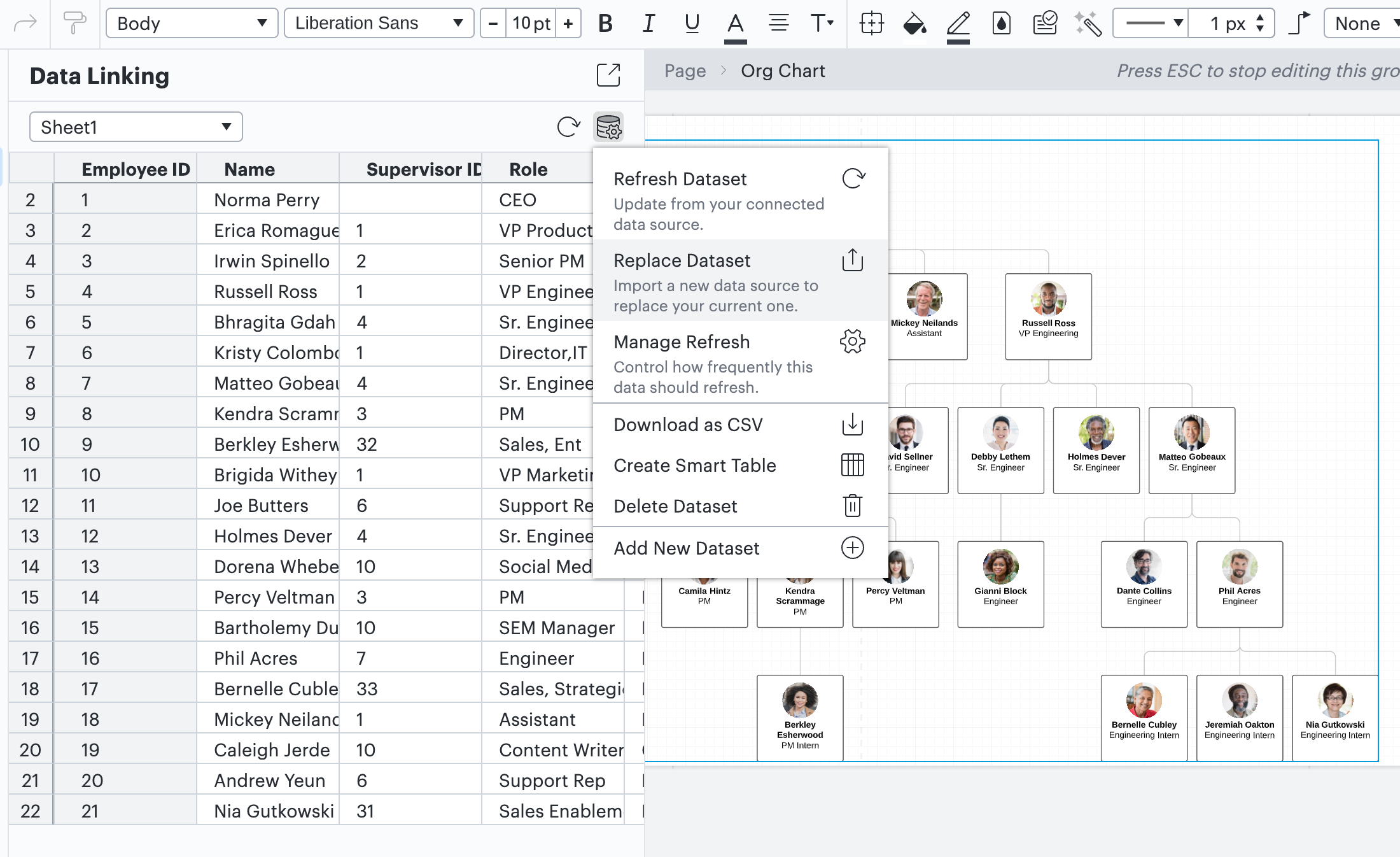
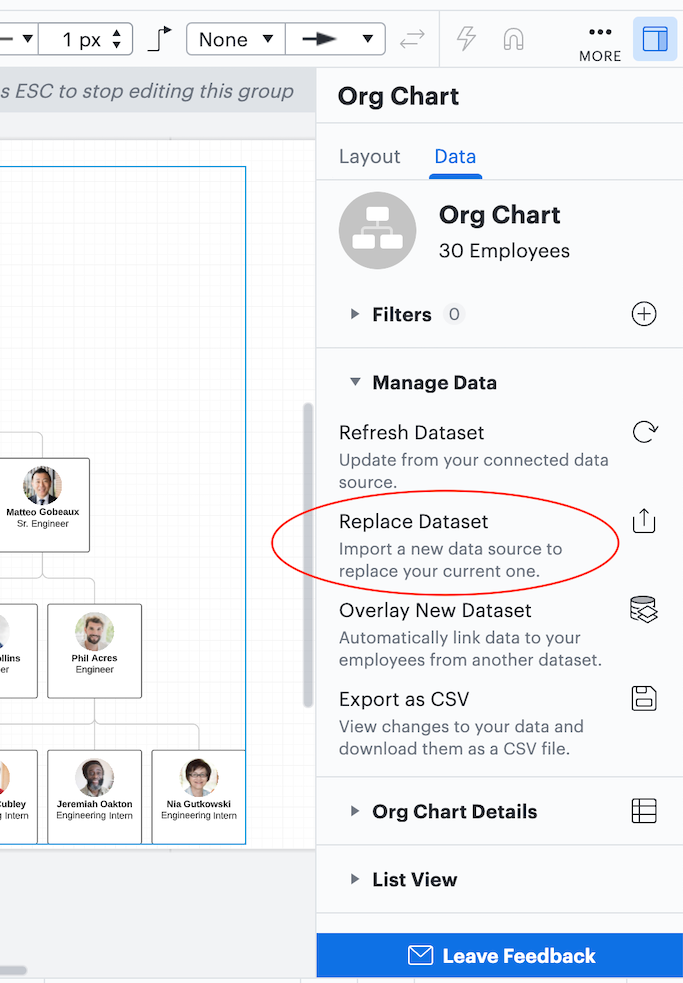
You can also delete a column from your original Google Sheet and then replace your data set so that the sensitive field is removed from your Org Chart. For more information about how to update or delete a data set please check out these step by step directions in this Help Center article. Please be sure to replace your data set rather than delete and re-upload if you would like to preserve any data mappings you have applied to your chart.
NF-hPAQvAuPKySt7intUlQ.png

EBd31CzEVctihC8QiBWrdQ.png

For more frequently asked questions about Data Linking please check out this Help Center article.

I hope this helps! Please let me know if you have any additional questions.

Comments

Kelsey Gaag
Lucidite
August 29, 2024

@Wnedy, thank you for the reply! Do you mind clarifying how you are making the org chart? If you are dragging information from the left Data Panel, a delete fields option does not appear. However, if you import your data following the steps in the linked article below you should see the option.

Are you creating your org chart by dragging information from the Data Panel? Could you try importing your data into an Org Chart by following the steps in this Help Center article? You should see the Delete Field options after importing data this way.  


Wendy P
August 29, 2024

I create a csv file from my HRIS and upload the data using the Import data link in Lucid Charts. Screenshot below.


Kelsey Gaag
Lucidite
September 3, 2024

Hi @Wendy P

Thank you for the reply! Apologies for the delay, could you try importing your data in a fresh document and follow the directions in this Help Center article, and see if you have the delete field option?

Wendy P
September 10, 2024

It’s in there with the new data being uploaded! Is there a way for that to work on the existing org charts, or would I have to start from scratch again?

Kelsey Gaag
Lucidite
September 10, 2024

Hi @Wendy P

Thank you for the reply! To clarify are you seeing the delete field option in the new document? I believe the field isn’t showing up in your existing charts because of how the data was imported. To see this field, you will have to import data again into new  documents by following the directions in the article above. 

Wendy P
September 10, 2024

I am now seeing it with the upload. For the record, I uploaded it without instructions as I have been using this product for years and didn’t need a tutorial. Was this a feature recently added? My last upload was Jan. 2024 and that org chart doesn’t have the delete field. 

Kelsey Gaag
Lucidite
September 10, 2024

Hi @Wendy P

Thank you for the reply and the clarification! In the document where you don’t see the ‘Delete Field’ option, are you selecting the shape only or the entire Org Chart? I apologize for the confusion here, I think I was mistaken. After doing some more testing, I believe the issue is that in order to see the Delete Field’ option you have to select the entire Org Chart instead of a shape. Are you able to see the option when selecting the whole chart? 


Wendy P
September 10, 2024

When I choose select > all shapes, then I check, that field is visible! Thank you!


Kelsey Gaag
Lucidite
September 10, 2024

Hi @Wendy P

Glad that worked! Let me know if you have any other questions or concerns.