
Question

How to remove AI generated alt text?

  • March 12, 2026
  • 4 replies
  • 16 views

Forum|alt.badge.img+1

Hi all,


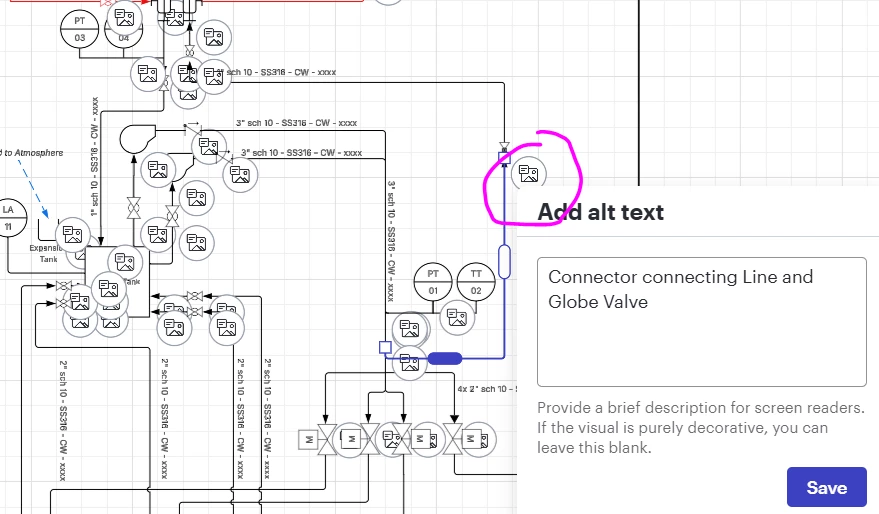
Starting today, several members have AI generated alt text dotted all over diagrams, making it impossible to cleanly screenshot and is generally frustrating because it adds no value and all have to be manually deleted.


Is there any way to get rid/hide these across all documents?


Many thanks!


Comments

Forum|alt.badge.img+1
  • Author
  • March 12, 2026

I stand corrected, it’s not possible to delete them, upon page reload they reappear.


Forum|alt.badge.img
  • March 12, 2026

I also suddenly had this issue. 
If you delete the text from the box and hit save, that bubble will go away but I cannot find a way to bulk remove them. Hoping someone has an answer, I can’t spend the time to manually remove 300+ of these this way


Forum|alt.badge.img+1

Just posted about this same issue.  I have spent about 2 hours now trying to figure out how to correct and cannot figure it out.  

The only thing I can see that “works” is clicking on the shape and changing the order of what appears.  It essentially brings the shape the front and the image icon goes behind it.  But no one is going to change that manually 3000 times.  

Lucid needs to respond to advise how to get rid of these.  


Forum|alt.badge.img+1
  • Author
  • March 12, 2026

I’m getting a Visio monthly license to export diagrams to work on. Not ideal because it doesn’t support live collaboration, but I have no idea when this will be resolved
