Answer

How to invite others to me on the board while collaborating

  • November 20, 2024
  • 2 replies
  • 83 views

Forum|alt.badge.img+1

Miro has the facilitation feature “Bring Everyone to Me” that moves everyone following the board to the location that you are on. Is anything similar available in LucidSpark? If not, this is a powerful facilitation feature that should be considered.


Best answer by Lance

Yes! Lucidspark also has that functionality. You can find it in the collaborator menu in the top right (it’s enabled if there are other people in the board with you).

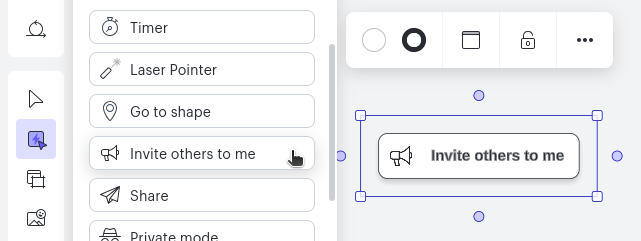
Additionally, we have a quick tool that you can add to the canvas when building a presentation so during the presentation you can simply click the button to invite others to you. To find it, first add the quick tools menu item to your toolbar (more button is at the bottom of the toolbar, and you can search). Then either scroll down or search for it in the quick tools menu.


Comments

Lance
Lucid Legend Level 6
Forum|alt.badge.img+11
  • Lucid Legend Level 6
  • Answer
  • November 20, 2024

Yes! Lucidspark also has that functionality. You can find it in the collaborator menu in the top right (it’s enabled if there are other people in the board with you).

Additionally, we have a quick tool that you can add to the canvas when building a presentation so during the presentation you can simply click the button to invite others to you. To find it, first add the quick tools menu item to your toolbar (more button is at the bottom of the toolbar, and you can search). Then either scroll down or search for it in the quick tools menu.


Forum|alt.badge.img+1
  • Author
  • November 20, 2024

Thanks for the tip noting that the option is only available if others are in the board!