

Here’s my setup:
- I’ve created a BPMN flow chart within swimlanes.
- I’ve got data linked via a live Google Sheet that has pain points/ Problems at each step of the process and this is linked to
- respective shape steps of the BPMN and
- created a Smart Container where each card is a Problem
- Added a field ‘Occurring at’ to the smart container to get the steps that these Problem occur at. This is applied to it’s children cards contained within
- I also want to add a similar field that tells me which swimlane these steps belong to (which department these problem steps are in essentially Eg. Sales, Production, etc)
I’m facing 2 issues:
- The Occurring at field displays shape labels inconsistently. This is the formula I’ve used:
=FILTER(DESCENDANTS(page), x => AND(((x."Problem") = THIS."Problem"), (LABEL(x) != LABEL(THIS))))
where ‘Problem’ is the primary field of my linked DB
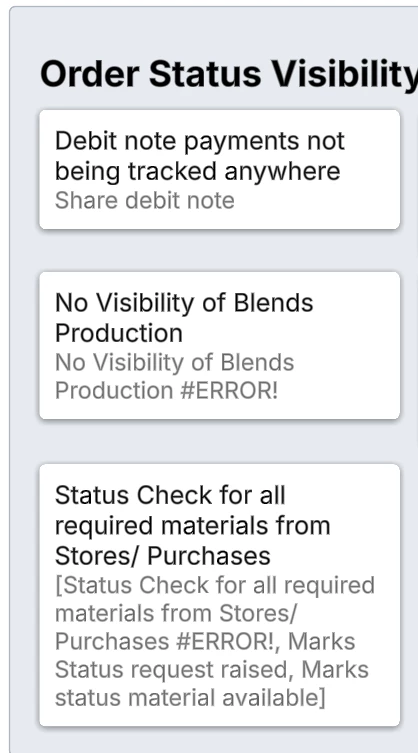
The issue is that sometimes it:- Sometimes displays the label of the card itself (i.e., the Problem), with an error but not the process shape label (card 2 in img)
- sometimes displays the card’s label, error and the shapes label all together (card 3 in img)
- I need it to only display the shape’s label (card 1 in img)
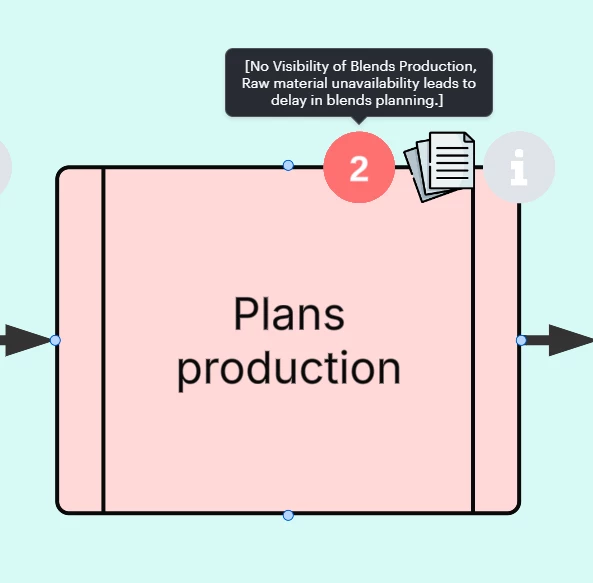
- I want to have another field called ‘Connected Department’ that displays the swimlanelane that the problem shape is within. I know the formula =((CONTAINEDBY($SWIMLANELANE))) can get the swimlanelane of the concerned shape, but I’m not sure how to use it with the FILTER function. I’d like to get the swimlanelane of the filtered shapes of the ‘Occurring at’ field.
Any suggestions on how to do this? Thanks in advance!
 Your privacy choices


