
A few months ago, suddenly a 7-day expiration was added to all lucidchart sharing — even within my own company. So now, everyone keeps losing access to links that were previously shared with them. I spoke to our corpeng team and they said they didn’t implement this, and security doesn’t implement without corpeng. What’s going on here?
Solved
How to disable the 7-day expiration on internal share links
 +1
+1Best answer by alison cheney
Hi
Thank you for contacting Lucid Support!
I was able to take a closer look at your account and found that you have the “Enable share link expiration” checked under your Sharing settings. I can confirm that this setting is set to unchecked by default.
It appears this expiration setting was set to 7 days some time ago. In order to fix this, please go to your Admin panel, and under the “Security” tab select “Sharing” to view your Sharing Settings. Under “Expiring shareable links” uncheck “Enable share link expiration”. This will make it so there is no expiration time for any of your shareable document and folder links. Please see the image below showing instructions on how to make this change.
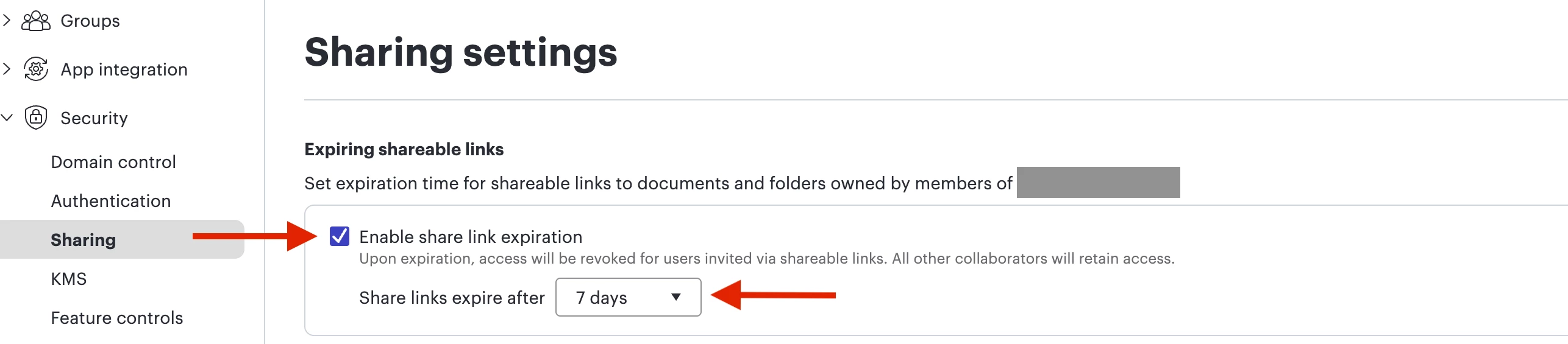
I hope this provides some clarity. Please let me know if you have any additional questions!


Create an account in the community
A Lucid or airfocus account is required to interact with the Community, and your participation is subject to the Supplemental Lucid Community Terms. You may not participate in the Community if you are under 18. You will be redirected to the Lucid or airfocus app to log in.
Log in to the community
A Lucid or airfocus account is required to interact with the Community, and your participation is subject to the Supplemental Lucid Community Terms. You may not participate in the Community if you are under 18. You will be redirected to the Lucid or airfocus app to log in.
Log in with Lucid Log in with airfocus
or
Enter your E-mail address. We'll send you an e-mail with instructions to reset your password.
 Your privacy choices


