Solved

How to access diagram as code in Lucidchart

  • April 23, 2025
  • 5 replies
  • 200 views

Forum|alt.badge.img+1

where is diagram as code? can't find itwhere is diagram as code? can't find it

Best answer by Humas1985

Hi ​@jeremy.gg 

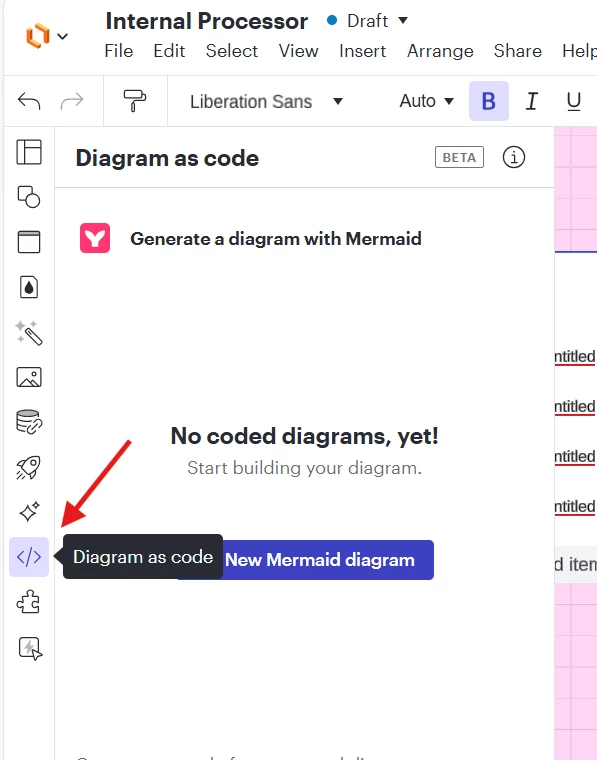
Dont you see the option in your far left-hand side of the workspace as highlighted below:

Best Regards

Comments

Humas1985
Lucid Legend Level 10
Forum|alt.badge.img+24
  • Lucid Legend Level 10
  • April 23, 2025

Hi ​@jeremy.gg 

To learn more about diagrams using code - please make use of the article - Diagram as code with Mermaid in Lucidchart – Lucid

Hope this helps - Happy to help further!!
Thank you very much and have a great one!
Warm regards


Forum|alt.badge.img+1
  • Author
  • April 23, 2025

Hi ​@jeremy.gg 

To learn more about diagrams using code - please make use of the article - Diagram as code with Mermaid in Lucidchart – Lucid

Hope this helps - Happy to help further!!
Thank you very much and have a great one!
Warm regards

I readi it. no luck to find how to use mermaid in diagram as code


Humas1985
Lucid Legend Level 10
Forum|alt.badge.img+24
  • Lucid Legend Level 10
  • Answer
  • April 23, 2025

Hi ​@jeremy.gg 

Dont you see the option in your far left-hand side of the workspace as highlighted below:

Best Regards


Forum|alt.badge.img+1
  • Author
  • April 23, 2025

Thank you!! Found it now

Hi ​@jeremy.gg 

Dont you see the option in your far left-hand side of the workspace as highlighted below:

Best Regards


Ambar D
Forum|alt.badge.img+13
  • Lucid community team
  • June 29, 2026

Jumping in this thread to share an additional method of generating diagrams with Mermaid code.

You can now generate editable Lucid shapes from your Mermaid syntax! 🎉 Copy your syntax and paste it into your Lucid document. The result will be native, editable shapes that you can format and move around freely! 

Learn more about this update here:

 Do you have additional feedback? Let us know what you’d like to see in this post: