Solved

How do I create a checkbox object?

  • November 13, 2025
  • 1 reply
  • 28 views

Forum|alt.badge.img

I want a checkable object. I see one in the Basics in Lucidspark course canvas that I am working on. See it highlighted below. Please tell me how to recreate this checkbox object. The pencil icon controls the default from unchecked to checked.

 

Best answer by Leianne C

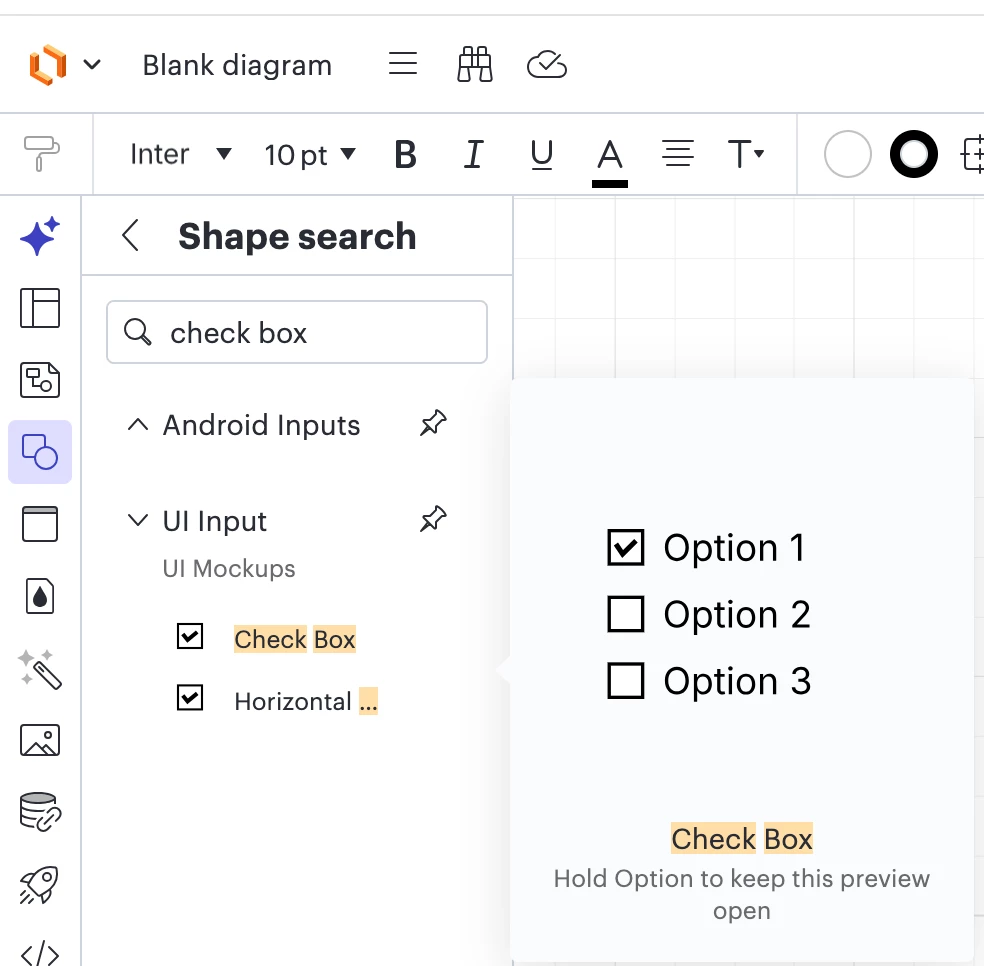
Hi ​@BrianWard, thank you for posting in the community! It looks like this specific check box shape is a custom shape likely created for the template. While slightly different, you can find checkable check box shapes by switching your editor over to Lucidchart via Universal Canvas and searching for the check box shape. It is under the UI Input shape library. You can also see an example in this video: Lucidchart - Check boxes - YouTube  

I hope this helps. Feel free to let me know if you have any questions!

Comments

Leianne C
Forum|alt.badge.img+15
  • Lucid support team
  • Answer
  • November 19, 2025

Hi ​@BrianWard, thank you for posting in the community! It looks like this specific check box shape is a custom shape likely created for the template. While slightly different, you can find checkable check box shapes by switching your editor over to Lucidchart via Universal Canvas and searching for the check box shape. It is under the UI Input shape library. You can also see an example in this video: Lucidchart - Check boxes - YouTube  

I hope this helps. Feel free to let me know if you have any questions!