Solved

How do I accept a Builder Badge when I can't see it in my Student Center?

  • November 19, 2025
  • 9 replies
  • 48 views

Forum|alt.badge.img+1

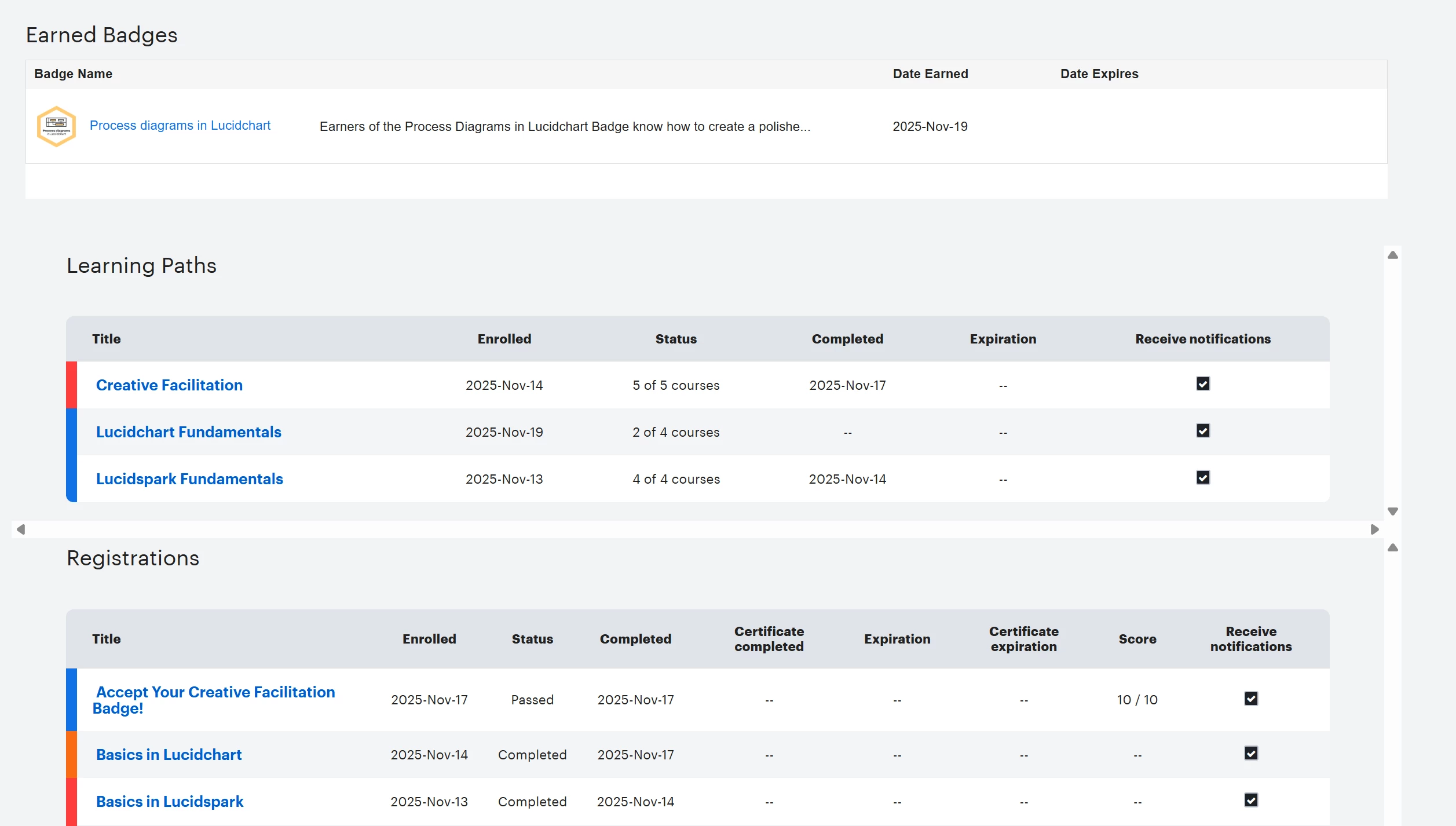
I have completed some Builder Badges, but I am unable to accept them in my My Profile. I did not receive an email from Credly as well. Can you please provide a way for me to accept my badges? Thank you!

 

Best answer by Ambar D

@Jacob Krantweiss 

Our Training Labs team did some digging and took care of the API problem they believe has caused this. They confirmed that you should now have all the badges that you’ve earned through course completion!

Way to go on completing these courses! I hope you’ve found them helpful in your work. 😁

Please let me know if you run into any more trouble here and we’d be happy to keep working to help.

Comments

Humas1985
Lucid Legend Level 10
Forum|alt.badge.img+24
  • Lucid Legend Level 10
  • November 20, 2025

Hi ​@Jacob Krantweiss 

Have you referred to this page on how to accept the badge,

Lucid Builder Badges – Lucid

Kindly check you Junk/Spam folder to get started on this

Did not receive a Lucidchart Fundamentals Badge from Training Labs after completing the course | Community

Hope this helps - Happy to help further!!
Thank you very much and have a great one!
Warm regards


Humas1985
Lucid Legend Level 10
Forum|alt.badge.img+24
  • Lucid Legend Level 10
  • November 20, 2025

 Step-1

Try to navigate as shown below:


Step-2

Click on the hyperlink and that is how you accept

Step3:

You being able to find your badges in credly as shown below:


Forum|alt.badge.img+1

Thank you for answering! I have checked my Spam folder and I did not receive anything from Credly or Lucid. I received one email, which is the one badge I was able to accept, but for the other learning paths, I did not receive anything.


Ambar D
Forum|alt.badge.img+10
  • Lucid community team
  • November 20, 2025

​Hi ​@Jacob Krantweiss, thank you for posting in the Lucid Community! Sorry you’re having a hard time accepting your badge, but I’m happy to help. The suggestions by ​@Humas1985 are great first steps here, thanks for confirming that you checked your spam folder. 

Would you mind trying the following items? Sometimes these issues can be related to internet security/speed or browser issues. These steps will help us eliminate that possibility.

  • Could you try opening your board in a private or incognito window and trying to access your badge? For help with opening an incognito window, please see this community post.
  • Could you also try connecting to a different network or disconnecting from your VPN (if applicable)?

If those don’t resolve this problem, would you try the following steps?

  1. Log out of your account in Skilljar/Training Labs
  2. Log out of your Lucid account
  3. Clear cookies
  4. Close all browser windows 
  5. Reopen your browser and try to log back in

Thank you for your help and patience here!


Forum|alt.badge.img+1

Hi ​@Ambar D! Thanks for responding with some additional steps, but none of those seemed to work unfortunately. Please let me know the next thing I should do. Thank you!


Ambar D
Forum|alt.badge.img+10
  • Lucid community team
  • November 20, 2025

Hi ​@Jacob Krantweiss, thanks for confirming that. I’m flagging this with our Training Labs team to get their eyes on this.

Would you mind confirming which training courses you’ve completed that you’re expecting badges for? That may help us take a closer look.


Ambar D
Forum|alt.badge.img+10
  • Lucid community team
  • Answer
  • November 21, 2025

@Jacob Krantweiss 

Our Training Labs team did some digging and took care of the API problem they believe has caused this. They confirmed that you should now have all the badges that you’ve earned through course completion!

Way to go on completing these courses! I hope you’ve found them helpful in your work. 😁

Please let me know if you run into any more trouble here and we’d be happy to keep working to help.


Forum|alt.badge.img+1

Hi ​@Ambar D, yes it seems to have been fixed yesterday evening! Thank you for the updates and having the team fix the issue! Have a great day!


Ambar D
Forum|alt.badge.img+10
  • Lucid community team
  • November 21, 2025

I'm happy to hear that this has been resolved for you ​@Jacob Krantweiss! It's my pleasure to help!

This community is dedicated to supporting your work in Lucid's products. If other product questions arise, or if you'd like to share how you use Lucid, you can create a new topic!

Have a great weekend!