Solved

How can my browser tabs show the Lucid board/document names?

  • December 10, 2025
  • 2 replies
  • 15 views

Forum|alt.badge.img

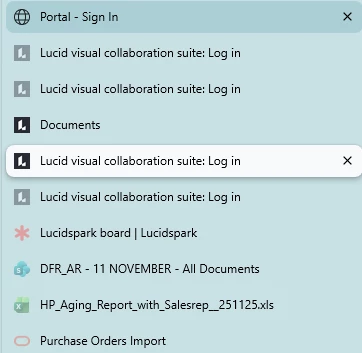
Hi  - would love to preserve my sanity.  Screen shot are my Browser Tabs (on left pane instead of top).  All the Lucids just say Login.   Would like for them to say the Board Name similar to the SharePoint, Excel,Power BI examples below so I know which Lucid tab that I need to navigate back to.   


Best answer by Zuzia S

@BAN Thank you for posting in the Community and thank you ​@aparrish for chiming into this thread! I really do like your alternative to add bookmarks and rename them.

@BAN Could you please let me know which browser you are using? I use the latest version of Chrome and I am not able to reproduce the issue you are experiencing, therefore I believe there is a high chance the issue is browser specific. On my end, board names do appear in all of the following instances:

  • In currently open tabs in the browser
  • In browser history
  • In saved bookmarks

For more context, I recommend going through our Help Center article on System requirements for optimized Lucid performance.

Please let me know if you have any further concerns. Cheers!

Comments

aparrish
Lucid Legend Level 7
Forum|alt.badge.img+15
  • Lucid Legend Level 7
  • December 13, 2025

@BAN that’s an interesting way to start. This is a screenshot of history, not tabs. Lucid cannot change the description of the links in history, same with any other organization that is entrusted to preserve a company’s trade secrets (e.g., Portal - Sign In). For example, when I look at my history for another organization like Fable, I see “Log into Fable.” These are legal requirements. As you can see in the image, the descriptive links are links to documents from downloadable software with online access. Lucid is cloud-based. However, you can save the links to bookmarks, edit the bookmark, and add your own descriptive name to each link. Alternatively, you can also pin them or add them to a tab group so you always have access to it. At work, I prefer to do both since tabs are not easily migratable.


Zuzia S
Forum|alt.badge.img+8
  • Lucid community team
  • Answer
  • December 16, 2025

@BAN Thank you for posting in the Community and thank you ​@aparrish for chiming into this thread! I really do like your alternative to add bookmarks and rename them.

@BAN Could you please let me know which browser you are using? I use the latest version of Chrome and I am not able to reproduce the issue you are experiencing, therefore I believe there is a high chance the issue is browser specific. On my end, board names do appear in all of the following instances:

  • In currently open tabs in the browser
  • In browser history
  • In saved bookmarks

For more context, I recommend going through our Help Center article on System requirements for optimized Lucid performance.

Please let me know if you have any further concerns. Cheers!