Timothy L
November 2, 2022
Solved

How can I fix the spacing between employee boxes in org charts?

  • November 2, 2022
  • 17 replies
  • 474 views

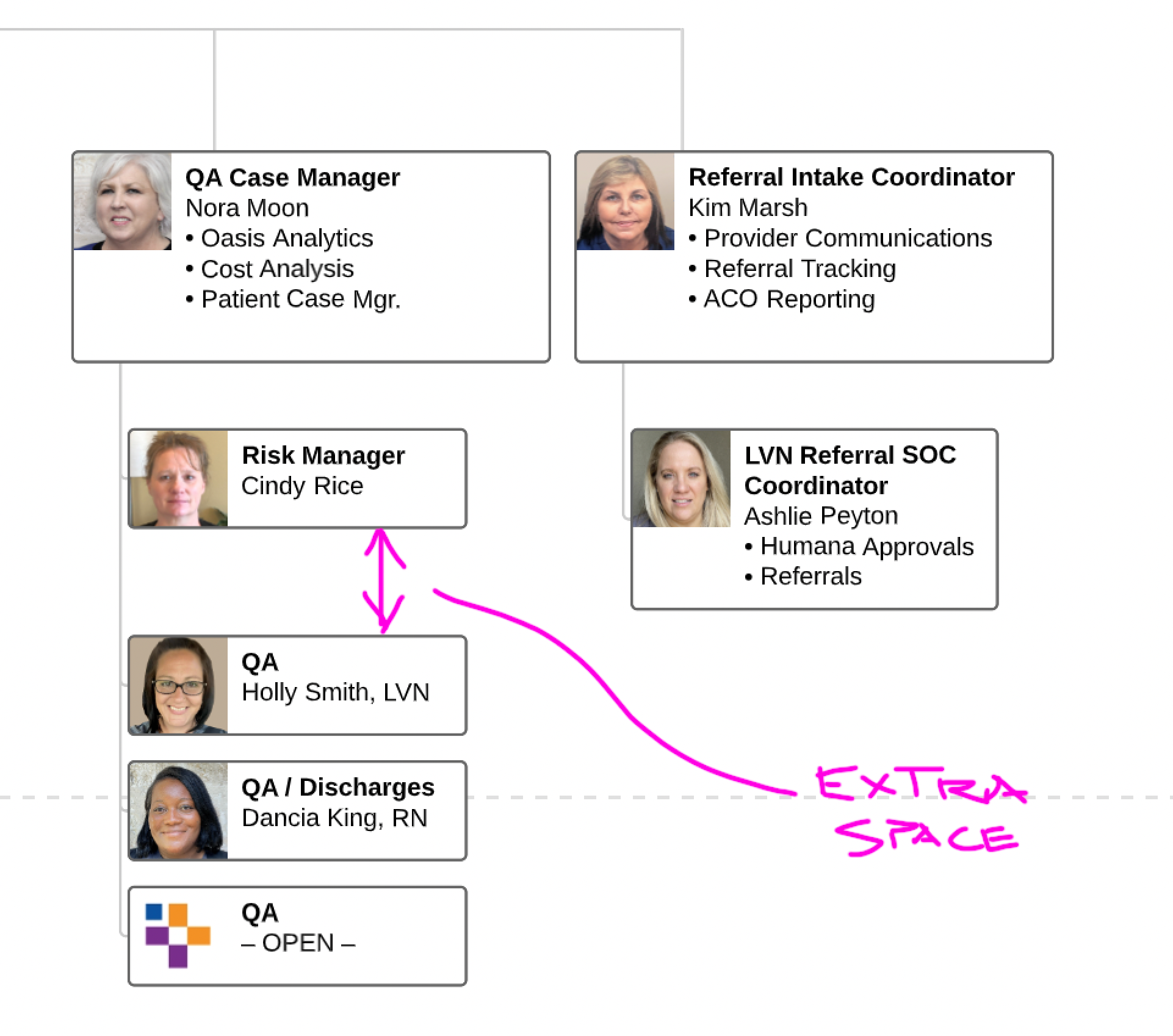
I am having a similar issue. I can select a column of employee boxes and go to Arrange > Match size > Width and Height but it does not fix an odd spacing between one at the top and the other below in a hierarchy. 
Best answer by Micah

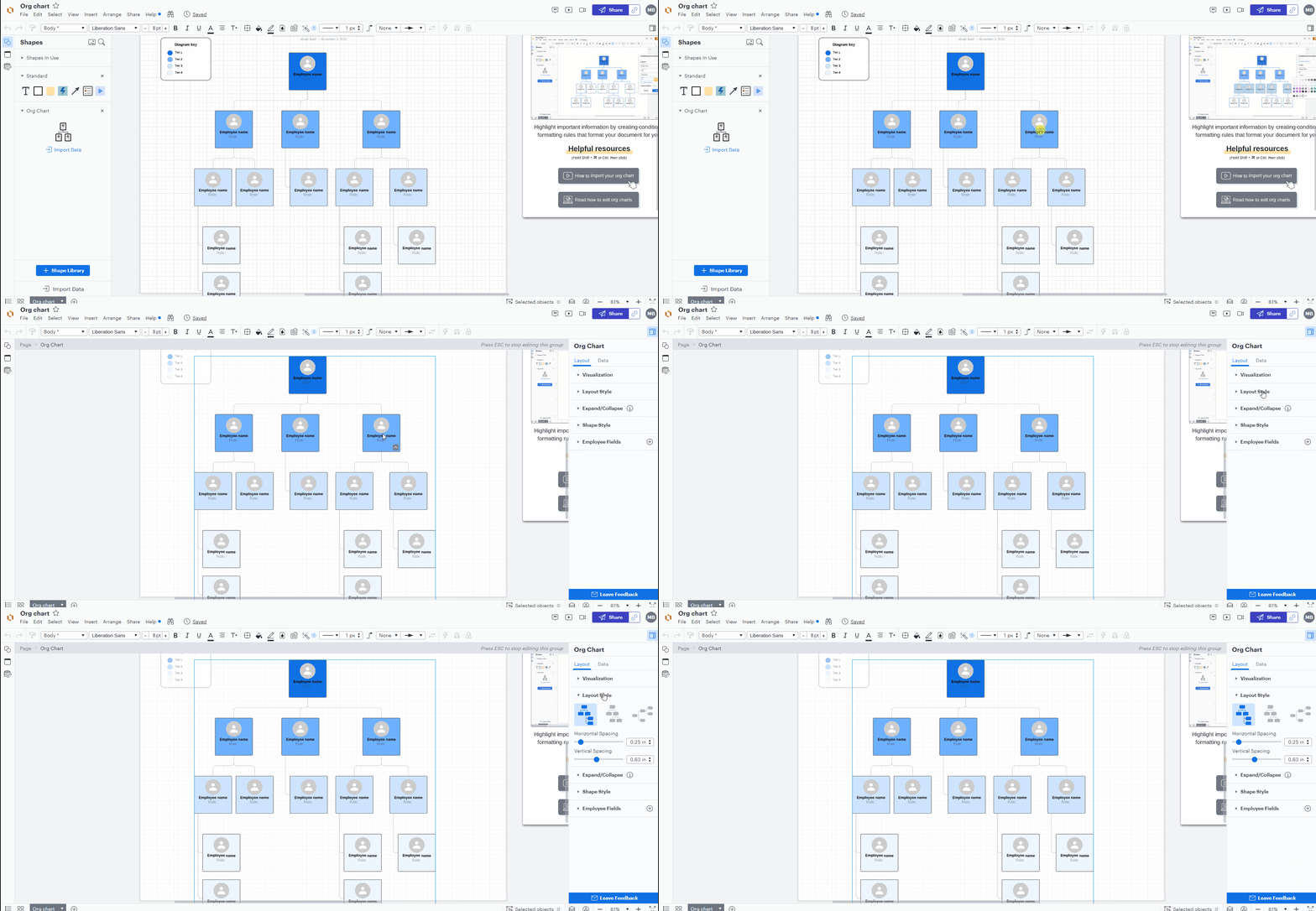
Hi Timothy thanks for getting back to me. Are you able to get the Org Chart panel to appear at all? It should automatically expand on the right side of the editor after double-clicking on your org chart and opening editing mode as shown in the GIF below:

If you're able to successfully open the panel do you simply not see a Layout Style dropdown menu? A screenshot of what you're seeing would be very helpful!

Comments

Micah
Lucid community team
November 15, 2022

Hi Timothy following up on this thread with an update from our development team - they have confirmed that the org chart tool is working as intended in those instances of irregular spacing. Lucidchart top-aligns employees by row within the org chart and gaps in spacing are a result of the corresponding card in another column being a different size. In your specific example note how Ashlie Peyton and Cindy Rice's tiles are aligned by the top edge. However because Ashlie's tile is larger due to the bullet points it contains additional space is added around Cindy's tile to match the occupied space. 

However our team recognizes this is not an ideal experience and can cause confusion - they've logged this feedback to share with our design team for future improvements. 

I hope this provides clarity around what you're experiencing in your diagram - please let me know if I can answer any additional questions!

May 22, 2025

Hi ​@Micah , 

I believe I am experiencing the same issue. Could you kindly let me know if there is a solution available? 

Thank you,


Micah
Lucid community team
May 22, 2025

Hi ​@zy.guan, thanks for your comment. This does look unusual - let’s take a look! Would you be willing to share a screenshot of your org chart that shows adjacent branches? If it’s the same issue raised earlier in the thread, I suspect there might be a differently-sized employee tile in another part of the structure that is causing this. 


If you’d prefer to not share a screenshot, would you mind generating a support PIN for this document so that I can take a closer look? You can do so by following the instructions here. Because it’s for internal use only and doesn’t grant public access to your document, you can safely share it directly in this thread. 

May 22, 2025

Thank you so much ​@Micah ! the PIN is: duB3VHxO107jzT207525865

Micah
Lucid community team
May 22, 2025

Hi ​@zy.guan, thanks for sending that over. I’ve taken a look, and do believe it’s the same issue that we saw earlier in this thread - a shape in another branch that is larger has shifted the one in the screenshot down. I believe the specific culprit is the light pink box with “contractuels” - if you remove this box, the orange branch spacing becomes more regular. This is the intended behavior to create alignment across the entire diagram, but unfortunately in instances like this, it’s not ideal. My apologies! Rest assured that we’ve logged this feedback!


As a workaround, I would suggest removing that box from the actual organigramme shape, copying the text with employee names to a regular square shape, and then positioning that shape in the same spot. This would allow you to recreate the same look while not forcing any automatic realignment. 


I hope this provides clarity around what you're experiencing in your diagram - please let me know if I can answer any additional questions!

December 30, 2025

I am experiencing the same issue as those above. No matter how I format my document, edit the org chart layout, change the order of the teammates, or cut and paste the teammates, the spacing remains wonky if more than 3 people direct report to the same person


Ambar D
Lucid community team
January 5, 2026

Hi ​@Gatewood, thanks for providing that screenshot! Happy to help here. 

Have you tried adjusting the vertical spacing under Layout style as shown below? 

If you’ve tried that with no success, could you share a temporary Document Support PIN for this document? This will help me take a closer look at what’s going on. This PIN is safe to post in this thread because it is only accessible by members of the Lucid support staff. You can find steps for generating a Support PIN in this Lucid Help Center article: Generate a Lucid Support PIN