Question

How can I connect more than one mindmaps

  • April 2, 2026
  • 1 reply
  • 8 views

Nabil S
Forum|alt.badge.img+2

I want to create two completely separate mindmaps in the same canvas for two separate processes.

Then I want to connect/join one mindmap with another? how can I do that in lucidspark or is that even possible?


Comments

justinjohnson57
Forum|alt.badge.img

Hi Nabil S!

Thank you for reaching out to the Lucid Community! To be fully transparent, I’m not entirely sure by what you mean by connecting/joining the Mind Maps with one another but, that’s okay! I’d love to dive into this a little bit further with you.


To help us get a better understanding of your use case, would you be able to share any insights into how you are wanting to incorporate the connection between these two Mind Maps? Are you wanting lines/nodes from the two Mind Maps to converge at a certain point? Are you wanting a line/node to point back to the root of the other Mind Map? Or are you wanting a completely different functionality to the ones I mentioned?


While there aren’t any built-in features to connect Mind Maps together, I did identify some potential ways you can connect them together:

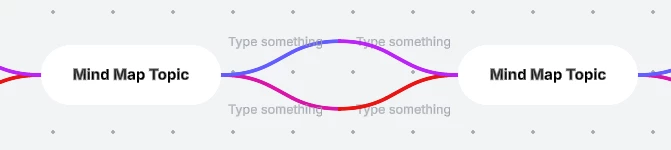
  • Workaround #1: You can simply drag one Mind Map to the other and line up the different lines/nodes so that they visually “connect.” Here is a quick example:


  • Workaround #2: If the lines/nodes are too far apart to connect together like the example provided above, you can use our Lines feature to connect them together! You can also use the Lines to connect to the root of the other Mind Map if that is what you are needing to do. Here is another example:
Note: You can also format Lines by changing the color and increasing/decreasing the thickness of the lines!


I hope these examples help! Please feel free to let me know if you have any further questions or concerns. Additionally, you are more than welcome to submit this as an idea within our Lucid Community! If you have found that no one has submitted this idea yet, please create one of your own and be sure to include details about your use case or what you’d like to see in this experience. This will also allow other users with similar requests to discover and upvote it, then add details of their own.


Best,

Justin