
Grouped items and movement in a multidimensional swimlane
Hi there,
I am trying to build a multidimensional swim lane process. I need to be able to tag each step in the process with two labels (either both, or just one).
First, I created a Dynamic table so that I could have both vertical and horizontal swimlanes. I can’t seem to turn magnetize on for this table type, as it’s greyed out (when I have a swimlane selected, and also when I have the whole table selected):

I tried using the tag function. But I can’t seem to move the tags around, and I don’t want them on the top left. I want them either underneath, or in the middle of the process shape. I also want them always fully visible, not just a tiny tag with no text. So that didn’t work for me.
Next, I tried adding a Standard shape (a tiny circle) to a process shape - but I can’t drag it to sit inside the process shape. I cannot group them together on the canvas either, as grouping is greyed out. I can take both off the canvas, then group them together there - but when I do that, and I drag the unified shape back to the canvas, the swimlanes stop auto moving the Standard shape and text - the process moves, but not the circle and the text. It’s like it’s no longer recognising the Process shape as part of the process when it’s grouped with something off-canvas.
I tried adding Dots, but the text I typed kept breaking across the line every time I added a space between words. So I tried adding Standard text next to the dot, which lets me add spaces. But when I group the text and the dot, again the swimlanes stop auto moving the Standard shape with the text.
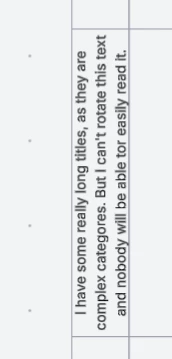
Next, I created a UML multidimensional swimlane instead of the Dynamic table. The grouped text and image now both move with the swimlanes! I thought I was ready to celebtrate - but then I discovered that I can’t rotate the text on the horizontal swimlane labels, which makes it impossible to read. I also can’t format the inside of the swimlanes (not a dealbreaker, but still pretty annoying):
So! I would really appreciate some help, if possible please.
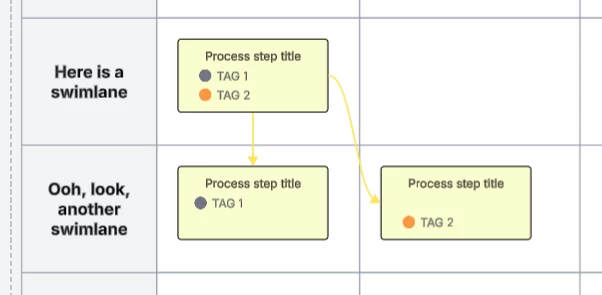
Does anyone please have any advice? Is there a way to create a Process shape that is able to be joined with other shapes so that I can have always-on, visible tags for each Process shape - and have these move within a Dynamic table when the size and order change? For clarity, the below (or similar) is what I’m looking for - but I need the TAG 1/TAG 2 text and coloured circles to move with the swimlanes when I resize them!
Thank you very much in advance for any advice you can offer.

 Your privacy choices


