Answer

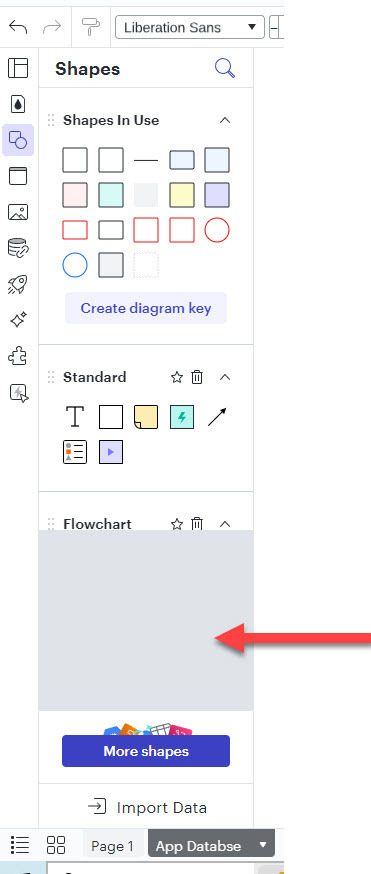
Grey box appears on the side - How do i get rid of it ?
  • May 21, 2024
  • 8 replies
  • 67 views

Forum|alt.badge.img+1


Best answer by Kelsey Gaag

Hi @cheskib
Thank you for posting in the Lucid Community! Could you try opening your document in a private or incognito window to help us narrow down the potential cause? Could you also try connecting to a different network or disconnecting from your VPN (if applicable)? Sometimes account performance issues can be related to internet security/speed or browser issues. These steps will help us eliminate that possibility. For help with opening an incognito window, please see this community post (in English).

If those don’t resolve the problem, can you please send the following information so I can take a closer look?

  • A screenshot of the associated Javascript Console output after reproducing the issue. You can open your Javascript Console by pressing Ctrl+Shift+J (if your computer is a Windows/Linux) OR Cmd+Opt+J (if your computer is a Mac).

Comments

Kelsey Gaag
Forum|alt.badge.img+16
  • Lucidite
  • Answer
  • May 22, 2024

Hi @cheskib
Thank you for posting in the Lucid Community! Could you try opening your document in a private or incognito window to help us narrow down the potential cause? Could you also try connecting to a different network or disconnecting from your VPN (if applicable)? Sometimes account performance issues can be related to internet security/speed or browser issues. These steps will help us eliminate that possibility. For help with opening an incognito window, please see this community post (in English).

If those don’t resolve the problem, can you please send the following information so I can take a closer look?

  • A screenshot of the associated Javascript Console output after reproducing the issue. You can open your Javascript Console by pressing Ctrl+Shift+J (if your computer is a Windows/Linux) OR Cmd+Opt+J (if your computer is a Mac).

Forum|alt.badge.img+1
  • Author
  • May 23, 2024


Forum|alt.badge.img+1
  • Author
  • May 23, 2024

It is possible that there’s an network security issue as IT, this week,  added additional security features to my computer. 


I beleive this isue began after security patch was installed.


Kelsey Gaag
Forum|alt.badge.img+16
  • Lucidite
  • May 23, 2024

Hi @cheskib

Thank you for providing that information. Can you confirm that opened the document in a private or incognito window? 


Forum|alt.badge.img+1
  • Author
  • May 23, 2024

the java script console pic was not made in an icgnito window

I did try to open the app incognito. Same issue occurs 


Kelsey Gaag
Forum|alt.badge.img+16
  • Lucidite
  • May 23, 2024

Hi @cheskib

Thank you for confirming! Can you please send a temporary Support PIN for this document? This will allow me to take a closer look at the issue you’re experiencing. For more information on generating a Support PIN, check out this Help Center article.


Forum|alt.badge.img+1
  • Author
  • May 28, 2024

Just FYI - I opend the application in incognito on my home computer too. Still the same issue. https://app.screencast.com/U9hlNwN39B9PN 

This isnt for just one doc , but for more than one

heres a support pin for an older sheet….    bm1mAxQDziMm 

Thank you


Kelsey Gaag
Forum|alt.badge.img+16
  • Lucidite
  • May 28, 2024

Hi @cheskib

Thank you for providing that support pin. I unfortunately don’t see the same issue on my end. 

Could you try clearing your cache and cookies in a regular browsing session and try again? Could you also try disabling your extensions one by one?
