Solved

Google Sheets integration not working

  • July 2, 2026
  • 4 replies
  • 214 views

Forum|alt.badge.img+2

Hi I’ve established integrafion of our Lucidspark board (I’m not the owner of the whole board but I have enough access permissions) and Google Sheet. I succesfuly synced one spreadsheet with the Lucid Cards on the board. It synces like a charm, both ways. 

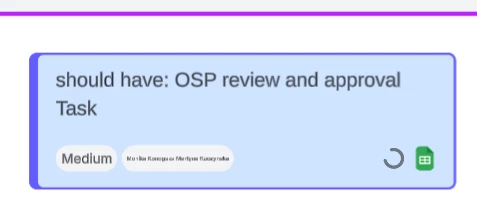
Unfortunately, it works only for me! :(. When the other team member updates a card in Lucid, a little wheel on the card rolls forever and the update is never synced with GSheet.

How can I provide all the team members the possibility to sync their updates? Collaboration is essential for us and we have planning next week 😥


Best answer by aparrish

@Leszek Olszanski See a solved thread. It includes everything you can try. If you need.

If you need a fix with login tickets, submit a ticket to our Product Support team

Comments

aparrish
Lucid Legend Level 7
Forum|alt.badge.img+18
  • Lucid Legend Level 7
  • Answer
  • July 5, 2026

@Leszek Olszanski See a solved thread. It includes everything you can try. If you need.

If you need a fix with login tickets, submit a ticket to our Product Support team


Leianne C
Forum|alt.badge.img+15
  • Lucid support team
  • July 8, 2026

Hi ​@Leszek Olszanski, thank you for posting in the community! Would you mind confirming if the issue is still happening? The issue may be happening because your collaborators have not yet authenticated with Google Sheets. 

Could you please share the details below to help me take a closer look at the issue on my end?

  • Do your collaborators have edit access to the linked Google Sheet? 
  • Can you please check if the collaborators have authenticated with Google? If not, please ask them to install the Google Sheets integration and authenticate by follow the steps outlined in this Help Center article

Please let me know if you see any changes after trying the steps above, or if you have any questions! 


Forum|alt.badge.img+2

Yes I figured it out with the team by trial and error, but it was no bed of roses… Unfortunately the process is a bit too complex for some individuals and the information available online is very scarce. At least it would be great to highlight in the article above, which steps need to be executed once and which need to be repeated by every team member to be able to sync fith the single file. I even created a guide for colleagues on how to get integrated, but unfortunately it wasn’t allowed here as being too big. 


Leianne C
Forum|alt.badge.img+15
  • Lucid support team
  • July 9, 2026

Hi ​@Leszek Olszanski, thank you for the update and feedback. I’d be happy to share this with our content team to update the Help Center article to include more information. Would you mind sharing what steps helped resolve the issue for your team? This will help me ensure I have the correct details. 

Thank you for your help and please let me know if you have any questions!