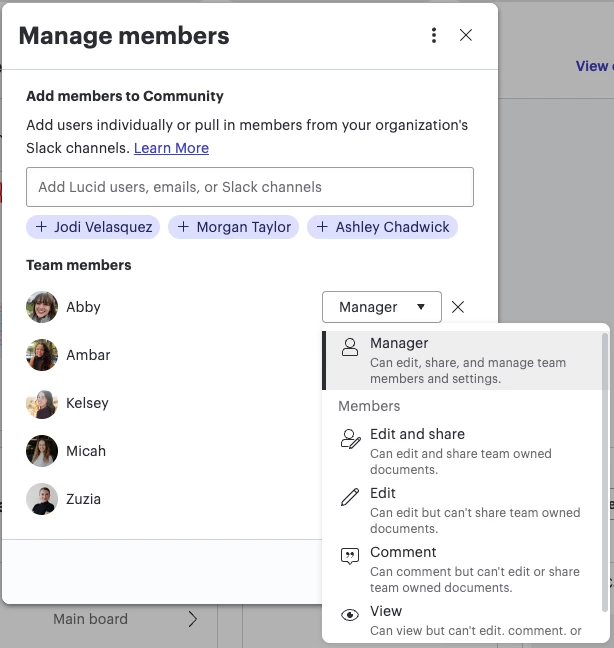
I have set up a team hub. How would I give edit and share rights to a team member?
Give edit and share permissions to teammates in Team Hubs
Best answer by Ambar D
Jumping in this thread to provide an update on newly released team roles and permissions for team hubs! With this update, you can now assign different levels of control and ownership.

There are two roles - team member and team manager.
Team members are assigned by team managers and can be given a variety of access permissions to documents - including edit and share, edit, comment, or view.
Team managers have all the same document access as team members, and they have access to these additional tools:
- Determine team type (open, closed, or hidden team)
- Add or remove team members
- Manage team documents and document permissions
- Restore archived items
You may have noticed that everyone in your team has defaulted to the role of team member, which can easily be changed to team manager if you desire.
Check out the details in the community post below:
Team roles and permissions streamline the way teams work, supporting collaboration and allowing them to work together faster. To learn more about the various roles and permissions, check out this Help Center article: Use team hubs in Lucid to collaborate and stay organized.
Please let us know if you have any additional questions and we’d be happy to help!
Create an account in the community
A Lucid or airfocus account is required to interact with the Community, and your participation is subject to the Supplemental Lucid Community Terms. You may not participate in the Community if you are under 18. You will be redirected to the Lucid or airfocus app to log in.
Log in to the community
A Lucid or airfocus account is required to interact with the Community, and your participation is subject to the Supplemental Lucid Community Terms. You may not participate in the Community if you are under 18. You will be redirected to the Lucid or airfocus app to log in.
Log in with Lucid Log in with airfocus
Enter your E-mail address. We'll send you an e-mail with instructions to reset your password.