Solved

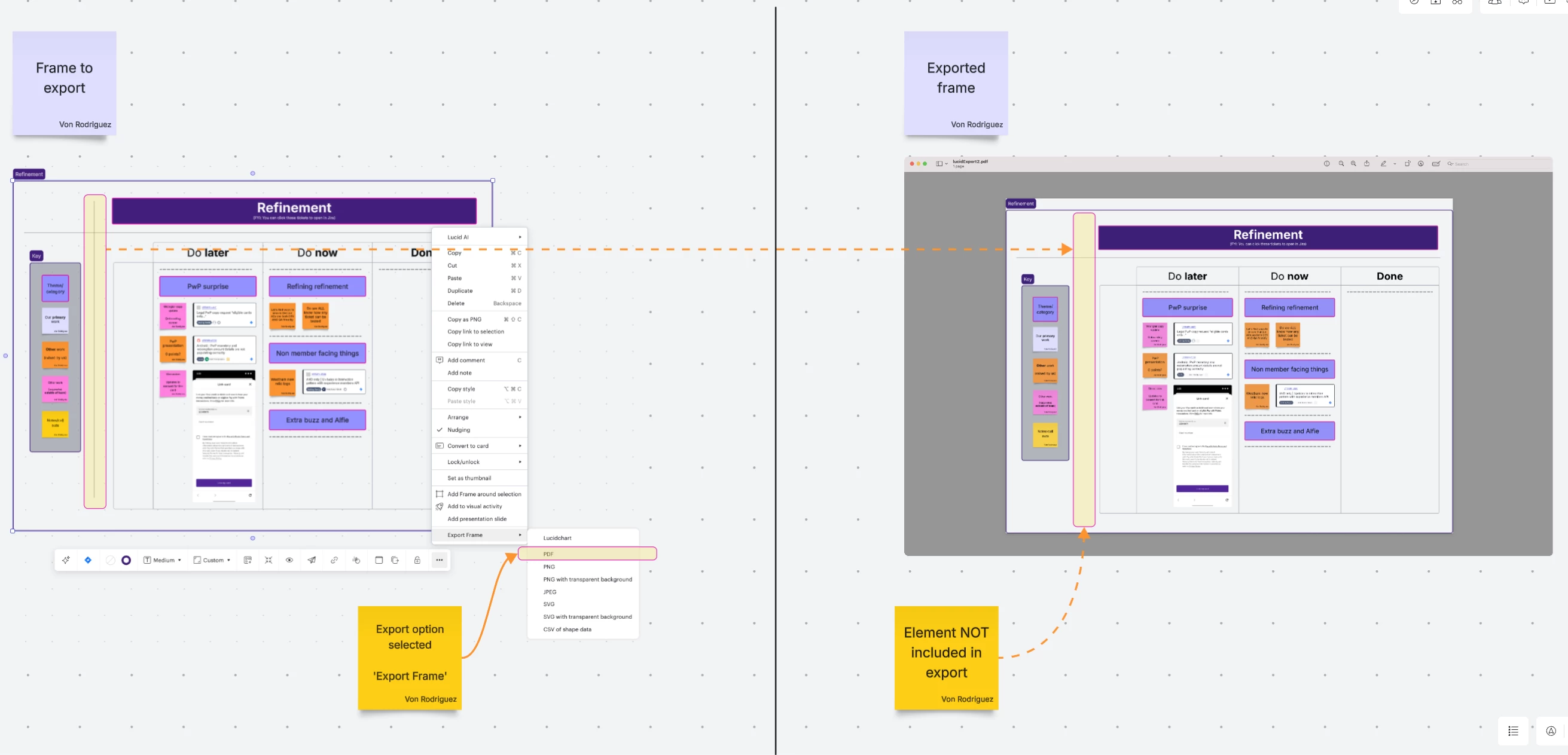
Exporting frames to PDF removes shapes

  • April 15, 2026
  • 4 replies
  • 23 views

Forum|alt.badge.img+1

Observed behaviour

  • When exporting a frame with contents (eg screenshots, post it notes etc), selected items are EXCLUDED from the PDF
  • Eg a horizontal line

Expected behaviour

  • ALL items within the frame should be INCLUDED in the export

Best answer by Leianne C

Hi ​@veeveerod, thanks for the reply! I unfortunately have not been able to reproduce this on my end. If you haven’t already, could you please try adding the same elements in a new blank board and try exporting again? Please let me know if you see any difference with this step. 

Could you please also share a temporary Document Support PIN for this document? This will help me take a closer look at what’s going on. This PIN is safe to post in this thread because it is only accessible by members of the Lucid support staff. You can find steps for generating a Support PIN in this Lucid Help Center article: Generate a Lucid Support PIN.

Thanks for your help and patience. Please feel free to let me know if you have any questions! 

Comments

Leianne C
Forum|alt.badge.img+15
  • Lucid support team
  • April 23, 2026

Hi ​@veeveerod, thanks for posting in the Lucid Community. To confirm, is this issue happening in a specific document/board or have you noticed this with other files too? 


Would you mind sending me the following details so I can take a closer look at the issue? 

  • A description of the download settings (file type, document pages, cropping, quality, etc.) that you selected for the download.
  • If the document will export but does not look as you expected, please send me a screenshot of the exported file and a description about what is incorrect in the file.


 Feel free to let me know if you’d prefer to move this conversation to a private support ticket or if you have any further questions. Thanks for your help and patience!


Forum|alt.badge.img+1
  • Author
  • April 23, 2026

Hello Leianne


Thanks for writing.  I have done my best to describe below


Export method:

  • Select frame (with content)
  • Tap 3 dots
  • Tap 'Export Frame'
  • Tap 'PDF'

Observations on export:

  • ALL elements were included in the export EXCEPT
  • A 'Vertical divider'
  • Strangely, it DID INCLUDE a 'Horizontal divider'


Will be on standby for any feedback


Thanks,

Von


Leianne C
Forum|alt.badge.img+15
  • Lucid support team
  • Answer
  • April 24, 2026

Hi ​@veeveerod, thanks for the reply! I unfortunately have not been able to reproduce this on my end. If you haven’t already, could you please try adding the same elements in a new blank board and try exporting again? Please let me know if you see any difference with this step. 

Could you please also share a temporary Document Support PIN for this document? This will help me take a closer look at what’s going on. This PIN is safe to post in this thread because it is only accessible by members of the Lucid support staff. You can find steps for generating a Support PIN in this Lucid Help Center article: Generate a Lucid Support PIN.

Thanks for your help and patience. Please feel free to let me know if you have any questions! 


Forum|alt.badge.img+1
  • Author
  • April 28, 2026

Hello Leianne

Feel free to review using the following


Actions performed:

  • Created new blank board
  • Added the following elements
    • Dynamic table with
      • Jira card
      • Horizontal line (within dynamic table)
    • Horizontal line (outside dynamic table)
    • Vertical line (outside dynamic table)
  • Created a frame to contain ALL of the above


Steps to replicate/observe:

  • Tap frame
  • Tap 3 dots
  • Tap ‘Export Frame’
  • Tap ‘PDF’
  • After export view file to see that the vertical line has NOT been included in export


For any future interactions, could we please continue on a non-public facing method?


Thanks,

Von