Solved

Export in Lucidchart: unnecessary whitespace / margin at the top of content

  • December 4, 2025
  • 11 replies
  • 80 views

Forum|alt.badge.img+1

I have a document where an SVG export with “Crop to content” consistenly fails to determine the correct bounding box of the content.

The detected box adds ~600px of whitespace at the top, before the first element in the diagram

And no, there is no addtional, hidden element at the top. or at least, nothing that is selectable in the editor.
 

Best answer by Zuzia S

@Markus Perndorfer thank you for providing this information and for your flexibility here! I was indeed able to reproduce the issue you are experiencing and am currently investigating it internally

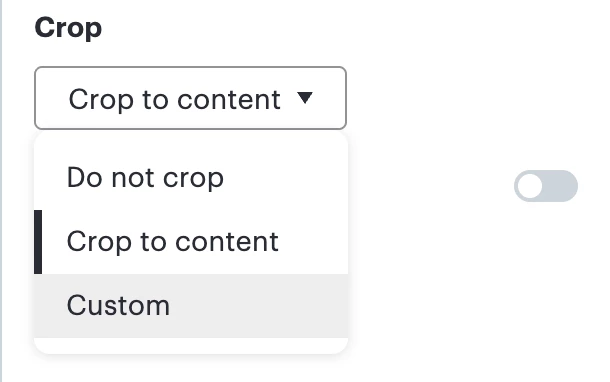
As a workaround in the meantime, could you please let me know whether you are able to select “Custom” in the Crop dropdown of the Options panel when exporting the document?

The dropdown appears as such:

Please let me know if this alternative works for you at this time!

Comments

Forum|alt.badge.img+1

I’ll provide a Support PIN to the document on demand.


Forum|alt.badge.img
  • December 4, 2025

Crop it in another app


Zuzia S
Forum|alt.badge.img+8
  • Lucid community team
  • December 5, 2025

Hi ​@Markus Perndorfer, thanks for posting in the Community!

As mentioned, could you please share a temporary Document Support PIN for this document? This will help me take a closer look at what’s going on. This PIN is safe to post in this thread because it is only accessible by members of the Lucid support staff. You can find steps for generating a Support PIN in this  Help Center article 

Cheers!


Forum|alt.badge.img+1

Hi ​@Zuzia S !

here's the support PIN again:

Support PIN:
duWClVdzMbhmpOQTNEiUzgyl6cHHtrlKc0111727627


Forum|alt.badge.img+1

Hi ​@Zuzia S - is there any update on this topic?


Zuzia S
Forum|alt.badge.img+8
  • Lucid community team
  • January 23, 2026

Hi ​@Markus Perndorfer, please accept my sincerest apologies for the delayed response. I have been out of office, and I appreciate your patience while I was away. I would like to jump back in and help you get this sorted out.

Regarding the issue you are experiencing, unfortunately, the Support PIN you provided has since expired, which means that I am currently unable to access the document to investigate.

Could you please generate a new Support PIN and share it here? I’d be very happy to take another look at the document and investigate further.

I appreciate your help and patience!


Forum|alt.badge.img+1

@Zuzia S - no worries, I also only recently returned from year-end vacation ;)

PIN:

du5iKSxEU2QnfANtjwlzbJftZUk406QB2x111727627

the issue I describe happens when I try to export page “GA - TAM”

Browser & OS:
MS Edge Version 144.0.3719.82
macOS Version 15.7.3


Zuzia S
Forum|alt.badge.img+8
  • Lucid community team
  • Answer
  • January 23, 2026

@Markus Perndorfer thank you for providing this information and for your flexibility here! I was indeed able to reproduce the issue you are experiencing and am currently investigating it internally

As a workaround in the meantime, could you please let me know whether you are able to select “Custom” in the Crop dropdown of the Options panel when exporting the document?

The dropdown appears as such:

Please let me know if this alternative works for you at this time!


Forum|alt.badge.img+1

@Zuzia S - using a Custom crop is exactly how I export it at the moment. 


Zuzia S
Forum|alt.badge.img+8
  • Lucid community team
  • January 30, 2026

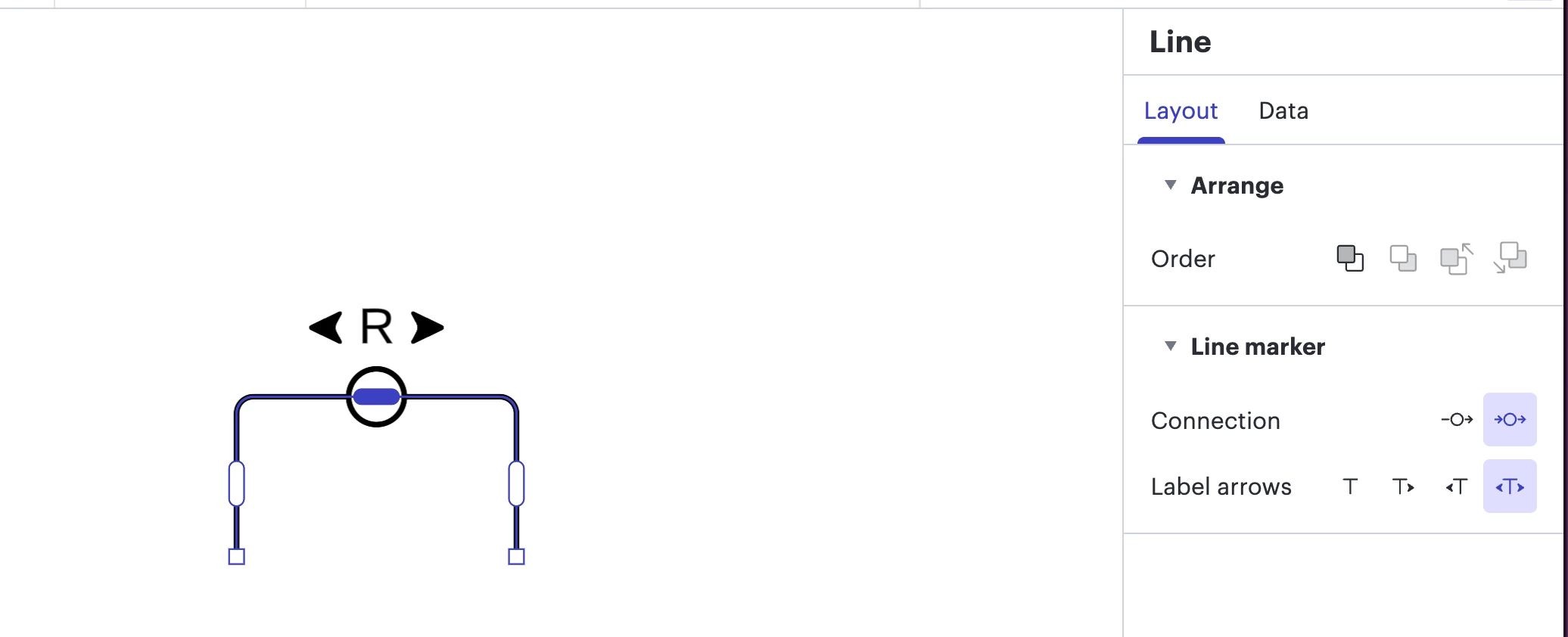
Hi ​@Markus Perndorfer, just following up here with an update. Our engineers have found the cause of the issue, and it seems like shapes that have an R or circle icon are causing this behaviour due to the way it interacts with the page, and this line has some special line marker data in its layout. 

As a workaround, I recommend removing these shapes and opting for their alternatives in our Shape library.

Our team is currently working on a fix, and I will follow up in this thread as soon as there is an update. 

Thank you so much for your continued patience!


Forum|alt.badge.img+1

Hi ​@Zuzia S 

thank you for the follow up, please update me when the fix is live