Answer

Export diagrams as GIF

  • January 13, 2024
  • 3 replies
  • 172 views

Forum|alt.badge.img+1

Does Lucidchart has support  to export diagrams as GIF? It supports to inserts GIFs to my diagram but it doesn’t allow me to export as GIF?

Is it in the roadmap to support?

Best answer by Ria S


Hi Pat

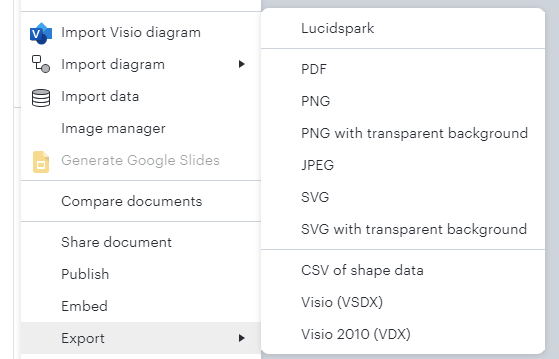
See the snapshot below for the file formats in which your diagrams can be exported. You can also refer to the article on Shape Libraries in Lucidchart here: https://help.lucid.co/hc/en-us/articles/14931750819476-Shape-libraries-in-Lucidchart#import-search

Hope this helps!


Comments

Ria S
Lucid Legend Level 8
Forum|alt.badge.img+19
  • Lucid Legend Level 8
  • Answer
  • January 13, 2024


Hi Pat

See the snapshot below for the file formats in which your diagrams can be exported. You can also refer to the article on Shape Libraries in Lucidchart here: https://help.lucid.co/hc/en-us/articles/14931750819476-Shape-libraries-in-Lucidchart#import-search

Hope this helps!


Forum|alt.badge.img+1
  • Author
  • January 17, 2024

Ría - Thanks for the response.

My question is not for the imports but for the exports. Say for example if I use a gif in the diagram by importing it I would like the export support gif too or else it’s not useful.

so I was wondering whether it is in the roadmap to support exporting diagrams in GIF format.


Addie
Forum|alt.badge.img+23
  • January 17, 2024

Hi @pat, thanks for clarifying! 

Unfortunately, exporting in GIF format isn’t currently supported in Lucid, but we are very interested in your feedback and committed to continually improving our products. Please first search the Product Feedback section of this community (with the filter Topic Type = Idea) to see if it’s already been submitted. If so, please add any additional details you’d like and upvote the request - this consolidation helps to refine feedback and properly capture the popularity of the request.

If no one has submitted this idea yet, please create one of your own and be sure to include details about your use case or what you’d like to see in this experience. This will also allow other users with similar requests to discover and upvote it, then details of their own.

Finally, for more information on how Lucid manages feedback via this community, take a look at this post: