Solved

Error replacing Excel dataset in Lucid

  • May 5, 2026
  • 5 replies
  • 14 views

Forum|alt.badge.img+1

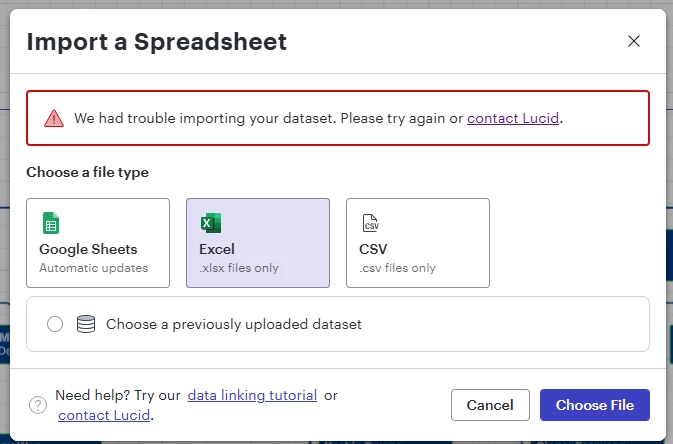
I’m experiencing a linking error when attempting to replace an Excel dataset. 
My agency blocks live linking, so I have to replace the entire dataset to perform updates.   

This is my first issue with my dataset.  Can anyone point me in a direction to start troubleshooting?  The error itself is rather vague. 


Best answer by Catalina Y

Hi ​@RutaBaega thanks for posting in the Lucid Community!

We’re happy to help. I’m converting this to a private support ticket so the right team can take a closer look. You should receive an email with further communication.

If you don’t receive an email please feel free to reach out in the thread below.

Comments

Humas1985
Lucid Legend Level 10
Forum|alt.badge.img+24
  • Lucid Legend Level 10
  • May 6, 2026

Hi ​@RutaBaega 

This error is usually caused by differences between the original and replacement Excel structure (such as renamed columns or sheet changes), or Lucid retaining a cached dataset mapping.

Since live linking is restricted, the safest approach is to ensure the replacement file matches the original structure exactly or remove and re-add the dataset connection to clear cached mappings

To learn more - How do I refresh or replace data for an org chart? – Lucid

Hope this helps !!


Forum|alt.badge.img+1
  • Author
  • May 7, 2026

Thank you. 


I tried using my data set in an entirely new chart,  thus removing the possibility that there was any cached iteration issues, and I still encounter the problem.  I have also completely removed the data set and attempted to replace it from the original file without success. 

We have been iterating on the database, adding columns for more tagging/metadata capabilities but this is not a material diversion from how I have used Lucid previously and expected the functionality to remain. 


Forum|alt.badge.img+2
  • Lucid support team
  • Answer
  • May 7, 2026

Hi ​@RutaBaega thanks for posting in the Lucid Community!

We’re happy to help. I’m converting this to a private support ticket so the right team can take a closer look. You should receive an email with further communication.

If you don’t receive an email please feel free to reach out in the thread below.


Forum|alt.badge.img+1
  • Author
  • May 7, 2026

Thank you! I already have a ticket ongoing - let’s not duplicate that effort and save churn.  My current ticket number is #6743264


I made this post before submitting that ticket hoping to solve the issue, alas we didn’t succeed. 


Forum|alt.badge.img+2
  • Lucid support team
  • May 7, 2026

Hi ​@RutaBaega 

Gotcha, I understand, I will be sure to flag the duplicate. Thank you so much for the notice on that!