August 20, 2024
Solved

Error occurred and not able to download

  • August 20, 2024
  • 11 replies
  • 617 views

Hi team,

Today I downloaded 2 of my Org Charts in a good way in PDF.

Since this afternoon I try to download the rest, but I keep receiving below error.

I re-started my laptop, always open in Chrome, as well open in the incognito version, but the result stay the same - showing below error.
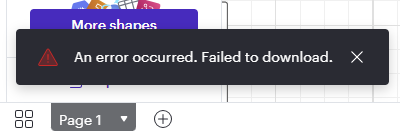
 

Hope you can support me. 

Best answer by Michelle S

Hi @MDesBiens , 

Thanks for your response! Can you please try the following to see if it fixes the issue: 

  1. Adjust the content scale: To adjust the content scale in Lucidchart, follow these steps: Select the File menu from the menu bar at the top of the workspace. Click Document Settings. Under the “Canvas and page” section, adjust the percentage using the arrows next to “Content scale”.
  2. Decrease document file size: If your document takes up a large amount of storage, it may take a long time to download. In some cases, a document’s size can cause the export to fail. The following steps can help decrease the file size of your document:
    • Decrease the number of high resolution images by deleting them from the canvas.
    • Split your content into multiple documents.
      • If your Lucidchart document has a large number of pages with a lot of content, consider importing those pages into a new Lucidchart document.
  3. Copy content to another document: To do this: Select all the content on the canvas by pressing Ctrl-A (PC) or Cmd-A (Mac) on your keyboard. Right-click on the selected content. Click CopyOpen a brand new Lucidchart document. Right-click on the canvas. 

    Select PasteAfter you move the content, try exporting from the new document.

    If these don’t resolve the issue, can you please send a temporary Support PIN for this document? This will allow me to take a closer look at the issue you’re experiencing. For more information on generating a Support PIN, check out this Help Center article.

    It is for internal use only and doesn't grant public access to your document, so you can safely share it directly in the thread.

    Thank you for your help and patience! 


Comments

Lucid & airfocus support team
October 30, 2024

Hi @MDesBiens , 

Thanks for your response! Can you please try the following to see if it fixes the issue: 

  1. Adjust the content scale: To adjust the content scale in Lucidchart, follow these steps: Select the File menu from the menu bar at the top of the workspace. Click Document Settings. Under the “Canvas and page” section, adjust the percentage using the arrows next to “Content scale”.
  2. Decrease document file size: If your document takes up a large amount of storage, it may take a long time to download. In some cases, a document’s size can cause the export to fail. The following steps can help decrease the file size of your document:
    • Decrease the number of high resolution images by deleting them from the canvas.
    • Split your content into multiple documents.
      • If your Lucidchart document has a large number of pages with a lot of content, consider importing those pages into a new Lucidchart document.
  3. Copy content to another document: To do this: Select all the content on the canvas by pressing Ctrl-A (PC) or Cmd-A (Mac) on your keyboard. Right-click on the selected content. Click CopyOpen a brand new Lucidchart document. Right-click on the canvas. 

    Select PasteAfter you move the content, try exporting from the new document.

    If these don’t resolve the issue, can you please send a temporary Support PIN for this document? This will allow me to take a closer look at the issue you’re experiencing. For more information on generating a Support PIN, check out this Help Center article.

    It is for internal use only and doesn't grant public access to your document, so you can safely share it directly in the thread.

    Thank you for your help and patience!