Solved

Enable removal of rounded corners on lines in Lucid

  • September 5, 2024
  • 5 replies
  • 140 views

Forum|alt.badge.img+6

Using Shape Options > Rounded > 0 px, the corners of shapes can be changed from rounded to sharp.  This feature should be available with lines as well.

Best answer by Geoff G

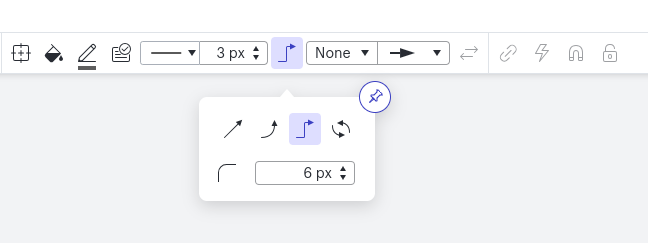
Hello! Great news! That feature actually is available for lines as well. Here’s a screenshot showing where you can modify this property in Lucidchart:

The input box in the open callout allows you to modify the corner rounding property for lines 

Thanks for posting, and please let us know if you have any other ideas for ways we can improve our products!

Comments

Geoff G
Forum|alt.badge.img+1
  • Lucid product team
  • Answer
  • September 5, 2024

Hello! Great news! That feature actually is available for lines as well. Here’s a screenshot showing where you can modify this property in Lucidchart:

The input box in the open callout allows you to modify the corner rounding property for lines 

Thanks for posting, and please let us know if you have any other ideas for ways we can improve our products!


Forum|alt.badge.img
  • February 9, 2026

Hi,

is there other callout box Lucid feature like in Visio? Thank you


Ambar D
Forum|alt.badge.img+10
  • Lucid community team
  • February 10, 2026

Hi ​@tjh, thanks for adding to this thread- sorry I’m not entirely familiar with that feature in Visio. Would you mind elaborating on what you’re hoping to do?

Are you trying to add text to a line? In Lucidchart, you can do so by double-clicking on any portion of a line to add text. You can then click and drag the text box to move the text to another place on the line if you’d like, as described in more detail in this article.

Add text to a line in Lucidchart

I hope this helps! Please let me know if I’m misunderstanding what you’re hoping to to do here and I’m happy to help further.


Forum|alt.badge.img
  • February 12, 2026

Hi ​@tjh, thanks for adding to this thread- sorry I’m not entirely familiar with that feature in Visio. Would you mind elaborating on what you’re hoping to do?

Are you trying to add text to a line? In Lucidchart, you can do so by double-clicking on any portion of a line to add text. You can then click and drag the text box to move the text to another place on the line if you’d like, as described in more detail in this article.

Add text to a line in Lucidchart

I hope this helps! Please let me know if I’m misunderstanding what you’re hoping to to do here and I’m happy to help further.

Thanks for your response. I am looking just for the visible notes that I can tied to the process instead of the whole new process box. 


Ambar D
Forum|alt.badge.img+10
  • Lucid community team
  • February 12, 2026

Oh I see, thanks for clarifying ​@tjh

Would you mind clarifying one other piece- are you hoping to add the note to a specific step or shape in your diagram, or would you like this note to appear between shapes in your diagram? I’d love to provide some additional suggestions, but want to ensure I understand where you’d like this note to show up.