Solved

draw an area with a dotted line

  • May 4, 2026
  • 5 replies
  • 20 views

Forum|alt.badge.img+1

I want to draw a dotted line around some shapes. It isn't a rectangle, it has more corners. How do I do that?


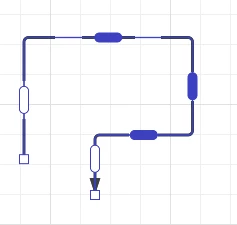
When I use the line tool, it tries to connect to other shapes that doesn’t work for me: the end should be connected to the start (and have rounded corners). The line tool has the option though to change the route by dragging a capsule on the line. It would be ideal if a box shape had that option with dragging capsules. 


Best answer by andrea_z

Hello ​@willem, thank you for explaining what you need help with. I apologize for misunderstanding earlier. 

You can follow these steps to create a “box” or shape that you can use to insert content or other shapes inside. 

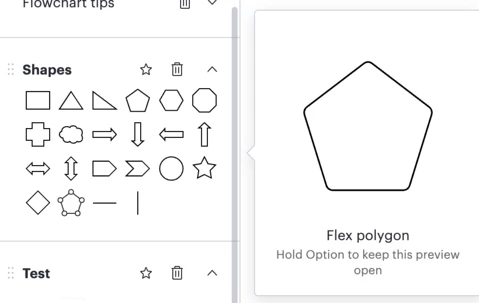
  1. Select the “Flex Polygon” shape on the Shapes left panel
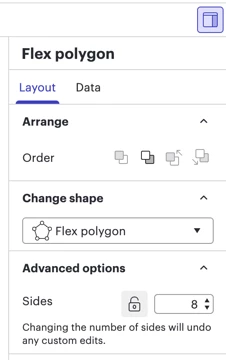
  1. Add more sides to the “Flex polygon” from the right-hand panel (you will need to unlock it first)
  1. Make your custom shape and add dash lines once you’re done editing your shape
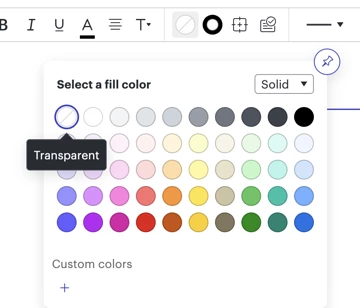
  1. You can make it translucent by selecting Fill Color and then choosing the Transparent option


You can save this shape you created in a Custom Shape Library so you can easily access this shape in other documents. For more information about creating custom shapes, you can check this Help Center article


Hopefully this answers your question!

Comments

Forum|alt.badge.img+2
  • Lucid support team
  • May 4, 2026

Hello ​@willem, thank you for posting in the Lucid Community! I’d be happy to explain some of the options you have to achieve what you’re wanting to do. 

First, you can select the curved line option at the top of your screen.


Then click on the dotted line as shown below to make it a curved dotted line.


After you select these two options, you can drag the line from the Shapes Library and start curving it as you like.


Another option would be to drag a shape first, and then follow the same steps I indicated above. Doing this will help you curve the line easier. 


Hopefully this helps. Please, let me know if you have any further questions!


Forum|alt.badge.img+1
  • Author
  • May 5, 2026

Hi Andrea, 

thank you for your reply. I haven’t been clear with my question. I need to draw a box around something, but the box isn’t a square as it has more than 4 corners (is that still a box? I suppose not). 


My example was with a line, because lines have functionality that I need on a box. I don’t need a line.


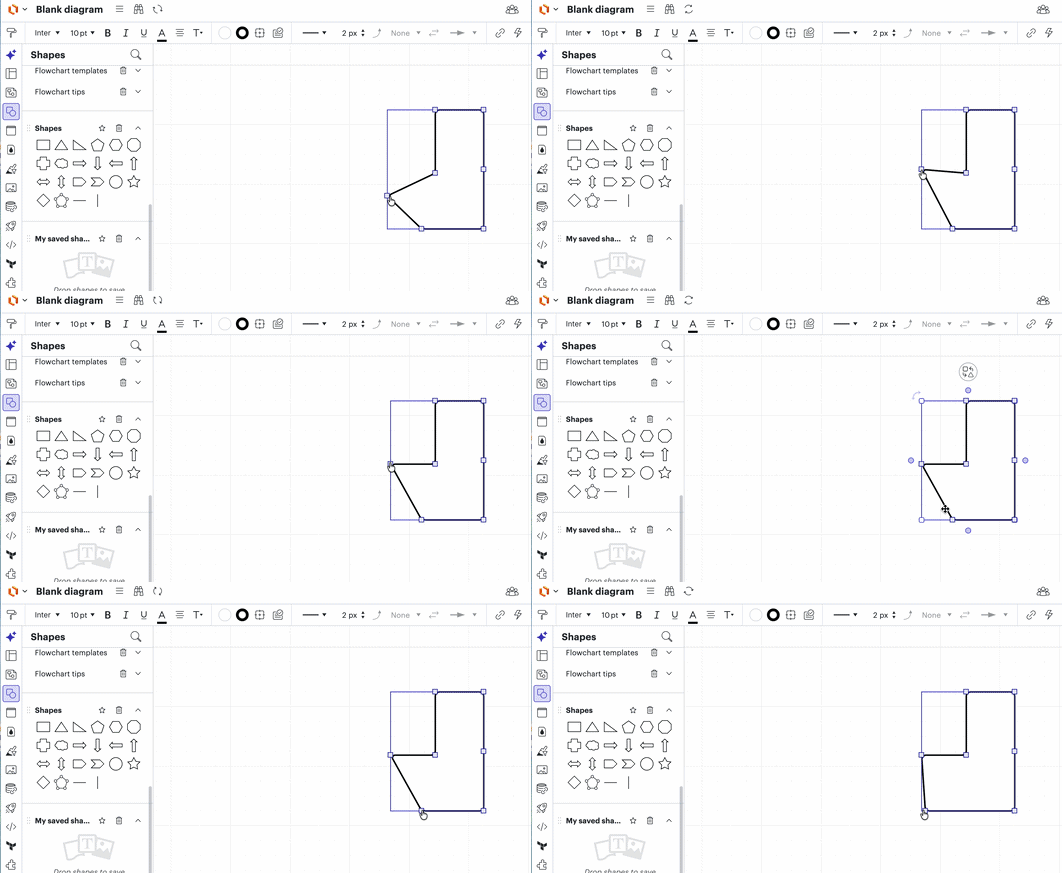
Here’s an example of what I try to achieve. But this example is still a line and not a box and the top left corner is not rounded because that’s where the line ends are. Also lines have the behaviour of connecting to other object, and that’s not what I want.


Forum|alt.badge.img+2
  • Lucid support team
  • Answer
  • May 5, 2026

Hello ​@willem, thank you for explaining what you need help with. I apologize for misunderstanding earlier. 

You can follow these steps to create a “box” or shape that you can use to insert content or other shapes inside. 

  1. Select the “Flex Polygon” shape on the Shapes left panel
  1. Add more sides to the “Flex polygon” from the right-hand panel (you will need to unlock it first)
  1. Make your custom shape and add dash lines once you’re done editing your shape
  1. You can make it translucent by selecting Fill Color and then choosing the Transparent option


You can save this shape you created in a Custom Shape Library so you can easily access this shape in other documents. For more information about creating custom shapes, you can check this Help Center article


Hopefully this answers your question!


Forum|alt.badge.img+1
  • Author
  • May 6, 2026

Thanks Andrea, that’s exactly what I was looking for.


Forum|alt.badge.img+2
  • Lucid support team
  • May 6, 2026

Hello again, ​@willem

I'm happy to hear that this has been resolved for you. It's my pleasure to help! Please don't hesitate to let me know if there is anything else I can do for you. 

This community is dedicated to supporting your work in Lucid's products. If other product questions arise, or if you'd like to share how you use Lucid, you can  create a new topic!