Solved

Dotted and dashed lines show partly as solid lines when using jump lines in Lucidchart

  • November 27, 2025
  • 3 replies
  • 40 views

Forum|alt.badge.img

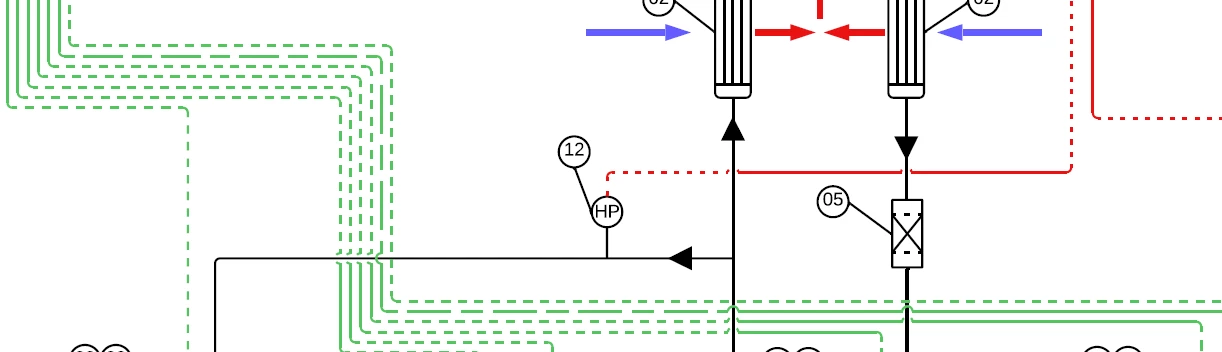
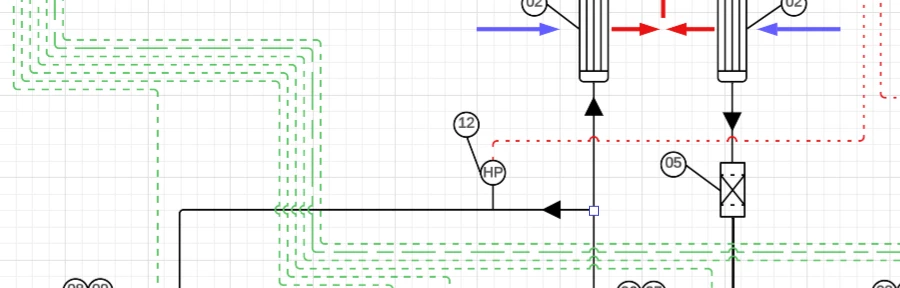
When the Jump function is enabled dotted and dashed lines partly shows as solid on prints and exported PDFs and PNG files.

Lines are created using :


Refer to screen dumps below.
First is from Lucidcharts, the second form exported PDF. The error only occurs when Jump is enabled on the line.


Best answer by Leianne C

Hi ​@Arne, thank you for posting in the community and adding an updated note. It looks like you have identified a bug, and I have reported this to our development team.

In the meantime, the best workaround will be to disable the line jumps option in the dashed/dotted lines. I apologize for any disruption this may cause, and I will update this thread with any new information about a fix.

Please follow along on this thread for updates, and post any additional questions or concerns below.

Comments

Leianne C
Forum|alt.badge.img+15
  • Lucid support team
  • Answer
  • November 28, 2025

Hi ​@Arne, thank you for posting in the community and adding an updated note. It looks like you have identified a bug, and I have reported this to our development team.

In the meantime, the best workaround will be to disable the line jumps option in the dashed/dotted lines. I apologize for any disruption this may cause, and I will update this thread with any new information about a fix.

Please follow along on this thread for updates, and post any additional questions or concerns below.


Forum|alt.badge.img

Same Issue here. Lucid, could you please let us know whether it could be resolved soon or it could take more time. As I feel it’s better to have proper dotted line even on line jumps. sometimes it is not just line jumps but also an issue when it is interacts between swimlanes.


Leianne C
Forum|alt.badge.img+15
  • Lucid support team
  • December 23, 2025

Hi ​@Dheeraj Byrisetty thanks continuing this thread and checking in! Our team is still actively working on this bug, and I don’t have an update to share just yet. I know this can be frustrating, and I really appreciate your patience in the meantime. I’ll be sure to follow up as soon as we have more information. Please let us know if you have any questions in the meantime.