Answer

Document pages in Lucidchart browser version for iPhone (Safari)

  • November 24, 2025
  • 8 replies
  • 38 views

Forum|alt.badge.img+1

Hi there,

I am wondering if someone can let me know if pages of diagrams can be seen on iphone browser. All I can see id the first page of every diagram.

I am able to see pages on iPad mini, but not on the phone. My account is individual.


Cheers

Best answer by Leianne C

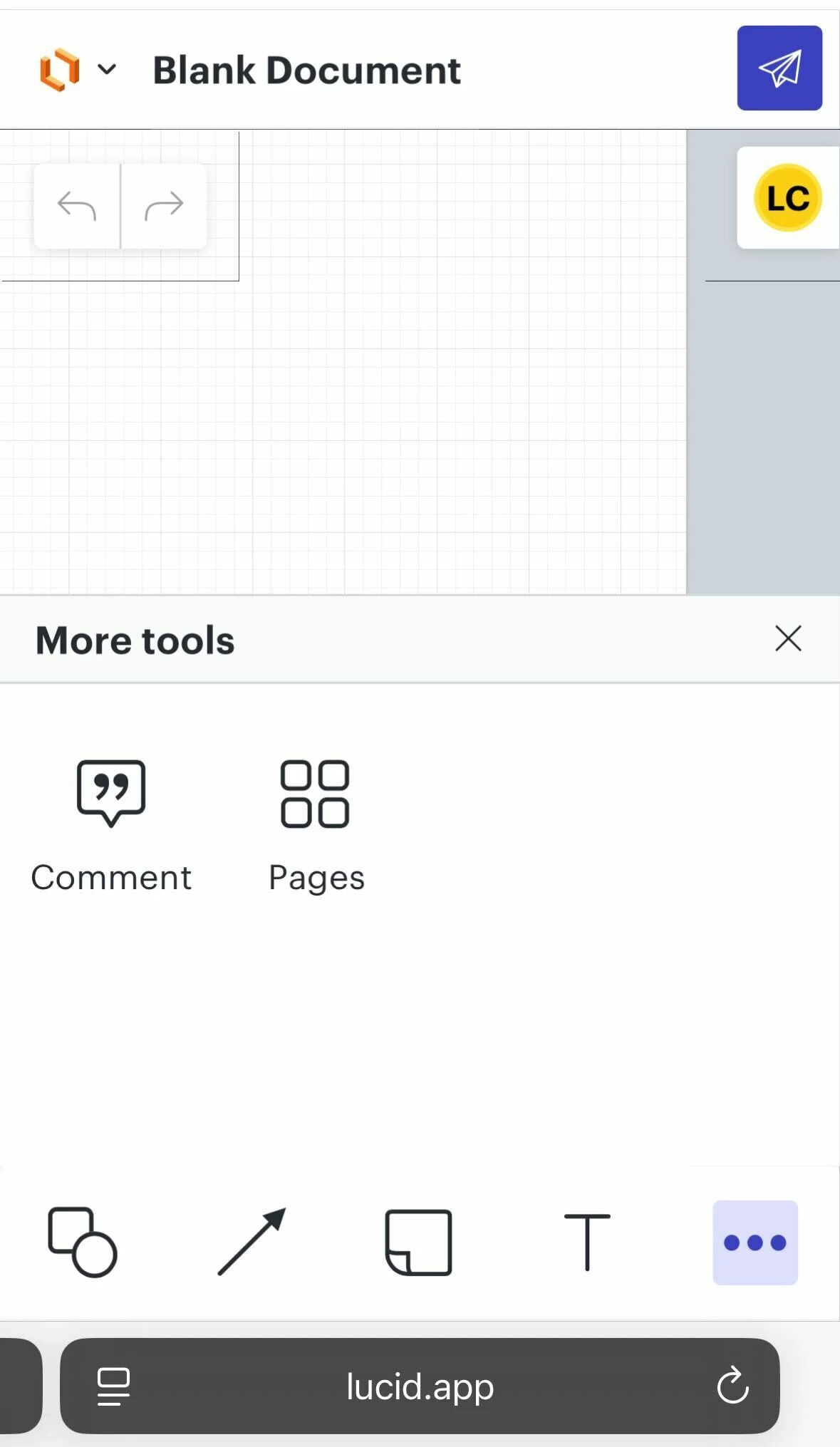
Hi ​@Tony9989, thank you for posting in the community! Just wanted to chime in and share more details about this. You should be able to switch between your pages in the browser by pressing the 3 dot ‘More Tools’ icon and selecting ‘Pages’ (see below screenshot from Safari browser on iPhone). The same should apply when using the Lucidchart mobile app. Fore more information about using Lucid on an iOS device, I recommend checking out this Use Lucidchart on the iOS mobile app article from the Lucid Help Center. 

I hope this helps. Please let me know if this is not what you see or if you have any questions!

Comments

Humas1985
Lucid Legend Level 10
Forum|alt.badge.img+24
  • Lucid Legend Level 10
  • November 24, 2025

Hi ​@Tony9989 

On small-screen mobile browsers (like iPhone Safari/Chrome/Edge), Lucid’s editor interface is simplified, and the normal page tabs/page list you see on desktop or iPad often aren’t shown. Because of this, multi-page Lucidchart documents usually display only page 1 on an iPhone browser with no built-in way to switch pages, which matches what you’re experiencing.

This limitation is due to the mobile web interface and screen size,

Workarounds include using a tablet or desktop, exporting the document to PDF for viewing on your phone, or adding internal links/hotspots inside the document to jump between pages when opened on mobile.

Hope this helps - Happy to help further!!
Thank you very much and have a great one!
Warm regards


Forum|alt.badge.img+1
  • Author
  • November 24, 2025

Hi Huma,

Thank you for your reply, would you be able to give me some guidance or point me to some article that describes the links/hotspots for mobile?


Thanks a lot


Cheers


Humas1985
Lucid Legend Level 10
Forum|alt.badge.img+24
  • Lucid Legend Level 10
  • November 24, 2025

Hi ​@Tony9989 

Hotspots are supported on mobile in general and can be used creatively for navigation, but for your exact iPhone browser only shows first page situation, they may or may not appear depending on the mobile viewer mode, and they do not restore the full desktop-style page navigation bar,

Here give with some useful pages to learn on the hotspot, however i dont think so we have specifically for mobile.

Difference between a Hotspot, Action, and Link Preview 💥 | Community

Use Hotspots and Layers in Lucidchart | Lucidchart

Best Regards


Leianne C
Forum|alt.badge.img+15
  • Lucid support team
  • Answer
  • November 26, 2025

Hi ​@Tony9989, thank you for posting in the community! Just wanted to chime in and share more details about this. You should be able to switch between your pages in the browser by pressing the 3 dot ‘More Tools’ icon and selecting ‘Pages’ (see below screenshot from Safari browser on iPhone). The same should apply when using the Lucidchart mobile app. Fore more information about using Lucid on an iOS device, I recommend checking out this Use Lucidchart on the iOS mobile app article from the Lucid Help Center. 

I hope this helps. Please let me know if this is not what you see or if you have any questions!


Forum|alt.badge.img+1
  • Author
  • November 26, 2025

Hi Leianne,

Thanks for your message. I will check the link.

As for Safari, no, it doesn’t work. The three dot shows something different.


Leianne C
Forum|alt.badge.img+15
  • Lucid support team
  • November 28, 2025

Hi ​@Tony9989, thank you for giving that a try and sharing a screenshot. Taking a look at the provided screenshot, the far right icon with the squares on the bottom toolbar seems to be likely the pages button. Would you mind pressing that icon and let me know if that resolved the issue? 

If not, could you please share the details of the iPhone model and iOS version you are using? This will help us reproduce the issue on our end. 

Hope this helps. Please don’t hesitate to let us know if you have any questions! 


Forum|alt.badge.img+1
  • Author
  • December 1, 2025

It is!!!!!!

thank you so much!!!! I do have to tell you the shape of the icon threw me off, not looking like a “pages button” but it doesn’t matter at this point: it works and that’s what matters.


thanks a lot again


Leianne C
Forum|alt.badge.img+15
  • Lucid support team
  • December 2, 2025

Hi ​@Tony9989, thank you for the update! I’m glad to hear that helped resolve the issue and you can see pages now. I can understand how that icon can be confusing and have shared this feedback with our mobile team. 

If you have any additional questions, please feel free to let us know - we are happy to help!