Hi @Hans, thank you for posting in the Lucid Community! Thank you @Humas1985 for those tips!
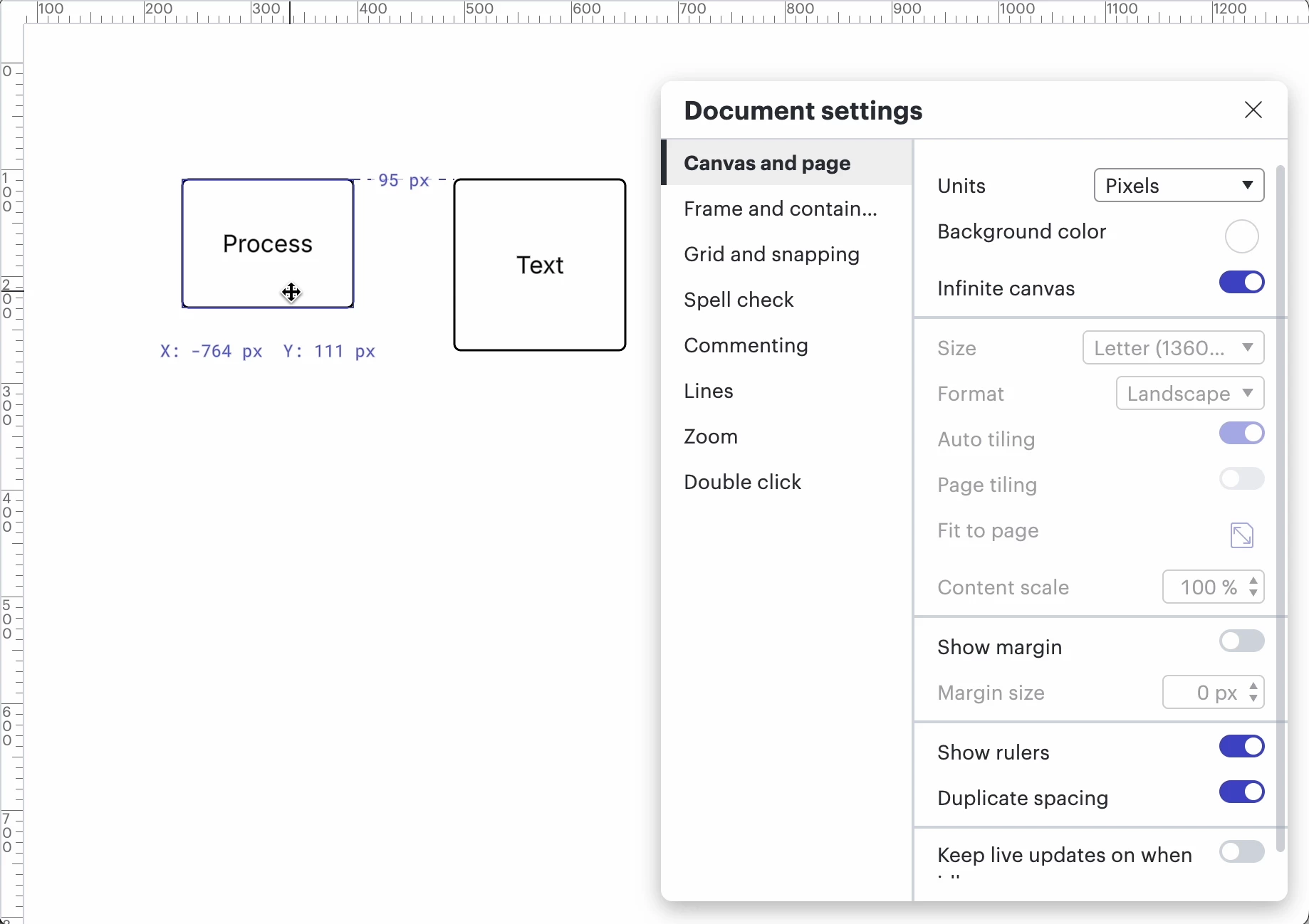
@Hans I would recommend toggling on ‘show rulers’ in your document settings, which provides you with measurements above and to the left of the workspace.
Additionally, when you move shapes that are aligned as shown below, you should see the measurements (‘95 px’ as shown below) update automatically.
Show rulers toggled on
Does that help you with what you’re hoping to achieve? I’d love to hear more about what your’e hoping for.
In general, Lucidchart does not automatically display and update the distance between two separate objects while they move. It supports layout, alignment, and some measurement-related tools in specific cases, but not a universal live distance label for arbitrary shapes.
Hi @Hans, thank you for posting in the Lucid Community! Thank you @Humas1985 for those tips!
@Hans I would recommend toggling on ‘show rulers’ in your document settings, which provides you with measurements above and to the left of the workspace.
Additionally, when you move shapes that are aligned as shown below, you should see the measurements (‘95 px’ as shown below) update automatically.
Show rulers toggled on
Does that help you with what you’re hoping to achieve? I’d love to hear more about what your’e hoping for.
A Lucid or airfocus account is required to interact with the Community, and your participation is subject to the
Supplemental Lucid Community Terms.
You may not participate in the Community if you are under 18. You will be redirected to the Lucid or airfocus app to log in.
A Lucid or airfocus account is required to interact with the Community, and your participation is subject to the
Supplemental Lucid Community Terms.
You may not participate in the Community if you are under 18. You will be redirected to the Lucid or airfocus app to log in.