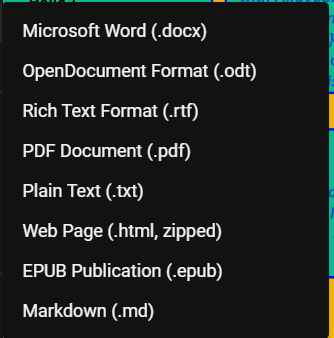
Is it possible to import a chart from google drive? I created it with a google doc using Drawings and the download options are below. Do I need to create it in google sheets? Do I have to start over on Lucid Charts?

Is it possible to import a chart from google drive? I created it with a google doc using Drawings and the download options are below. Do I need to create it in google sheets? Do I have to start over on Lucid Charts?

Best answer by Humas1985
Hi
Lucidchart currently doesn't support direct import of Google Docs Drawings.
The other options are listed below for your reference.
You can export your Google Drawing as an image file (PNG, JPEG) or PDF from Google Drive and import it into Lucidchart,
using it as a reference or background. Note that individual elements won't be editable.
For full editability, recreate your chart in Lucidchart, leveraging its robust diagramming tools and templates to streamline the process.
Additionally, Lucidchart offers data linking features that connect to Google Sheets for specific diagram types, although direct import from Google Sheets isn't available
More help can be referenced in the below help article:
Integrate Lucidchart with Google Drive – Lucid
Lucidchart Supports Integration with Google Drive | Lucidchart Blog
Hope this helps - Happy to help further!!
Thank you very much and have a great one!
Warm regards
A Lucid or airfocus account is required to interact with the Community, and your participation is subject to the Supplemental Lucid Community Terms. You may not participate in the Community if you are under 18. You will be redirected to the Lucid or airfocus app to log in.
Enter your E-mail address. We'll send you an e-mail with instructions to reset your password.