Solved

Conditional formatting on Jira card condition in Lucidspark

  • December 17, 2025
  • 10 replies
  • 55 views

Forum|alt.badge.img+3

Conditional formatting is working well for us thus far on a JIRA card’s status (planning, execution, etc.). However, I am now trying to set conditional formatting on a card’s condition (On Track, At Risk, etc.).


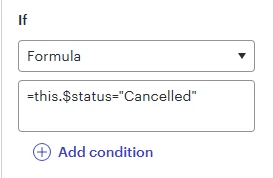
For status, here is our formula and it works without issue.
 

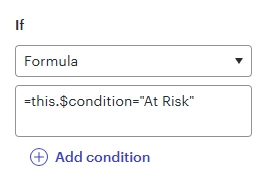
Here is the same thing for condition and it is not working even though condition is a field the same exact as status.
 

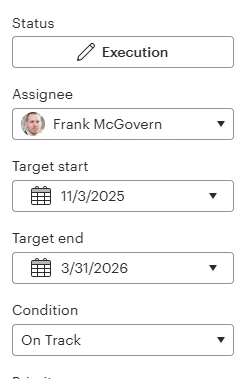
Card details as seen here showing Status and Condition are both pulled in attributes.
 

Best answer by Leianne C

Hi ​@Frank McGovern, thank you for posting in the community! This is likely happening because $condition is unfortunately not one of the fields we normalize (since it isn't a universal property), so this.$condition doesn't exist in the formula system.

For Jira card data, we import all custom fields from the Jira instance, and some have picklist data types (status, for example, or potentially condition), and these have an underlying ID that represents the selected value as well as other properties like name. If condition is a picklist in your Jira instance, using this.condition.name might work instead.

For a list of available attributes, you can use the ATTRIBUTES function in a formula (e.g. adding =ATTRIBUTES onto a shape, for example), which will enumerate all available attributes.

Would you mind giving this a try and let us know if you see any improvements? Thank you! 

Comments

Humas1985
Lucid Legend Level 10
Forum|alt.badge.img+24
  • Lucid Legend Level 10
  • December 28, 2025

Hi ​@Frank McGovern 

Lucidspark’s Jira integration only surfaces certain fields on the card object that it syncs from Jira. Some fields, especially non‑standard or custom fields like Condition - may not be exposed to conditional formatting if they’re not mapped or supported by the integration.

Check the Data Panel on your Jira card in Lucidspark to confirm that the Condition field is actually present and has the values you expect. If it isn’t available there, the conditional rule won’t ever trigger because the card has nothing for it to evaluate.

To learn more - Supported custom fields for Jira integrations in Lucidspark | Community

Hope this helps - Happy to help further!!
Thank you very much and have a great one!
Warm regards


Forum|alt.badge.img+3

Huma,

Condition is mapped and fully supported as it shows on every card.


Small snippet from a card listed on JIRA board. “On Track” is condition field.


In the Card details, it is listed:


Humas1985
Lucid Legend Level 10
Forum|alt.badge.img+24
  • Lucid Legend Level 10
  • December 29, 2025

Hi ​@Frank McGovern 

Thanks for the insight, seems the syncing is all fine and some things needs to be checked on the field structure, maybe we can wait / take it to the Lucid internal team to take a closer look.

Best Regards


Leianne C
Forum|alt.badge.img+15
  • Lucid support team
  • Answer
  • December 30, 2025

Hi ​@Frank McGovern, thank you for posting in the community! This is likely happening because $condition is unfortunately not one of the fields we normalize (since it isn't a universal property), so this.$condition doesn't exist in the formula system.

For Jira card data, we import all custom fields from the Jira instance, and some have picklist data types (status, for example, or potentially condition), and these have an underlying ID that represents the selected value as well as other properties like name. If condition is a picklist in your Jira instance, using this.condition.name might work instead.

For a list of available attributes, you can use the ATTRIBUTES function in a formula (e.g. adding =ATTRIBUTES onto a shape, for example), which will enumerate all available attributes.

Would you mind giving this a try and let us know if you see any improvements? Thank you! 


Forum|alt.badge.img+3

@Leianne C,

It looks like condition is not a known attribute, unfortunately. Trying ‘this.condition.name’ also did not work.


Leianne C
Forum|alt.badge.img+15
  • Lucid support team
  • December 31, 2025

Hi ​@Frank McGovern, thank you for giving that a try and and sorry to hear that didn’t work. Let me check internally for some additional insight. I’ll share an update here as soon as I have more details.

Please let us know if you have any questions in the meantime! 


Leianne C
Forum|alt.badge.img+15
  • Lucid support team
  • January 6, 2026

Hi ​@Frank McGovern, thank you for your patience. Based on the screenshot provided, it seems you are looking for this.$condition which unfortunately will not exist; it's important to only include the $ when using attributes. Attributes are accessible as =ATTRIBUTES or =ATTRIBUTES(this) for a current shape (it enumerates the attributes on the shape). Our engineers advised that because of this, what you have in the screenshot will not work. 

If this.condition.name doesn't work, can you please try using this.condition. This might returning the ID which you can use for conditional formatting. 

Please let me know if you experience any issues with this, or if you have any questions! 


Forum|alt.badge.img+3

I do not even have condition as an option.


Leianne C
Forum|alt.badge.img+15
  • Lucid support team
  • January 8, 2026

Hi ​@Frank McGovern, thank you for following up. Could you share a temporary Document Support PIN for this document? This will help me take a closer look at what’s going on. This PIN is safe to post in this thread because it is only accessible by members of the Lucid support staff. You can find steps for generating a Support PIN in this Help Center article

Thanks for your help! Please let us know if you have any questions in the meantime. 


Forum|alt.badge.img+3

@Leianne C,

duFhnTAPJ740fnaPnBT2cmPNp18m8zbGFU194041989