Hey @yianni -- aha, okay, I think I have a solution for us -- we will need to utilize a formula. Here’s the formula that should do the trick:
=contains(shapetype(upstream), ‘ProcessBlock’)
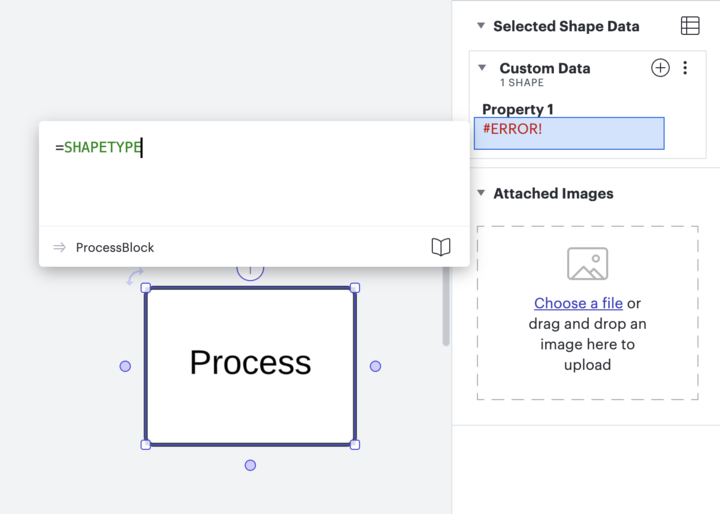
Process is the shape type that I used for my example, however, you will need to know the type of shape that you’re using. To find that out, click on the shape, navigate to the right side panel and under property one, type the formula:
=shapetype
Once you have all of your “if” statements clarified for all the shapes, you can then move down to the “then” statement and make the line colors what you would like them to be.
Hi @yianni! I’m Abby from Lucid, reaching out because I think you, and others who might come across this topic in the future, might be interested in Lucid’s Data Trusted User Group. This group is made up of knowledgeable users who regularly analyze and visualize data in their work. As part of this group, you’ll have the opportunity to connect directly with Lucid’s product team, gain early access to beta features, and share insights about your needs, shaping the future of Lucid’s data solutions 🎉 You can learn more and request to join here. Thanks!
Hi @Phillip W - can you confirm that the formula you posted above works? I’m trying to achieve the same result, but I’m getting this error when using your formula. Thanks for your help!
A Lucid or airfocus account is required to interact with the Community, and your participation is subject to the
Supplemental Lucid Community Terms.
You may not participate in the Community if you are under 18. You will be redirected to the Lucid or airfocus app to log in.
A Lucid or airfocus account is required to interact with the Community, and your participation is subject to the
Supplemental Lucid Community Terms.
You may not participate in the Community if you are under 18. You will be redirected to the Lucid or airfocus app to log in.


 Your privacy choices


