September 3, 2026
Solved

Cloud resources filter not working for AWS Accounts

  • September 3, 2026
  • 2 replies
  • 66 views

I have created a Cloud document with multiple AWS Accounts, so that some views can cover all accounts (to show a summary of resources) and others can be filtered to a specific account (to show details). However, although I can create a filter for a contained item (Internet Gateway), non-contained item (CloudFront Distribution) and a container (VPC), I can’t seem to filter Accounts. I’ve used $NAME and matched the value displayed in the Account shape but all values I try don’t match in the filter, and all items are filtered (not displayed).

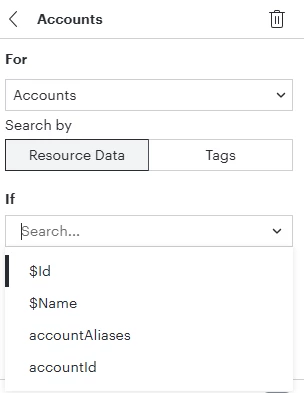
I tried all four available fields for an account.
 

Best answer by David Wilson

Hi,

Thanks for the response.

I have changed the operator to be ‘contains’ rather than ‘equals’ and that has worked.

Comments

Humas1985
Lucid Legend Level 10
September 7, 2026

Hi ​@David Wilson 

Based on the behavior described, the AWS Account object may not support filtering by the displayed $NAME value in the same way as resource-level or VPC filters. The displayed account name may not map directly to a filterable metadata field, which could explain why the filter returns no results.

As a workaround, try filtering on a resource-level field that reliably identifies the account, such as the Account ID, where available. If the issue persists, sharing a screenshot of the Account filter fields and a sanitized sample of the account values with Lucid Support should help confirm whether this is expected behavior or a product limitation.

To learn more - Use cloud frames to visualize cloud infrastructure in Lucidchart – Lucid

Work with AWS infrastructure documents in Lucidscale (legacy experience) | Community

Hope this helps !!

Huma || Lucid Legend
David WilsonAuthorAnswer
September 8, 2026

Hi,

Thanks for the response.

I have changed the operator to be ‘contains’ rather than ‘equals’ and that has worked.