I cannot create a new, blank Lucidchart diagram. When I click the Lucidchart > Blank document menu item the new tab opens momentarily but then closes by itself. I have cleared browser cache, tried Incognito mode and tried both Chrome and Edge browsers. None of these have worked.

Javascript console shows an error as below.
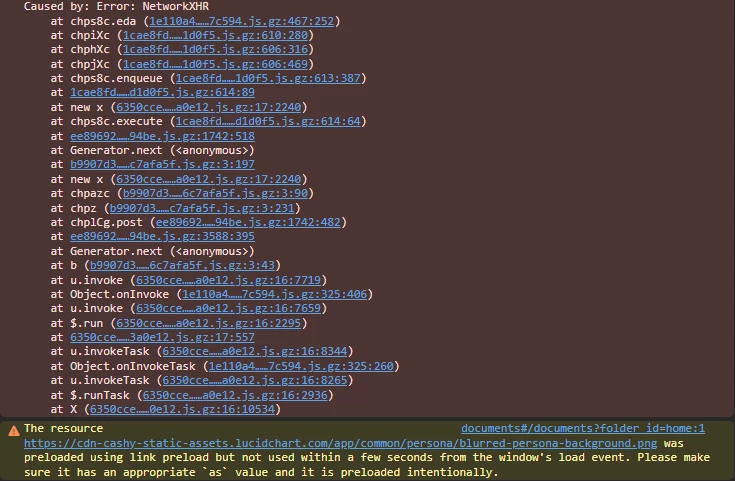
Has anyone else noticed this behaviour? Trying to work out if it is the product or our environment.

Best answer by Zuzia S
@cpannell Thank you for providing the above information! I am sorry to hear the issue persists. In order to rule a few more things out:
Could you please let me know whether this behaviour persists in Firefox?
Could you also try to see if you can reproduce this on a different computer or device?
Finally, could you share a Technical Support PIN for your account? This will help me take a closer look at what’s going on. This PIN is safe to post in this thread because it is only accessible by members of the Lucid support staff. You can find steps for generating a Support PIN in this Help Center article.
Hi @cpannell, thank you for posting in the Community! I’ll be happy to help.
Could you please let me know whether this behaviour occurs when trying to create a new Lucidspark document as well?
As you mentioned that the new document window opens and closes, does the document exist in your Documents space and can be opened/used from there?
Additionally, could you please try creating a new document from within one already created in the past by clicking on the hamburger menu > New > Lucidchart, and let me know whether you have the same experience through that route?
Finally, could you please let me know whether this behaviour persists in Firefox?
Hi Zuzia, thanks for responding to this, appreciated. Taking each point in tirn.
Could you please let me know whether this behaviour occurs when trying to create a new Lucidspark document as well? I see the same behaviour in Lucidspark.
As you mentioned that the new document window opens and closes, does the document exist in your Documents space and can be opened/used from there? No.
Additionally, could you please try creating a new document from within one already created in the past by clicking on the hamburger menu > New > Lucidchart, and let me know whether you have the same experience through that route? Yes. Same behaviour is observed, no diagram is created.
@cpannell Thank you for providing the above information! I am sorry to hear the issue persists. In order to rule a few more things out:
Could you please let me know whether this behaviour persists in Firefox?
Could you also try to see if you can reproduce this on a different computer or device?
Finally, could you share a Technical Support PIN for your account? This will help me take a closer look at what’s going on. This PIN is safe to post in this thread because it is only accessible by members of the Lucid support staff. You can find steps for generating a Support PIN in this Help Center article.
A Lucid or airfocus account is required to interact with the Community, and your participation is subject to the
Supplemental Lucid Community Terms.
You may not participate in the Community if you are under 18. You will be redirected to the Lucid or airfocus app to log in.
A Lucid or airfocus account is required to interact with the Community, and your participation is subject to the
Supplemental Lucid Community Terms.
You may not participate in the Community if you are under 18. You will be redirected to the Lucid or airfocus app to log in.