Answer

Can't enable column for document attributes

  • July 14, 2025
  • 5 replies
  • 27 views

Astrid_G
Lucid Legend Level 3
Forum|alt.badge.img+7

I created a new attribute which can be populated for a document, but when I try displaying that as a column in a document listing, it can’t be enabled.

Here’s a doc with an attribute set.
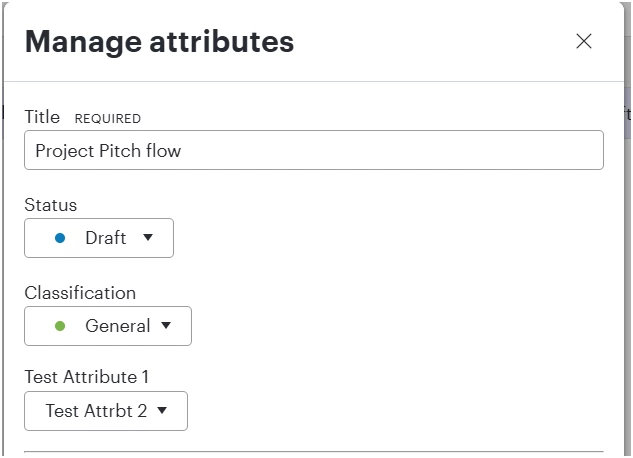
 

when clicking the Manage Columns button, the attribute name is visible but can’t be enabled.
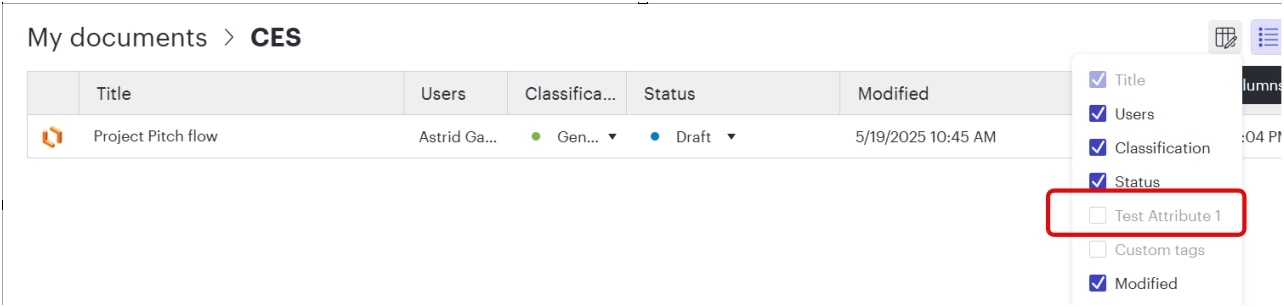
 

is it expected that this should be usable to see all attributes in a doc listing?

Best answer by Leianne C

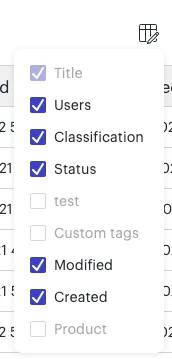
Hi ​@Astrid_G, thank you for posting in the community! Taking a look at your screenshot, it looks like you might already have 6 columns selected for your view.

Only a maximum number of 6 columns can be displayed at one time. If you already have 6 selected, one will need to be deselected before you can display something else. 

Default fields such as ‘Modified’ and ‘Created’ can be found in the right details panel when you right-click a document/folder and select ‘Show details’. Since custom attributes don’t appear in the details panel, it may be helpful to deselect one of the default in favour of a custom attribute. 

I hope this helps! Feel free to let me know if you have any questions. 

Comments

Leianne C
Forum|alt.badge.img+15
  • Lucid support team
  • Answer
  • July 16, 2025

Hi ​@Astrid_G, thank you for posting in the community! Taking a look at your screenshot, it looks like you might already have 6 columns selected for your view.

Only a maximum number of 6 columns can be displayed at one time. If you already have 6 selected, one will need to be deselected before you can display something else. 

Default fields such as ‘Modified’ and ‘Created’ can be found in the right details panel when you right-click a document/folder and select ‘Show details’. Since custom attributes don’t appear in the details panel, it may be helpful to deselect one of the default in favour of a custom attribute. 

I hope this helps! Feel free to let me know if you have any questions. 


Astrid_G
Lucid Legend Level 3
Forum|alt.badge.img+7
  • Author
  • Lucid Legend Level 3
  • July 16, 2025

Thanks Leianne, that explains whats going on.  

Might I suggest having information on that pop-up window to explain the limitation? 


Leianne C
Forum|alt.badge.img+15
  • Lucid support team
  • July 18, 2025

Hi ​@Astrid_G, glad that information was helpful! I agree that a tooltip or pop-up with that information would be beneficial. I will pass this feedback onto our development team for their consideration. 

Would you mind submitting an idea post for this as well? This will also allow other users with similar requests to discover and upvote it, then add details of their own.

Finally, for more information on how Lucid manages feedback via this community, take a look at this post:

Thanks for sharing your feedback and ideas in the community. Please let us know if you have any questions! 


Astrid_G
Lucid Legend Level 3
Forum|alt.badge.img+7
  • Author
  • Lucid Legend Level 3
  • August 12, 2025

Leianne C
Forum|alt.badge.img+15
  • Lucid support team
  • August 13, 2025

Thanks for the update, ​@Astrid_G