Nora M
August 7, 2026
Solved

Can't add a new page in Lucidchart

  • August 7, 2026
  • 5 replies
  • 212 views

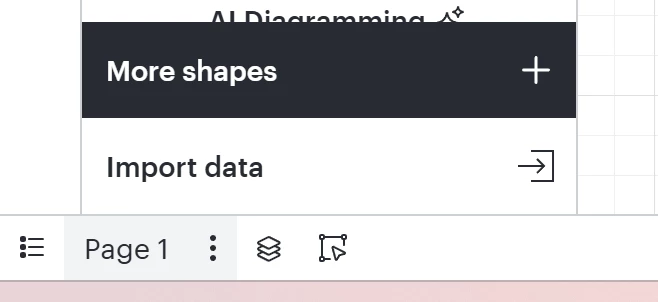
I have the icon that shows the pages, but there is no + icon to add a new page. 
 

Best answer by Susan_Rose

I have the icon that shows the pages, but there is no + icon to add a new page. 


I have run across the same issue this week! If I refresh my page, the plus comes back. 

Comments

August 11, 2026

I have the icon that shows the pages, but there is no + icon to add a new page. 


I have run across the same issue this week! If I refresh my page, the plus comes back. 

Nora M
Nora MAuthor
August 13, 2026

I wonder if it was a temporary glitch in the system. 

kmougammadou
August 24, 2026

Hi ​@Nora M, thanks for posting in the community! I wanted to check if you still not able to see the + to add more pages in your document? Generally, we would recommend following some basic troubleshooting steps as they can quickly resolve temporary issues. Could you try opening your document in a private or incognito window to help us narrow down the potential cause? Could you also try connecting to a different network or disconnecting from your VPN (if applicable)? Sometimes account performance issues can be related to internet security/speed or browser issues. Let me know if the issue still persists! Thanks :)  

Lucid Legend Level 1
August 24, 2026

adding some context as I ran into this issue previously and this morning.  I rebooted my computer, and tried another browser (Edge, Chrome).  Neither worked.  

However, I just hit refresh on the document page I was working on and the button came back.  I’ve tried this and it didn’t work either. 

kmougammadou
August 25, 2026

Hi ​@JSzeto and all, thanks again for your contribution to the community. I believe you have identified a bug, and I have reported this to our development team. I apologize for any disruption this may cause, and I will update this thread with any new information about a fix. Please follow along on this thread for updates, and post any additional questions or concerns below.
As a workaround, I would recommend refreshing the page to make the button appearing again. Thanks!