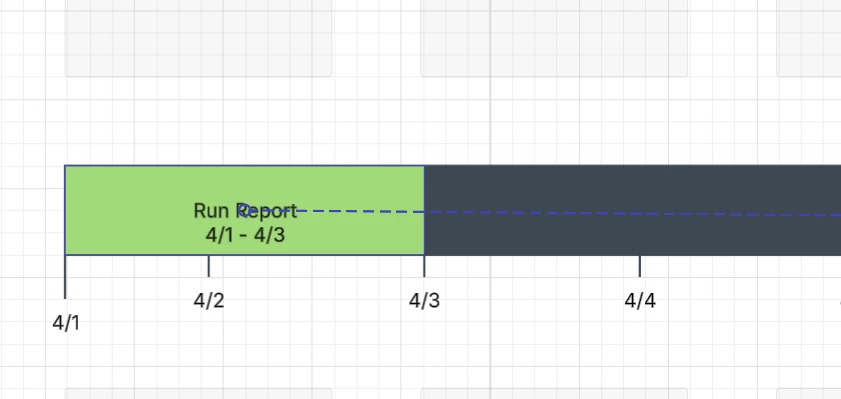
I plan to put the interval on top of the time block. But every time I put on the top, it will either be off the block or my Lucidchart will be so slow to auto-save or black screen (I wait for more than 10 minutes).
Hi @Elissa X, thanks for posting in the Lucid Community!
To clarify- are you having trouble with your document changes saving, or are you having a difficult time making your timeline shapes appear as desired?
In the example below, I slowly moved the interval up so that it is on top of the time block as I believe you mention wanting to do.
If I move it down any further, the shape behavior will ‘snap’ the interval onto the time block as it appears you’re seeing in your screenshot. Is this what you’re hoping to avoid?
Please let me know if I’m misunderstanding your question here and I’m happy to take a closer look!
Hi @Elissa X, thanks for posting in the Lucid Community!
To clarify- are you having trouble with your document changes saving, or are you having a difficult time making your timeline shapes appear as desired?
In the example below, I slowly moved the interval up so that it is on top of the time block as I believe you mention wanting to do.
If I move it down any further, the shape behavior will ‘snap’ the interval onto the time block as it appears you’re seeing in your screenshot. Is this what you’re hoping to avoid?
Please let me know if I’m misunderstanding your question here and I’m happy to take a closer look!
A Lucid or airfocus account is required to interact with the Community, and your participation is subject to the
Supplemental Lucid Community Terms.
You may not participate in the Community if you are under 18. You will be redirected to the Lucid or airfocus app to log in.
A Lucid or airfocus account is required to interact with the Community, and your participation is subject to the
Supplemental Lucid Community Terms.
You may not participate in the Community if you are under 18. You will be redirected to the Lucid or airfocus app to log in.




 Your privacy choices


