Solved

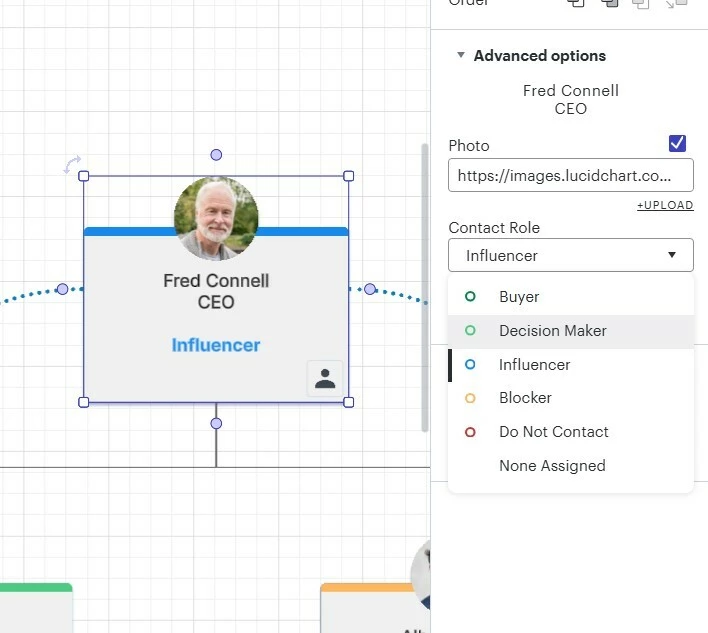
Can I edit the 'Contact Role' in the 'Local account map example' template?

  • January 19, 2026
  • 2 replies
  • 19 views

Forum|alt.badge.img+1

I love the Local account map example template. It’s perfect for what I need to map.

I see that if I choose a Contact Role, it will automatically update the role and colour of the card. So brilliant.

But I can’t find a way of adding or editing the Contact Role list. Can you please tell me how to do this?



Best answer by Humas1985

Hi ​@meredith 

User can't currently edit the underlying “Contact Role” list for the Local account map example template; the roles and their colors are baked into that smart template and not exposed for user editing

To learn more - Can I edit the "Sales Contact" field in Lucid's Salesforce cards within the Local Account map template? | Community

Hope this helps - Happy to help further!!
Thank you very much and have a great one!
Warm regards

Comments

Humas1985
Lucid Legend Level 10
Forum|alt.badge.img+24
  • Lucid Legend Level 10
  • Answer
  • January 19, 2026

Hi ​@meredith 

User can't currently edit the underlying “Contact Role” list for the Local account map example template; the roles and their colors are baked into that smart template and not exposed for user editing

To learn more - Can I edit the "Sales Contact" field in Lucid's Salesforce cards within the Local Account map template? | Community

Hope this helps - Happy to help further!!
Thank you very much and have a great one!
Warm regards


Forum|alt.badge.img+1
  • Author
  • January 19, 2026

Thank you ​@Humas1985 - I was actually relying on advice from a Lucid Community Team Member given in the Lucid Learning Campus here:


Thank you for letting me know!