Jan 24, 2024 10:50 PM UTC
Solved

Can I copy or export comments?

I need to copy the discussion my team had in comments into our ticketing system. I can’t seem to select and copy the comments. How can I do this?

Ambar D
Ambar DAnswer
Lucid community team
Jun 22, 2026 8:33 PM UTC

Hi everyone! Jumping in this thread to provide an update to comments in Lucid. 

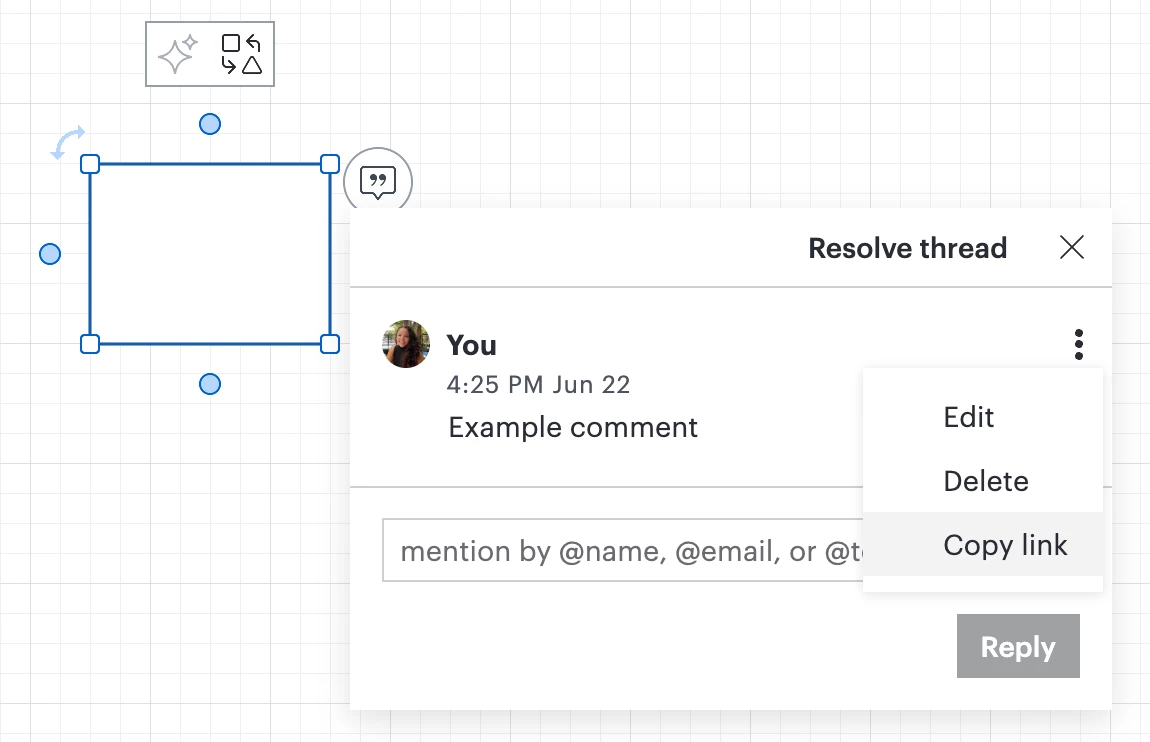
You can now copy a link to your comment from the tri-dot menu shown next to your comment, as shown below!

You can then include the link to your comment in your ticketing system, or send the link to collaborators. Clicking the link will automatically send you to the open comment. To learn more, check out this resource.


Comments

Ria S
Lucid Legend Level 9
Jan 25, 2024 5:44 PM UTC

Hi @Jenny N 

Depending on your access level and features available in Lucidchart, you might be able to export the discussion as text or image. Look for options to export the document or comments and choose a format that is compatible with your ticketing system.

You can also check out this article here for some further guidance: 

https://help.lucid.co/hc/en-us/articles/16726269725204-Add-comments-and-assign-tasks-to-collaborators#add-comments-from-shape-or-text-field

Hope this is helpful. 

Translate
Ria S.
Jenny NAuthor
Jan 25, 2024 6:51 PM UTC

I tried finding the option to include comments in the export, but I didn’t see anything like that. The formats available are either PDF or various image formats. Which is why I posted my question.

Edited to add: the link you posted is just about how to use comments, but doesn’t include any way to save, select & copy, or any functions related to my question, unfortunately.

Translate
Micah
Lucid community team
Jan 26, 2024 6:52 PM UTC

Hi @Jenny N, and thanks for the great suggestion Ria! Unfortunately, directly exporting your comments isn’t currently supported in Lucid, but we’re very interested in your feedback and committed to continually improving our products. Please first search the Product Feedback section of this community (with the filter Topic Type = Idea) to see if it’s already been submitted. If so, please add any additional details you’d like and upvote the request - this consolidation helps to refine feedback and properly capture the popularity of the request.

If no one has submitted this idea yet, please create one of your own and be sure to include details about your use case or what you’d like to see in this experience. This will also allow other users with similar requests to discover and upvote it, then details of their own.

Finally, for more information on how Lucid manages feedback via this community, take a look at this post:


Translate
xenia cubrac
Jan 28, 2024 5:01 PM UTC

@Micah that would be a great improvement to be able to make exporting feature happen, especially for team who actively brainstorm in Lucid.

Translate
x.cubrac
Sylvia X
Lucid support team
Jan 29, 2024 7:26 AM UTC

@xenia cubrac thanks for sharing your feedback! If you haven’t already I suggest you add your feedback to our Product Feedback section in our community for this request as Micah stated above :) 

Translate
Ambar D
Ambar DAnswer
Lucid community team
Jun 22, 2026 8:33 PM UTC

Hi everyone! Jumping in this thread to provide an update to comments in Lucid. 

You can now copy a link to your comment from the tri-dot menu shown next to your comment, as shown below!

You can then include the link to your comment in your ticketing system, or send the link to collaborators. Clicking the link will automatically send you to the open comment. To learn more, check out this resource.

 
Translate