Answer

After export, chart erased

  • June 3, 2024
  • 1 reply
  • 23 views

Forum|alt.badge.img+2

After exporting a chart (a draft), and then reopening it from documents, the chart reverts back to the Template and all of my work is gone. Yes I hit save as I went along. Please help.

I am stuck in a loop of creating a new chart every time I use Lucid. If I try to access charts I made from Templates, they eventually get erased.

Best answer by Leianne C

Hi @Maddie, thanks for your post!  I'm sorry for the trouble you are having with your document and am happy to help. It sounds like you may have two pages in your document which is why it appears as your document reverts back to the template. If you upload data to create an org chart in a document, it will always be created in a new page.
 
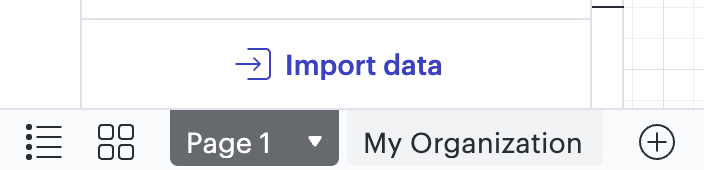
Could you please try opening the document in question and check the bottom left of the editor? You should see pages tabs as shown in the screenshot below.

 
Please let me know if this doesn’t help, or if you have any questions! 

Comments

Leianne C
Forum|alt.badge.img+15
  • Lucid support team
  • Answer
  • June 4, 2024

Hi @Maddie, thanks for your post!  I'm sorry for the trouble you are having with your document and am happy to help. It sounds like you may have two pages in your document which is why it appears as your document reverts back to the template. If you upload data to create an org chart in a document, it will always be created in a new page.
 
Could you please try opening the document in question and check the bottom left of the editor? You should see pages tabs as shown in the screenshot below.

 
Please let me know if this doesn’t help, or if you have any questions!