October 15, 2026
Solved

Can I disable the new editor and return to the prior?

It displays as a public beta so I am assuming there is a way to disable.  I’ve been a Lucidchart user since Day 1 and this is miserable.

Ambar D
Ambar DAnswer
Lucid community team
October 20, 2026

Hi ​@nmcbride, thank you for sharing your feedback about the new Lucidchart editor. Yes, you can switch back to the classic Lucidchart editor following the steps below. 

  1. Open a Lucidchart document.
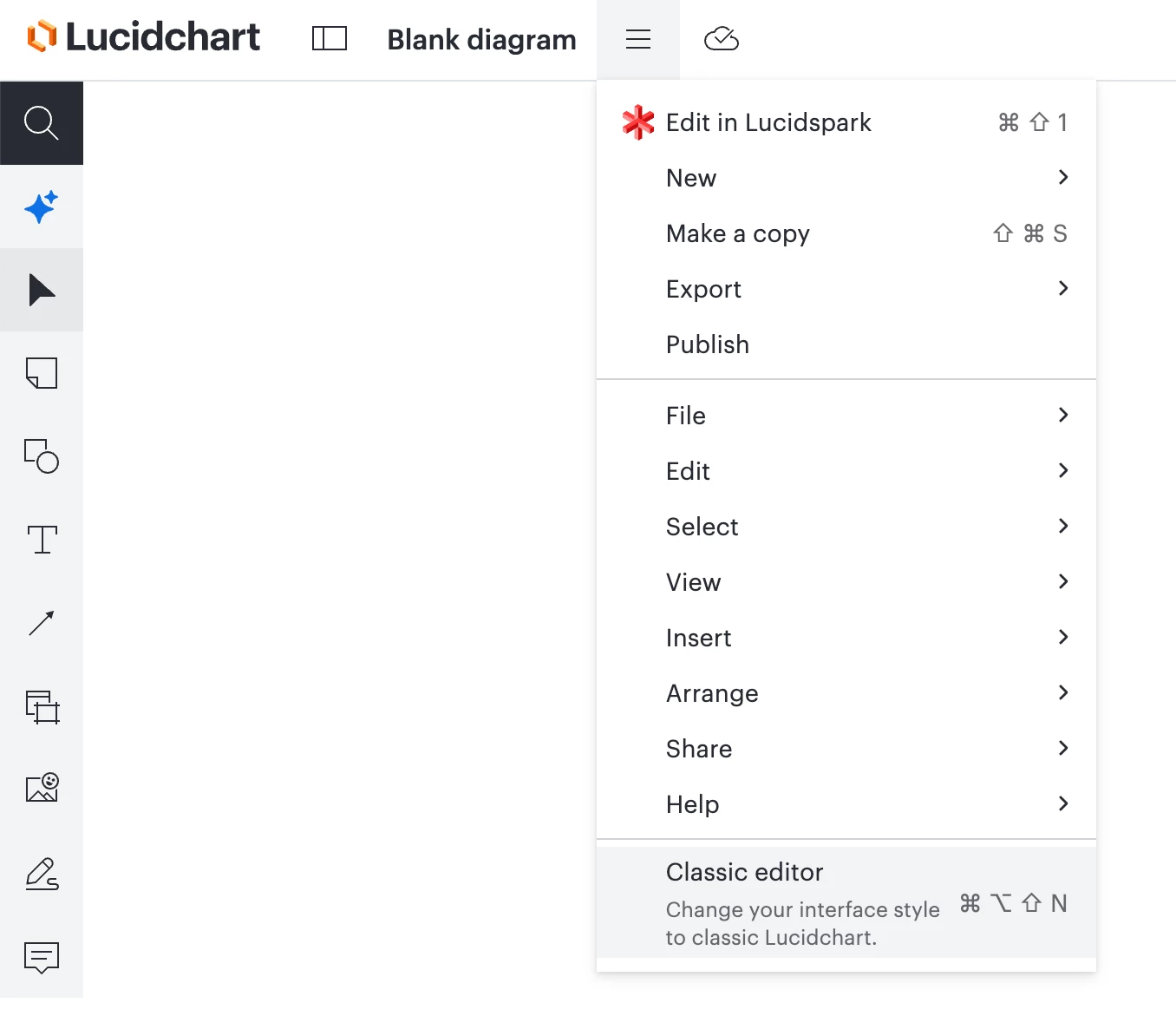
  2. Navigate to the file menu at the top of your canvas (the three-line icon next to the document name).
  3. Select Classic editor to switch your session back to the classic editor.


I would love to understand a bit more about your experience. Is there a specific feature or tool that you’re having trouble locating, or a specific pain point in the new editor? 

Our product teams are regularly reviewing feedback in this space of the community, so your insights are incredibly helpful as they continue building.

To learn more, I recommend checking out this resource for an overview of what’s new. If you have any questions about the editor or about where to find a tool, I’d be happy to help in this thread! 

Comments

October 19, 2026

You can switch back two ways. 1) Clicking on the Three Line menu bar and select “Classic Editor”. 2) Cntl Alt Shift N

However, once you switch to this new editor, it defaults to it everytime you open lucidchart and you have to manually switch back each time. Completely ridiculous. 

Translate
Ambar D
Ambar DAnswer
Lucid community team
October 20, 2026

Hi ​@nmcbride, thank you for sharing your feedback about the new Lucidchart editor. Yes, you can switch back to the classic Lucidchart editor following the steps below. 

  1. Open a Lucidchart document.
  2. Navigate to the file menu at the top of your canvas (the three-line icon next to the document name).
  3. Select Classic editor to switch your session back to the classic editor.


I would love to understand a bit more about your experience. Is there a specific feature or tool that you’re having trouble locating, or a specific pain point in the new editor? 

Our product teams are regularly reviewing feedback in this space of the community, so your insights are incredibly helpful as they continue building.

To learn more, I recommend checking out this resource for an overview of what’s new. If you have any questions about the editor or about where to find a tool, I’d be happy to help in this thread! 

Translate
October 22, 2026

Please allow us to turn off this new editor completely. I’ve “discovered” it and it’s utterly useless. Sure, we can “switch back” to classic during a session, but every time we open a new document, it defaults to the completely un-useable “new” editor and we have to manually switch back to classic. Sometimes we have to refresh the document, because the layer profiles aren’t shown when we switch back to classic, which restarts the whole process. It’s extremely annoying. 

Translate
Ambar D
Lucid community team
October 26, 2026

Thank you for your honest feedback ​@MSmidowicz. I certainly understand your feedback and appreciate you sharing just how much it impacts your workflow. 

We’ll continue updating this space in the community with any new announcements or changes to the new Lucidchart editor. Thank you for being part of the feedback collection process here at Lucid!

Translate
nmcbrideAuthor
October 26, 2026

I don’t really understand the need for change but I get it, I am just one user, so what might not be good for me may be good for others.  I started using LC back in 2012 and have become accustomed to very specific ways of doing things.  And I’m generally tolerant when you all make UI changes...like when Document Settings got buried four levels deep and I had to adjust my mouse speed settings because I would rarely hit it on the first try. Ok dealt with it and started using FNF4 but try this on a MBP that has keys mapped differently and a trackpad and, well...So anyway, the problem is that you have implemented a UI that is so low-performing that to find something that used to be right in front of me, like a timeline object, I have to employ a click and hope strategy to get there.  I appreciate that by document I can change back but if I cannot do it globally, then what’s the point?  So, maybe I will get used to it over time or maybe not but my feedback is it was not done well enough to make things more productive for heavy, long-term users.

Translate