Idea

Layer functionality in Lucid has changed

Related products:Lucidchart
  • December 12, 2025
  • 5 replies
  • 77 views

john.a.lopez
Forum|alt.badge.img+11

The function of layers have changed. Layers now act almost like a group. Geometry is frozen in the layer so if 1 element moves they all do, unless you double-click (like a group) to edit the individual object. It used to be more like a CAD drawing, where layers were used not to group goemetry so much as to manipulate the visible portions of the image.

is there a way to change it back or get the previous functionality?
Thanks

January 2, 2026

Hi ​@john.a.lopez, thank you for sharing the additional details. I’m glad to hear that the <alt>drag tip is helpful!

We’re very interested in your feedback and committed to continually improving our products. I have passed your feedback on to our development team internally. I’ve also converted this post to an idea so that it’s visible to others within the Product Feedback section of the community - from here, they can upvote it and add details of their own.

Finally, for more information on how Lucid manages feedback via this community, take a look at this post:

Thank you for taking the time to share your feedback in the community. Please let us know if you have any questions! 

Comments

aparrish
Lucid Legend Level 7
Forum|alt.badge.img+15
  • Lucid Legend Level 7
  • December 13, 2025

@john.a.lopez Here is the official Lucid help documentation on layers: https://help.lucid.co/hc/en-us/articles/16296419779476-Add-layers-to-a-Lucidchart-document

Here is the official Lucid blog post on layers: https://www.lucidchart.com/blog/creating-layers-in-lucidchart

I hope these links help!


john.a.lopez
Forum|alt.badge.img+11
  • Author
  • December 17, 2025

hi ​@aparrish - thanks for the response. I’ve been using Lucid layers for 6 or so years.

Functionality changed and not for the better in the last year or so.

I do pretty complex BPMN, UML, and solution architecture diagrams that really need layer functionality. It used to work a lot more like layers in varied CAD packages i’ve used.

Now it is a pain.

is there an alternative to accomplish the following:

  • image segregation on layers that only isolates the geometry when the layer is hidden
  • it does NOT act on all objects on a layer when one is moved, deleted, etc.
  • i do NOT want it to act like a group
  • individual objects should still have individual connection points accessible for example when connecting a line from object 1 on layer A to object 2 on layer B

Are there other approaches to accomplishing the same? Feature based show/hide capabilities?
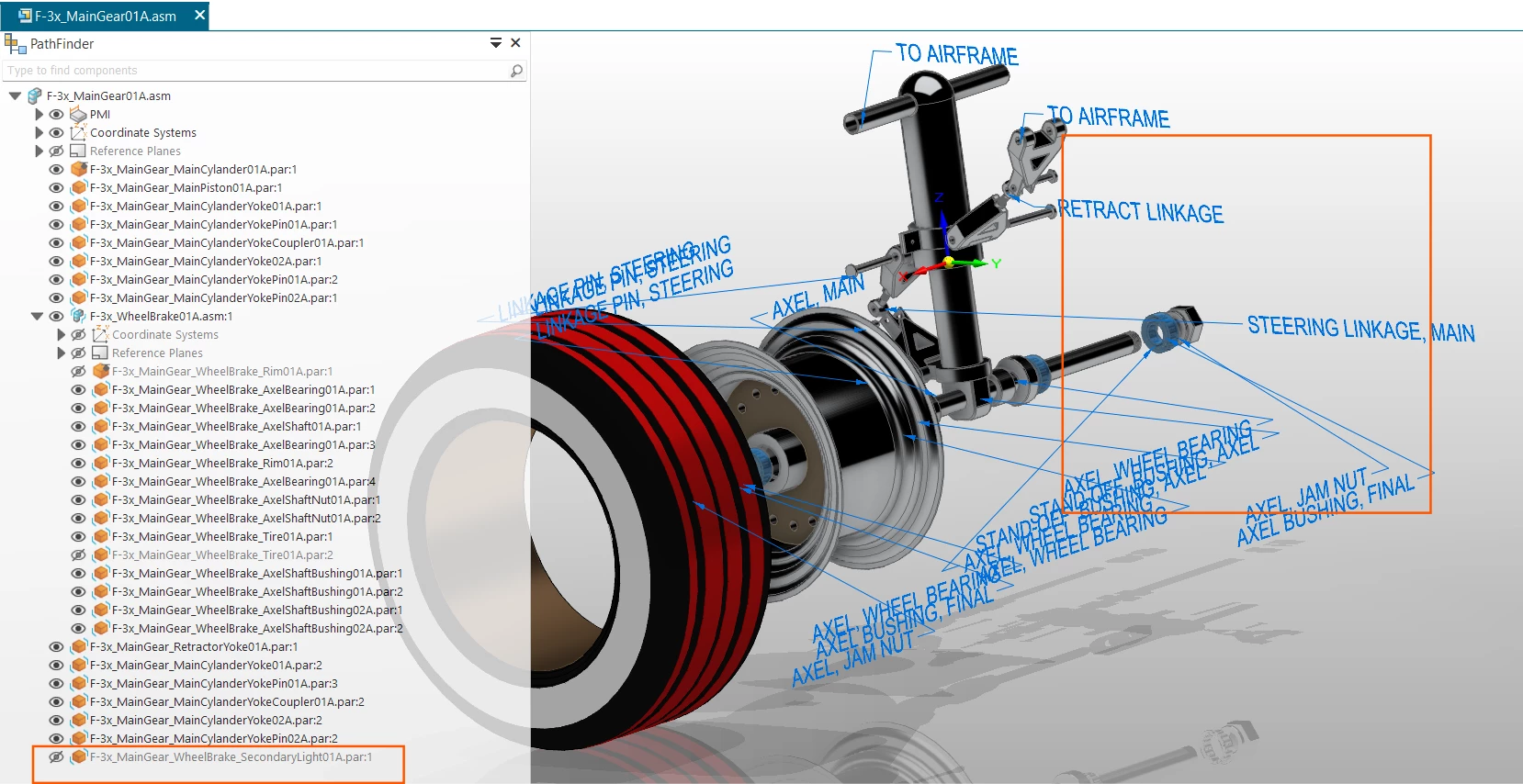
As you can see from this model (below) i can suppress certain features on a per object basis:


Leianne C
Forum|alt.badge.img+15
  • Lucid support team
  • December 24, 2025

Hi ​@john.a.lopez, thanks for posting in the community and sharing this feedback. I am happy to help.

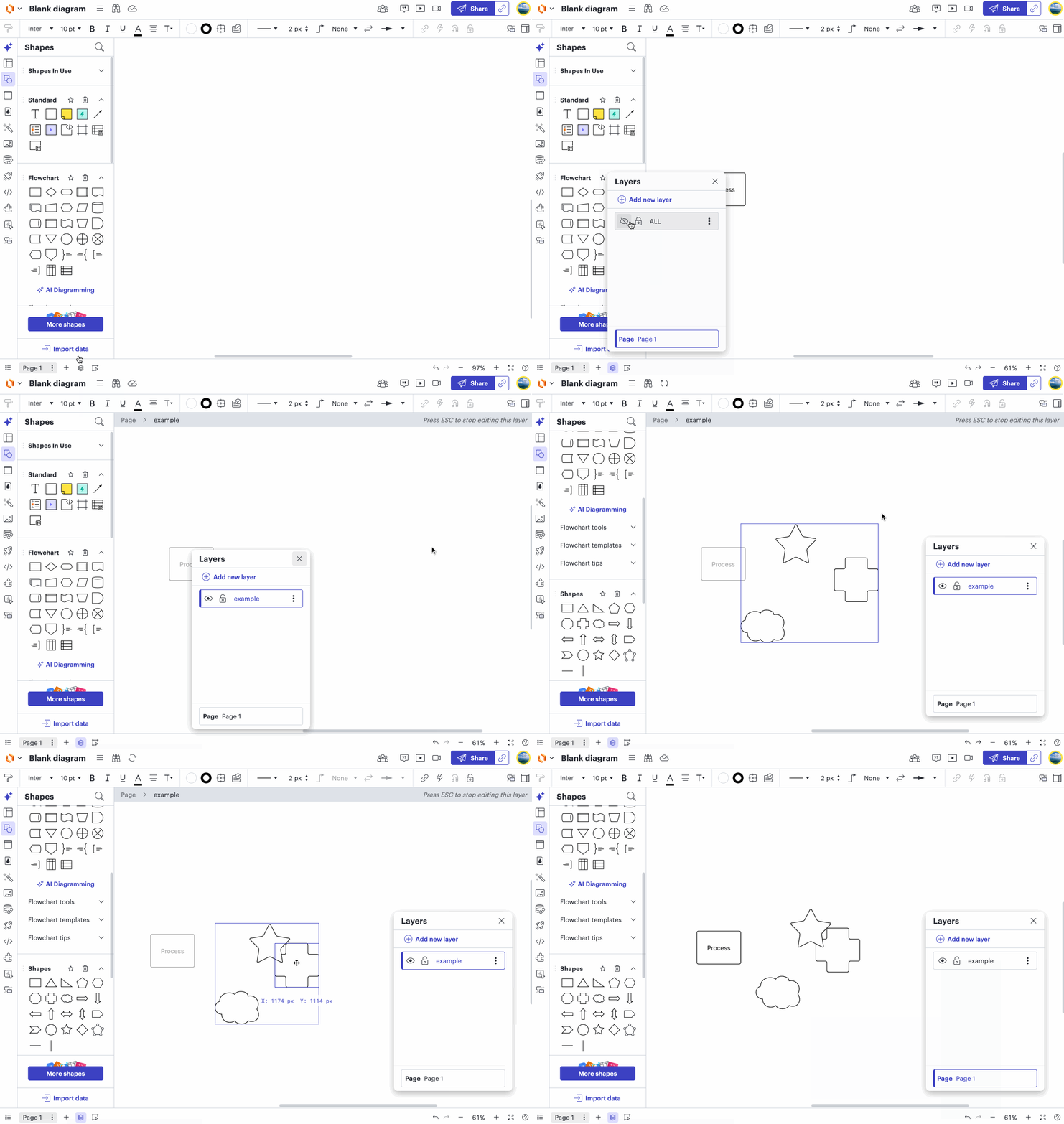
You mentioned that “Geometry is frozen in the layer so if 1 element moves they all do, unless you double-click (like a group) to edit the individual object”. Editing shapes on another layer requires a double-click. I created a quick GIF to demonstrate this, could you please confirm if that is the behaviour you’re referring to? If not, would it be possible to share a screenshot or more details about the behaviour you are seeing? 

In the meantime, it’s possible to connect objects between layers using lines by holding the Alt or Option key on your keyboard when drawing the line. This should enable you to attach lines to objects in different layers.

Thank you in advance for your help and patience. Please let us know if you have any questions!


john.a.lopez
Forum|alt.badge.img+11
  • Author
  • December 29, 2025

@Leianne C - yes the above GIF correctly displays the functionality i described. Please note it was not always this way however. That has changed in the last few years. I was not aware of using <Alt>drag to connect lines to objects on different layers. I will use this technique so thank you for that. 

The “double-click to edit” is similar with groups. I have often created custom objects from primatives, grouped them, added meta-data at the group level, and used the formula “={{PARENT.attribute}}” to populate a primative text value from the group meta-data.

Often i use layers to segregate parts of a diagram where i have both the current-state and future-state process objects in the same diagram, but turn them on or off based on viewpoint i am trying to express.

The example in the CAD model screen-shot above shows how layers are used to segregate geometry without affecting it’s spacial relationships - spacial relationships are often established with parametric or associative constraints (as in a mechanism simulation). Layers are simple an attribute to affect viewability of said geometry. I’ve used it as one of several methodologies in CAD for decades. Lucid use to work similarly. that was my point and it made using them more laborous.

Thanks


Leianne C
Forum|alt.badge.img+15
  • Lucid support team
  • January 2, 2026

Hi ​@john.a.lopez, thank you for sharing the additional details. I’m glad to hear that the <alt>drag tip is helpful!

We’re very interested in your feedback and committed to continually improving our products. I have passed your feedback on to our development team internally. I’ve also converted this post to an idea so that it’s visible to others within the Product Feedback section of the community - from here, they can upvote it and add details of their own.

Finally, for more information on how Lucid manages feedback via this community, take a look at this post:

Thank you for taking the time to share your feedback in the community. Please let us know if you have any questions!