
After following the steps for integrating with ServiceNow: we get the following error: Error occured while creating Business Application Hierarchy in Lucidchart. Please try again.
ServiceNow is describing the issue as a Token issue.
Is anyone familiar with how to solve this?
Solved
ServiceNow Integration
 +3
+3Best answer by Ian Baenziger
Lucid has worked with ServiceNow on triaging customer issues setting up the integration, and we’ve learned there are three additional checks that may help get the integration set up properly:
- Make sure the Grant Type is set to Authorization code
- Make sure the integration has the scopes:
- offline_access
- lucidchart.document.content (you might be able use lucidchart.document.app.folder instead; however, we have not tested this)
- folder (you might be able to use folder:readonly; however we have not tested this)
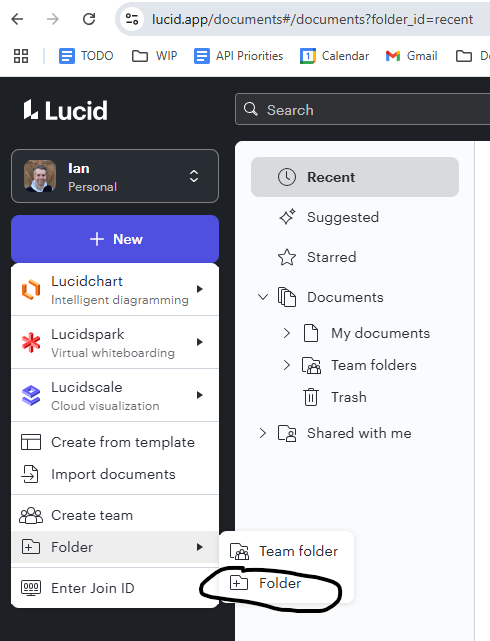
- In Lucid, make sure you have created a normal folder in your Lucid home page (e.g. the page that pop ups when you open Lucid.app - see image below). What we recently discovered was that the ServiceNow integration hits Lucid’s API looking for a list of folders in the Lucid user’s root Lucid directory/folder. If there is none, the integration returns an error claiming there was an issue with the OAuth token (which unfortunately is an incorrect error message). At the time of writing this post, the requirement to have a Lucid folder created in your Lucid root directory is not documented in ServiceNow documentation.
Note that this information is up-to-date as April 2025, but things may change over time. Also, please note that ServiceNow owns the integration and you should first reach out to ServiceNow with any issues setting up or using the integration.
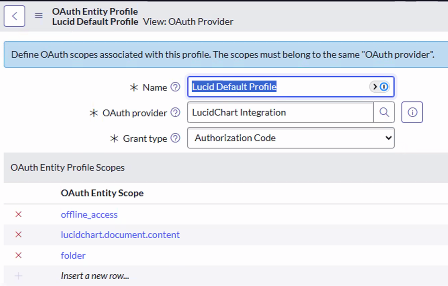
ServiceNow screen associated with #1 and #2, as of April-2025





Create an account in the community
A Lucid or airfocus account is required to interact with the Community, and your participation is subject to the Supplemental Lucid Community Terms. You may not participate in the Community if you are under 18. You will be redirected to the Lucid or airfocus app to log in.
Log in to the community
A Lucid or airfocus account is required to interact with the Community, and your participation is subject to the Supplemental Lucid Community Terms. You may not participate in the Community if you are under 18. You will be redirected to the Lucid or airfocus app to log in.
Log in with Lucid Log in with airfocus
or
Enter your E-mail address. We'll send you an e-mail with instructions to reset your password.


