Answer

How to apply a rounding value to only some custom shapes

  • March 21, 2025
  • 5 replies
  • 60 views

Forum|alt.badge.img+4

Hi,

Is there a way to apply a rounding value to a shape or sub-shape but not to all shapes in a custom shape?

When I test it, rounding works in the root style{rounding 10} but not in shapes[{styles {rounding 10}}].

If not possible, how can I create a rectangle with rounded corners?

Thanks for your help,

NM
Best answer by NMN

Thank you for your answers.

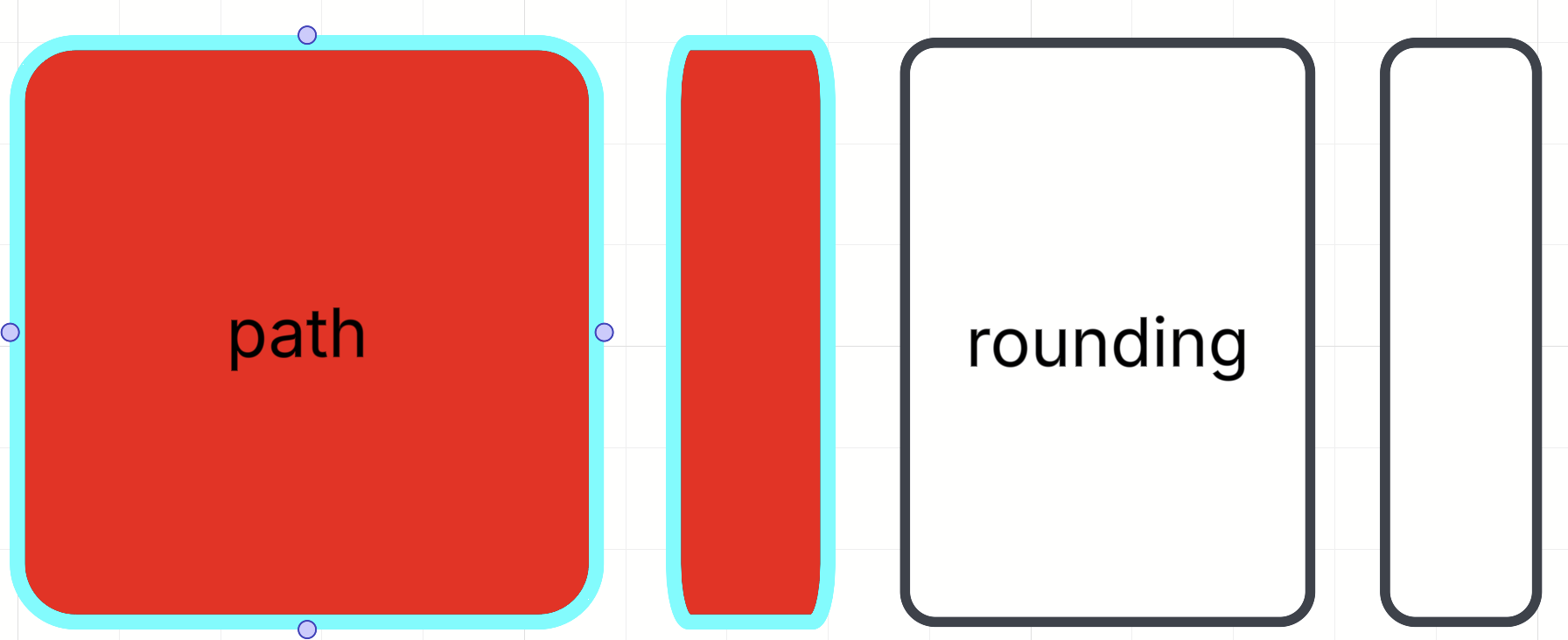
I’ve tried using the path type. See the example below. However, when you resize the shape, you lose the roundness.

{
"geometry": [
{
"type": "path"
"path": "M 0.1,0 h 0.8 a 0.1,0.1 0 0 1 0.1,0.1 v 0.8 a 0.1,0.1 0 0 1 -0.1,0.1 h -0.8 a 0.1,0.1 0 0 1 -0.1,-0.1 v -0.8 a 0.1,0.1 0 0 1 0.1,-0.1 z"
}
]
}


Comments

Humas1985
Lucid Legend Level 10
Forum|alt.badge.img+24
  • Lucid Legend Level 10
  • March 21, 2025

Hi ​@NMN 

The key is that you can apply specific styles to individual shapes or sub-shapes, including rounding, without affecting the entire root shape. 

You can apply rounding to specific parts of a custom shape, like using path shapes or controlling individual shape styles.

Refer this thread to learn more - Rounding a rectangle and setting it to no fill in Lucidchart | Community

Hope this helps - Happy to help further!!
Thank you very much and have a great one!
Warm regards


Forum|alt.badge.img+4
  • Author
  • March 27, 2025

Hi Huma,

Thanks for your answer.

Could you provide a small working JSON example?

When I try it, rounding only works when applied to the root shape.

Maybe I’m missing something, but I can’t figure it out.

Thanks for your help,

Nicolas


Richard Udell
Forum|alt.badge.img+8
  • Lucid support team
  • March 27, 2025

Hi ​@NMN , you might find this example helpful: GroupedShape.shape from our example-shape-library repo. It shows an example of styling with sub-shapes specifically. 

Hope that helps! Let us know if you get stuck or have any further questions.


Humas1985
Lucid Legend Level 10
Forum|alt.badge.img+24
  • Lucid Legend Level 10
  • March 27, 2025

Hi ​@NMN 

You are right, that styles rounding works at the root level in a custom shape. besides, you can still create sub-shapes with rounded corners by using a path instead of a basic rectangle.

Best Regards


Forum|alt.badge.img+4
  • Author
  • Answer
  • March 27, 2025

Thank you for your answers.

I’ve tried using the path type. See the example below. However, when you resize the shape, you lose the roundness.

{
"geometry": [
{
"type": "path"
"path": "M 0.1,0 h 0.8 a 0.1,0.1 0 0 1 0.1,0.1 v 0.8 a 0.1,0.1 0 0 1 -0.1,0.1 h -0.8 a 0.1,0.1 0 0 1 -0.1,-0.1 v -0.8 a 0.1,0.1 0 0 1 0.1,-0.1 z"
}
]
}