Idea

Team Hub and Team Folders with mix of permissions

Related products:Lucid Suite
  • March 2, 2022
  • 7 replies
  • 81 views

Melody E

I would like to have a mix of editable and non editable charts in a team folder (non-editable ones for reference only). What is the best way to do this when permissions are inherited from the main team folder? Does adding people with view only on the individual document override the team permissions? 

August 15, 2025

Hi ​@Timothy.Potter8@T-Mobile.com, thank you for following up. I understand that is a workaround and unfortunately, more granular access levels in Team Hubs isn’t currently supported in Lucid.

However, we’re very interested in your feedback and committed to continually improving our products. If you’re willing to share, we’d love to hear more details about your use case or what you’d like to see in this experience within this thread. I’ve also converted this post to an idea so that it’s visible to others within the Product Feedback section of the community - from here, they can upvote it and add details of their own.

Finally, for more information on how Lucid manages feedback via this community, take a look at this post:

Thank you for sharing your feedback and ideas in the community. Please let us know if you have any questions. 

Comments

Richard Udell
Forum|alt.badge.img+8
  • Lucid support team
  • March 3, 2022

Hi Melody 

Thanks for reaching out to the community!  Unfortunately we can't do this with Team Folders.  We're always looking for ways to improve Lucidchart we would really value your feedback with a feature request via this form.  One way to share a mix of editable and view-only documents with your team is to create separate team folders each with unique sharing permissions.  Regarding your question about changing the sharing permission for individual documents within a team folder please refer to the Team Folder Ownership section within this Lucid Help Center article on Team Folders

You can grant greater access permissions to a user for an individual document or board than the user has for the Team Folder but you cannot restrict access to individual documents or boards if the user has greater permissions to the Team Folder. In other words if you have edit access to a Team Folder you cannot have view-only access to documents and boards in that Team Folder; you will be able to edit all documents and boards within the Team Folder. However if you have view-only access to the Team Folder then you are able to gain edit access to a document or board within that Team Folder.

I hope this helps! 


Forum|alt.badge.img+2

In the above response, it implies that you can set permissions for a member of a Team. When I go into a Team and look at Members, there are no options to set their permissions. I believe that I read somewhere that all Team members have full edit/share permissions for everything in the Team. Am I missing something? I’d love to be able to set base permissions for Team Members (such as View or Comment) and then only have to go in to increase permissions for members for limited docs when needed. Right now, I have a Team space that only has 8 people (only people who should have edit/share access to ALL diagrams in the Team, and then have to go in and add people to each diagram in that team one at a time for view rather than being able to add them to the team once with view access. It is less convenient than a folder.


Leianne C
Forum|alt.badge.img+15
  • Lucid support team
  • August 13, 2025

Hi ​@Timothy.Potter8@T-Mobile.com, thank you for continuing this post. The above response is specifically for Team Folders, not Team Hubs which is likely why you are seeing this difference. Team hubs act as a central shared space for teams to access important documents, track project progress, and access important links. I recommend checking out this Community Post for a comparison between Team account plan, team hubs, and team folders.

As you have noticed, all Team Hub members will have full edit/share permissions. As a workaround for your use-case, you can create a folder in the Team Documents section of your Team Hub to house all the documents and share that with users who only need view or comment permissions. The documents will appear in the ‘Shared with me’ section of these collaborators and this should allow you to change the permission level for each user as required. However please note that these users will not have access to documents that are shared directly with a team

I hope this helps. Please feel free to let us know if you have any questions! 


Forum|alt.badge.img+2

That is a workaround, just an inconvenient workaround. It is very weird to have to organize documents into folders based on access controls vs. based on logical ways to organize documents. It would still be nice to be able to put access levels on each Team Member.


Leianne C
Forum|alt.badge.img+15
  • Lucid support team
  • August 15, 2025

Hi ​@Timothy.Potter8@T-Mobile.com, thank you for following up. I understand that is a workaround and unfortunately, more granular access levels in Team Hubs isn’t currently supported in Lucid.

However, we’re very interested in your feedback and committed to continually improving our products. If you’re willing to share, we’d love to hear more details about your use case or what you’d like to see in this experience within this thread. I’ve also converted this post to an idea so that it’s visible to others within the Product Feedback section of the community - from here, they can upvote it and add details of their own.

Finally, for more information on how Lucid manages feedback via this community, take a look at this post:

Thank you for sharing your feedback and ideas in the community. Please let us know if you have any questions. 


Ambar D
Forum|alt.badge.img+10
  • Lucid community team
  • October 1, 2025

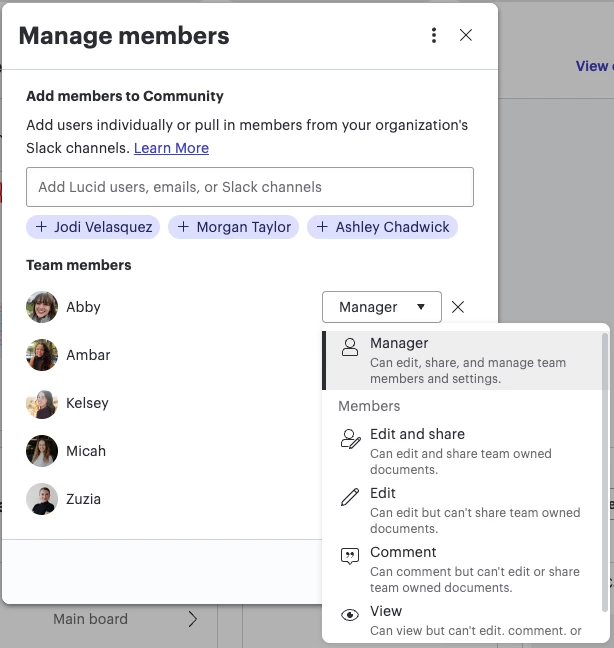
Jumping in this thread to provide an update on newly released team roles and permissions for team hubs! With this update, you can now assign different levels of control and ownership.

There are two roles - team member and team manager

Team members are assigned by team managers and can be given a variety of access permissions to documents - including edit and share, edit, comment, or view only. 

Team managers have all the same document access as team members, and they have access to these additional tools:

  • Determine team type (open, closed, or hidden team)
  • Add or remove team members
  • Manage team documents and document permissions
  • Restore archived items

You may have noticed that everyone in your team has defaulted to the role of team member, which can easily be changed to team manager if you desire. 


Check out the details in the community post below:


Team roles and permissions streamline the way teams work, supporting collaboration and allowing them to work together faster. To learn more about the various roles and permissions, check out this Help Center article: Use team hubs in Lucid to collaborate and stay organized

Please let us know if you have any additional questions and we’d be happy to help! 


Forum|alt.badge.img+2

Jumping in this thread to provide an update on newly released team roles and permissions for team hubs! With this update, you can now assign different levels of control and ownership.

There are two roles - team member and team manager

Team members are assigned by team managers and can be given a variety of access permissions to documents - including edit and share, edit, comment, or view only. 

Team managers have all the same document access as team members, and they have access to these additional tools:

  • Determine team type (open, closed, or hidden team)
  • Add or remove team members
  • Manage team documents and document permissions
  • Restore archived items

You may have noticed that everyone in your team has defaulted to the role of team member, which can easily be changed to team manager if you desire. 


Check out the details in the community post below:


Team roles and permissions streamline the way teams work, supporting collaboration and allowing them to work together faster. To learn more about the various roles and permissions, check out this Help Center article: Use team hubs in Lucid to collaborate and stay organized

Please let us know if you have any additional questions and we’d be happy to help! 

Thank you for this. I have already been using this feature and it is excellent and super useful for managing teams. Now I just have to figure out how to educate people on the team to not just respond to requests for access to specific team docs and to instead add the people to the team with the correct role.